
Free Preparation Discussions
 MENU
MENU
F5 Networks F5CAB3 Exam - Topic 2 Question 8 Discussion
Topic #: 2
Refer to the exhibit.
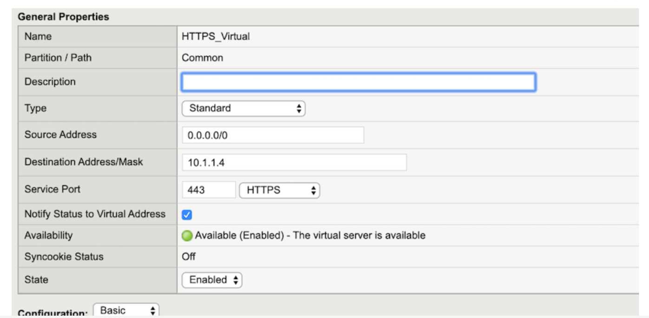
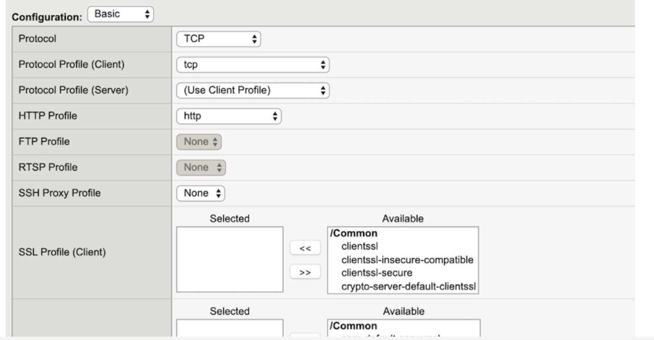
A BIG-IP Administrator configures a Virtual Server to handle HTTPS traffic. Users report that the application is NOT working. Which additional configuration is required to resolve this issue?
According to the provided exhibit, the 'SSL Profile (Client)' section in the Virtual Server configuration is empty. For a BIG-IP system to process HTTPS traffic, it must act as an SSL/TLS endpoint. This process, known as SSL Termination or SSL Offload, requires the assignment of a Client SSL Profile to the Virtual Server. Without this profile, the BIG-IP does not have the necessary certificate and private key information to perform the SSL handshake with the client's browser. Consequently, when a user attempts to connect via HTTPS, the TCP connection may establish, but the SSL handshake will fail because the BIG-IP will not know how to decrypt the incoming encrypted packets.
A Client SSL profile defines the ciphers, certificates, and keys that the BIG-IP uses to communicate securely with the client. In a standard HTTPS deployment, the BIG-IP decrypts the traffic and can then send it to the backend pool members either as plain text (header insertion/manipulation) or re-encrypt it using a Server SSL profile. While a Server SSL profile (Option C) is needed if the backend servers themselves require HTTPS, the initial failure for a user reaching a Virtual Server is almost always the lack of a Client SSL profile to terminate the user's connection. Changing the Service Port to HTTP (Option D) would be incorrect because the goal is to handle HTTPS traffic (typically port 443). Assigning the 'clientssl' or a custom client-side profile from the 'Available' list to the 'Selected' list in the GUI is the mandatory step to make the Virtual Server operational for secure web traffic.
Felicitas
5 days agoNikita
11 days agoJamal
16 days agoVonda
21 days agoRodrigo
26 days agoYuki
1 month agoMelynda
1 month agoJacki
1 month agoDyan
2 months agoFlorinda
2 months agoValentine
2 months agoDexter
2 months agoKaran
2 months agoGalen
2 months agoYuki
4 months agoNathan
4 months agoGeorgene
5 months agoJavier
5 months agoLettie
5 months agoShonda
5 months ago