
 MENU
MENU
A technician inspects the following workstation configuration:
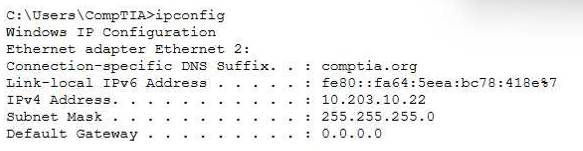
The workstation is unable to open any external websites. The browser displays an error message that says that the site cannot be reached.
The correct answer is C. The default gateway is not set, and this is clearly indicated by the ipconfig output showing the Default Gateway: 0.0.0.0. In TCP/IP networking, the default gateway is the router address that allows a workstation to communicate with networks outside its local subnet, including the internet. Without a valid default gateway, a device can only communicate with other devices on the same local network.
According to the Quentin Docter -- CompTIA A+ Complete Study Guide, a missing or incorrect default gateway is one of the most common causes of a system being unable to access external resources. The guide explains that when a destination IP address is outside the local subnet, the workstation forwards the traffic to the default gateway. If no gateway is defined, the traffic has nowhere to go and is dropped.
The Travis Everett & Andrew Hutz -- CompTIA A+ All-in-One Exam Guide reinforces that an IP address such as 10.203.10.22 with a subnet mask of 255.255.255.0 is valid for internal communication. The DNS suffix comptia.org is also not responsible for routing failures. DNS resolves names to IP addresses, but routing still requires a gateway.
The Mike Meyers / Mark Soper Lab Manual further clarifies that a subnet mask error would prevent even local communication, which is not indicated here. Because only external websites are unreachable, the absence of a default gateway is the definitive root cause.