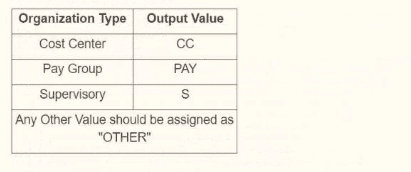
You are creating an outbound connector using the Core Connector: Organization Outbound template. The vendor has provided the following requirements for how the data should appear in the output file.
The vendor would also like to change the default document retention policy of 30 days to 7 days. What tasks do you need to use to configure this in your connector?
AnswerC
ExplanationWhen creating an outbound connector using the Workday Core Connector: Organization Outbound template, you need to configure the connector to meet specific vendor requirements, such as formatting output data and adjusting document retention policies. Let's break down the question and analyze the requirements and options based on Workday's integration framework, specifically focusing on the Core Connector and its configuration tasks.
Understanding the Requirements
Output Data Formatting:The vendor has provided a table specifying how organization types should appear in the output file (e.g., Cost Center as 'CC', Pay Group as 'PAY', Supervisory as 'S', and any other value as 'OTHER'). This indicates a need to transform or map Workday organization data into specific output values, which is typically handled by configuring how fields are processed or mapped in the integration.
Document Retention Policy Change:The vendor wants to change the default document retention policy from 30 days to 7 days. In Workday, document retention policies for integrations (e.g., files stored on SFTP or other delivery methods) are managed through integration settings, specifically attributes related to file retention or delivery options.
Analyzing Workday Core Connector: Organization Outbound
The Core Connector: Organization Outbound template is a pre-built Workday integration template used to extract organization-related data (e.g., cost centers, pay groups, supervisory organizations) and send it to an external system. It leverages Workday's integration framework, including integration maps, field overrides, and attributes, to customize data output and behavior.
Integration Maps: Used to define how data is transformed or mapped from Workday to the output format, often involving XSLT or predefined mappings.
Integration Field Overrides: Allow you to override or customize how specific fields are displayed or formatted in the output, such as mapping 'Cost Center' to 'CC' as per the vendor's table.
Integration Attributes: Control broader integration settings, such as delivery methods, file formats, and retention policies (e.g., document retention duration).
Integration Field Attributes: Typically focus on specific field-level properties but are less commonly used for retention policies or broad mappings compared to the above options.
Evaluating the Vendor's Output Requirements
The table provided (Cost Center 'CC', Pay Group 'PAY', Supervisory 'S', any other value 'OTHER') suggests a need to transform or override the default output values for organization types. This is a field-level customization, best handled by Integration Field Overrides, which allow you to specify custom values or formats for specific fields in the output.
For example, in the Core Connector, you can use Integration Field Overrides to map the Workday organization type (e.g., 'Cost_Center') to the vendor's desired output ('CC'). This is a common practice for outbound integrations where external systems require specific formatting.
Evaluating the Retention Policy Change
The default document retention policy of 30 days needs to be changed to 7 days. In Workday, retention policies for integration output files (e.g., files delivered via SFTP or email) are configured as part of the integration's attributes, not field-level settings.
Integration Attributes are used to manage integration-wide settings, including delivery options, file retention periods, and other global configurations. You can specify the retention period (e.g., 7 days) in the attributes section of the Core Connector configuration.
This is distinct from field-level overrides or maps, as retention is not tied to individual data fields but to the integration's output management.
Analyzing the Options
Now, let's evaluate each option to determine which tasks are needed to meet both requirements:
A . Configure Integration Maps and Configure Integration Attributes
Integration Maps: These are used for broader data transformations or mappings, such as converting Workday XML to another format or defining complex data relationships. While they could theoretically handle the output value mappings (e.g., Cost Center 'CC'), they are typically more complex and less granular than field overrides for simple value changes.
Integration Attributes: Correct for configuring the retention policy (e.g., changing from 30 to 7 days), as attributes manage integration-wide settings like retention.
Why Not Sufficient?: Integration Maps are overkill for simple field value overrides like the vendor's table, and field-level customization is better handled by Integration Field Overrides for precision and ease.
B . Configure Integration Field Overrides and Configure Integration Field Attributes
Integration Field Overrides: Correct for mapping specific field values (e.g., Cost Center 'CC'), as they allow granular control over output formats for individual fields.
Integration Field Attributes: These are less commonly used and typically focus on field-specific properties (e.g., data type, length), not broad integration settings like retention policies. Retention is not managed at the field level, so this is incorrect for the retention requirement.
Why Not Sufficient?: Integration Field Attributes do not handle retention policies, making this option incomplete.
C . Configure Integration Field Overrides and Configure Integration Attributes
Integration Field Overrides: Perfect for mapping the vendor's output values (e.g., Cost Center 'CC', Pay Group 'PAY', etc.), as they allow precise control over field-level output formatting.
Integration Attributes: Correct for configuring the retention policy (e.g., changing from 30 to 7 days), as attributes manage integration-wide settings like file retention.
Why Sufficient?: This combination addresses both requirements---field-level output formatting and integration-wide retention policy changes---making it the most accurate choice.
D . Configure Integration Maps and Configure Integration Field Attributes
Integration Maps: As explained, these are better for complex transformations, not simple field value overrides like the vendor's table. They could work but are less efficient than field overrides.
Integration Field Attributes: As noted, these do not handle retention policies or broad integration settings, making them incorrect for the retention requirement.
Why Not Sufficient?: This combination fails to address retention effectively and uses Integration Maps when Integration Field Overrides would be more appropriate for the output formatting.
Conclusion
Based on the analysis, the vendor's requirements for output formatting (mapping organization types to specific values) and changing the retention policy (from 30 to 7 days) are best met by:
Integration Field Overrides: To customize the output values for organization types (e.g., Cost Center 'CC') as shown in the table.
Integration Attributes: To adjust the document retention policy from 30 days to 7 days.

 MENU
MENU