
Deal of The Day! Hurry Up, Grab the Special Discount - Save 25% - Ends In 00:00:00 Coupon code: SAVE25
Welcome to Pass4Success

- Free Preparation Discussions

VMware 5V0-41.20 Exam - Topic 4 Question 11 Discussion

Scenario 2:After completing the branch activation activities for all required branches, the network administrator attempts to test connectivity between the various branches and between the hubs and branches. The administrator notices a lack of connectivity despite being certain that configurations have been complete. The administrator also observed that several users are reporting intermittent connectivity to some of the applications they are accessing. Other users are reporting no access to these applications. Other users at some of the branches claim they cannot gel to certain public resources. The administrator wants to ensure that all sites can talk to each other and all resources are accessible.Exhibit.A business policy is created and saved.How can the network administrator verify the business policy is working?
B) Executing Route table dump under VCE > Test St Troubleshoot > Remote Diagnostics and select Route Table dump and look for business policy applied in the Route table Dump stats.
A) Select a VCE > Test & Troubleshoot > Remote diagnostics and select List Active flows and check the flows to see what Business policy is applied under the Business policy column.
C) Check under Monitor > Applications tab and check the listing of applications at the bottom of the screen and the category of the type of traffic there.
D) Check under the Monitor > Business Priority tab for Business policy statistics.

VMware 5V0-41.20 Exam - Topic 4 Question 11 Discussion

Actual exam question for VMware's 5V0-41.20 exam
Question #: 11
Topic #: 4
[All 5V0-41.20 Questions]

Scenario 2:

After completing the branch activation activities for all required branches, the network administrator attempts to test connectivity between the various branches and between the hubs and branches. The administrator notices a lack of connectivity despite being certain that configurations have been complete. The administrator also observed that several users are reporting intermittent connectivity to some of the applications they are accessing. Other users are reporting no access to these applications. Other users at some of the branches claim they cannot gel to certain public resources. The administrator wants to ensure that all sites can talk to each other and all resources are accessible.

Exhibit.
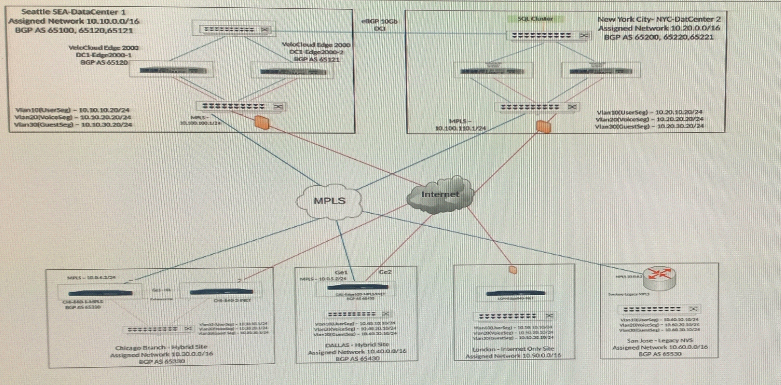
A business policy is created and saved.

How can the network administrator verify the business policy is working?

Show Suggested Answer Hide Answer
Suggested Answer: B

Contribute your Thoughts:

0/2000 characters
Arlie
11 months ago
C is useful too, but I’d stick with A for clarity.
upvoted 0 times
...
Nickie
11 months ago
Wait, can we really trust the stats from the Monitor tab?
upvoted 0 times
...
Sharen
11 months ago
Not so sure about that, B might show more relevant data.
upvoted 0 times
...
Theola
11 months ago
Definitely agree with A, it gives the most detailed info.
upvoted 0 times
...
Lai
11 months ago
I think option A is the best way to check the business policy.
upvoted 0 times
...
Brittney
12 months ago
Route table dumps sound familiar, but I’m not confident that option B would directly show if the business policy is working as intended.
upvoted 0 times
...
Beatriz
12 months ago
I feel like I saw a similar question about monitoring applications, but I can't recall if checking the applications tab would actually confirm the business policy is applied.
upvoted 0 times
...
Roslyn
12 months ago
I think option D might be the right answer since it specifically mentions business policy statistics, which sounds relevant to what we're trying to verify.
upvoted 0 times
...
Ilene
12 months ago
I remember practicing how to check active flows, so option A seems like a good choice, but I'm not entirely sure if that's the best way to verify the business policy.
upvoted 0 times
...
Barrett
12 months ago
I'm pretty confident that the answer is C. Objective forecasting has to be grounded in data and facts, not just opinions or subjective judgement.
upvoted 0 times
...
Micah
12 months ago
Hmm, I'm not sure if publishing the app workspace is the right solution here. I think I need to focus on the specific web part settings to resolve this.
upvoted 0 times
...
Helaine
12 months ago
This seems like a straightforward question on the ITIL service management processes. I'll need to think through the typical sequence for handling a service failure.
upvoted 0 times
...
Howard
12 months ago
Okay, let's see here. The IOC event was triggered by the employee abusing PowerShell commands and script interpreters, which suggests it's related to some kind of suspicious activity or malware execution. I'll try to eliminate the options that don't seem to fit that description.
upvoted 0 times
...
Emerson
12 months ago
I'm pretty confident in my answer here. The sequence is Incident Management, Problem Management, Change Management, and Release Management. That aligns with the ITIL framework for managing service failures.
upvoted 0 times
...
Reuben
12 months ago
The "web cache" option seems off to me; I don't recall it having anything to do with user identification through IP address. Am I missing something?
upvoted 0 times
...

Save Cancel