
Free Preparation Discussions
 MENU
MENU
Salesforce Plat-Arch-204 Exam Questions
- Topic 1: Evaluate the Current System Landscape: This domain covers analyzing existing technical environments to understand current systems, their standards, protocols, limitations, and boundaries, while identifying constraints and authentication/authorization requirements.
- Topic 2: Evaluate Business Needs: This domain addresses gathering functional and non-functional requirements, classifying data by sensitivity, identifying CRM success factors, and understanding how business growth and regulations impact integration choices.
- Topic 3: Translate Needs to Integration Requirements: This domain involves converting business needs into technical specifications by documenting systems and patterns, evaluating constraints, defining security requirements, and determining performance needs like volumes, response times, and latency.
- Topic 4: Design Integration Solutions: This domain centers on selecting integration patterns, designing complete solutions with appropriate components, understanding trade-offs and limitations, choosing correct Salesforce APIs, and determining required standards and security mechanisms.
- Topic 5: Build Solution: This domain covers implementing integrations including API design considerations, choosing outbound methods, building scalable solutions, implementing error handling, creating security solutions, and ensuring resilience during system updates.
- Topic 6: Maintain Integration: This domain focuses on monitoring integration performance, defining error handling and recovery procedures, implementing escalation processes, and establishing reporting needs for ongoing integration health monitoring.
Free Salesforce Plat-Arch-204 Exam Actual Questions
Note: Premium Questions for Plat-Arch-204 were last updated On Sep. 01, 2026 (see below)
Northern Trail Outfitters (NTO) has a requirement to encrypt a few widely-used standard fields. NTO also wants to be able to use these fields in record-triggered flows.
Which security solution should an integration architect recommend to fulfill the business use case?
To satisfy the requirement of encrypting standard fields while maintaining their functionality within record-triggered flows, Shield Platform Encryption is the recommended architectural solution.1
Shield Platform Encryption is a modern security layer that allows for encryption at rest while 2preserving critical platform features. Unlike Classic Encryption (Option B)---which is limited to a specific 'Encrypted Text' custom field type and often breaks platform features like search and automation---Shield is designed to work with standard fields such as Name, Email, and Phone.
Key architectural considerations for Shield include:
Compatibility with Automation: Shield fields can be used in Flows, Apex triggers, and validation rules. This allows NTO to implement the required record-triggered business logic without needing to decrypt the data manually in code.
Search and Filtering: By using Deterministic Encryption, Shield allows users to filter and search for records based on encrypted fields, which is often a requirement for 'widely-used' standard fields.
Compliance and Governance: Shield provides advanced key management (Bring Your Own Key - BYOK) and auditing, ensuring that NTO meets corporate security guidelines while data is being processed by the platform.
Data Masking (Option C) is primarily used for sandboxes to obfuscate PII during testing and is not a production encryption-at-rest solution. By recommending Shield, the architect provides a transparent security model that protects sensitive data without sacrificing the declarative power of Flow Builder.
An enterprise customer is implementing Salesforce for Case Management. Based on the landscape (Email, Order Management, Data Warehouse, Case Management), what should the integration architect evaluate?
The evaluation of an integration landscape is a process of rationalization. The goal is to identify which legacy systems Salesforce will replace (System Retirement) and which systems it must coexist with (Integration).
In this scenario, Salesforce is being implemented for Case Management. Salesforce Service Cloud is the industry leader for this specific function. Therefore, the legacy Case Management System should be retired. Any architecture that suggests 'integrating' Salesforce with the legacy Case Management system (Options A and B) is creating a redundant and complex 'dual-master' scenario that increases technical debt.
To provide a successful support experience, Salesforce needs to be the central 'Engagement Layer,' which requires integration with the remaining ecosystem:
Email Management System: To support 'Email-to-Case' and ensure all customer communications are captured within the Salesforce Case record.
Order Management System (OMS): Support agents often need to verify purchase history or shipping status to resolve a case. A 'Data Virtualization' or 'Request-Reply' integration with the OMS is vital.
Data Warehouse: For long-term historical reporting and cross-functional analytics, Salesforce must push case data to the enterprise Data Warehouse.
By evaluating the integration with the Data Warehouse, Order Management, and Email Management systems, the architect ensures that Salesforce is enriched with the context it needs to resolve cases while simultaneously retiring the redundant legacy support system.
Northern Trail Outfitters leverages Sales Cloud. When an opportunity has changed its status to ''Closed/Won'' and there are products attached, the details should be passed to the OMS for fulfillment operations. The callout from Salesforce to the OMS should be synchronous. What should an integration architect do to satisfy these requirements?
A synchronous requirement in Salesforce implies a Request-Reply pattern where the user waits for a response. To implement this correctly while adhering to platform constraints, the architect must initiate the callout from the User Interface (UI) layer.3
Option C is the correct architectural choice. By using a Lightning component and a button (or a Quick Act4ion), the callout is initiated directly from the user's session. The component calls an Apex controller, which performs the synchronous REST callout to the OMS. This allows the user to receive immediate feedback---such as a 'Success' message or an 'Error' notification from the OMS---directly on the Opportunity page.
Option A is incorrect because Apex Triggers are prohibited from making synchronous callouts. If a trigger initiates a callout, it must be asynchronous (using @future or Queueable Apex), which violates the business requirement for synchronicity. Making a synchronous call from a trigger would block the database transaction and could lead to 'Uncommitted Work Pending' errors or system timeouts. Option B (Batch Apex) is inherently asynchronous and delayed; an hourly job would not provide the real-time, synchronous feedback required during the 'Closed/Won' transition. Therefore, moving the integration logic to a UI-driven button is the only way to satisfy the synchronous requirement while staying within Salesforce's execution and transaction limits.
What is the first thing an integration architect should validate if a callout from a Lightning web component (LWC) to an external endpoint is failing?
When an integration initiated from the client-side (the browser) fails, the architect must first look at the browser's security policies. In Salesforce, Lightning Web Components are subject to the Lightning Component framework's Content Security Policy (CSP).
CSP is a security layer that prevents cross-site scripting (XSS) and other code injection attacks by restricting which domains the browser is allowed to communicate with. If an LWC attempts to make a fetch() call to an external REST endpoint, the browser will block the request unless that specific domain is whitelisted in CSP Trusted Sites.
Option B (Remote Site Settings) is a common distractor; these settings are strictly for server-side Apex callouts and have no effect on client-side JavaScript requests. Option A (CORS) is also a browser security mechanism, but it must be configured on the external server to allow Salesforce to access its resources. While CORS is necessary, the first thing to validate within the Salesforce environment for a failing LWC callout is the CSP Trusted Site entry. Without this whitelisting, the request will be terminated by the browser before it even leaves the client, regardless of how the external server is configured.
An enterprise architect has requested the Salesforce integration architect to review the following (see diagram and description) and provide recommendations after carefully considering all constraints of the enterprise systems and Salesforce Platform limits.
About 3,000 phone sales agents use a Salesforce Lightning user interface (UI) concurrently to check eligibility of a customer for a qualifying offer.
There are multiple eligibility systems that provide this service and are hosted externally.
However, their current response times could take up to 90 seconds to process and return (there are discussions to reduce the response times in the future, but no commitments are made).
These eligibility systems can be accessed through APIs orchestrated via ESB (MuleSoft).
All requests from Salesforce will have to traverse through the customer's API Gateway layer, and the API Gateway imposes a constraint of timing out requests after 9 seconds.
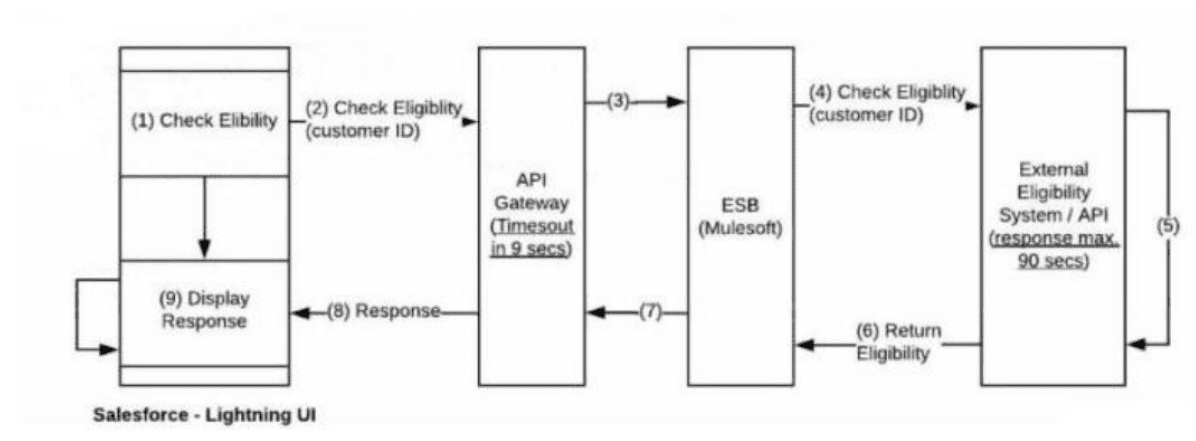
Which recommendation should the integration architect make?
The primary architectural challenge in this scenario is the massive discrepancy between the backend response time (up to 90 seconds) and the API Gateway timeout constraint (9 seconds). In any synchronous integration pattern, the connection must remain open across the entire path; if the API Gateway closes the connection at 9 seconds, a standard Salesforce 'Request-Reply' callout will fail long before the 90-second eligibility check is complete.
Option A is non-viable because synchronous polling at a high scale (3,000 concurrent users) would likely hit Salesforce concurrent request limits and place an immense, unnecessary load on the API Gateway. Option B, using Continuation, is designed to handle long-running callouts (up to 120 seconds) without blocking Salesforce threads, but it still requires the external connection path to remain open. It does not bypass the 9-second timeout imposed by the customer's API Gateway.
The optimal recommendation is Option C, which implements an Asynchronous Request-Reply pattern using Platform Events and the empAPI.12
Request Phase: The Salesforce UI initiates the request. To bypass the 9-second gateway timeout, the ESB (MuleSoft) should be configured to receive the request3 and immediately return an acknowledgment (e.g.,4 HTTP 202 Accepted). This allows the initial Salesforce callout to complete successfully within the 9-second window.56
Processing Phase: MuleSoft then proceeds with the long-running (up to 90 seconds) call to the external eligibility systems.78
Callback Phase (Remote Call-In)9: Once the eligibility result is received, MuleSoft calls back into Salesforce via the REST API to publish a Platform Event containing the result.10
UI Update (empA11PI): The 3,000 sales agents' browsers, having subscribed to the event channel using the empAPI (Lightning's built-in library for streaming events), receive the notification in real-time. The UI then updates to display the 'Display Response' step.
This event-driven architecture effectively 'insulates' Salesforce and the API Gateway from the backend's high latency, ensures scalability for 3,000 concurrent users, and provides a seamless, real-time user experience without hitting governor limits or timeout constraints.
==========
- Select Question Types you want
- Set your Desired Pass Percentage
- Allocate Time (Hours : Minutes)
- Create Multiple Practice tests with Limited Questions
- Customer Support
Nathan Thompson
2 days agoLinda Parker
17 days agoWilliam Murphy
1 month agoAngela Turner
2 months agoKenneth Stewart
2 months agoAmanda Murphy
3 months agoNathan Taylor
3 months agoMatthew Lee
4 months agoMargaret Turner
4 months agoLinda Brown
4 months agoGerald Morgan
4 months agoSarah Martin
4 months agoBarbara Sanchez
4 months agoThomas King
4 months agoKimberly Morgan
4 months agoLavonda
5 months agoAnissa
5 months agoTammara
6 months agoMatt
6 months agoJunita
6 months agoClay
7 months agoMurray
7 months agoElfriede
7 months agoRosita
7 months agoBulah
8 months agoOlene
8 months agoTamar
8 months agoSommer
8 months agoLili
9 months agoMicheline
9 months ago