
Free Preparation Discussions
 MENU
MENU
Salesforce Analytics-Con-301 Exam - Topic 4 Question 17 Discussion
Topic #: 4
A data analyst sets up a calculation to filter a dashboard so that it displays only the users' information. The dashboard will then be published to Tableau Cloud.
The data analyst plans to use the following calculation to filter the data: USERNAME() = [Correct Answer]
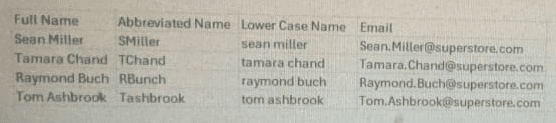
Which column in the table below should the data analyst reference in the calculation?
When dashboards are published to Tableau Cloud, the function USERNAME() returns the user's Tableau Cloud username, which is the email address associated with their Tableau Cloud account.
Tableau documentation states:
On Tableau Cloud, the value returned by USERNAME() is always the user's email address.
Row-Level Security (RLS) is typically implemented using a comparison of USERNAME() to an email field in the data source.
For secure filtering, the field compared to USERNAME() must match the authentication identity exactly.
Looking at the provided table:
''Abbreviated Name'' contains short custom codes like ''SMiller,'' which do not match Tableau Cloud usernames.
''Lower Case Name'' contains names like ''sean miller,'' which also do not match Tableau Cloud usernames.
''Email'' contains the full email address for each user, such as ''Sean.Miller@superstore.com,'' which is the only field that corresponds to what USERNAME() returns in Tableau Cloud.
Therefore, the correct field to reference is Email.
Tableau Cloud authentication documentation stating USERNAME() returns the user's email address.
Row-Level Security setup guidance recommending the comparison USERNAME() = [Email Field].
Tableau security practices indicating only the email column will match USERNAME() values on Tableau Cloud.
Skye
13 days agoMarjory
18 days agoStevie
23 days agoJillian
29 days agoLuther
1 month agoAudrie
1 month agoLashandra
1 month agoNu
2 months agoKenneth
2 months agoLemuel
2 months agoOzell
2 months agoCary
2 months ago