
Free Preparation Discussions
 MENU
MENU
Salesforce Analytics-Con-301 Exam Questions
- Topic 1: Business Analysis: This section of the exam measures skills of Tableau Consultants focusing on evaluating the current state of analytics within an organization. It covers mapping business needs to Tableau capabilities, translating analytical requirements to best practices in Tableau, and recommending appropriate deployment options like Tableau Server or Tableau Cloud. It also includes evaluating existing data structures for supporting business needs and identifying performance risks and opportunities.
- Topic 2: Data Analysis: This domain targets Tableau Consultants to plan and prepare data connections effectively. It includes recommending data transformation strategies, designing row-level security (RLS) data structures, and implementing advanced data connections such as Web Data Connectors and Tableau Bridge. Skills in specifying granularity and aggregation strategies for data sources across Tableau products are emphasized.
- Topic 3: Business Consulting: For Tableau Consultants, this section involves designing and troubleshooting calculations and workbooks to meet advanced analytical use cases. It covers selecting appropriate chart types, applying Tableau’s order of operations in calculations, building interactivity into dashboards, and optimizing workbook performance by resolving resource-intensive queries and other design-related issues.
- Topic 4: Data Management: This part focuses on establishing governance and support for published content. Tableau Consultants are expected to manage data security, publish and maintain data sources and workbooks, and oversee content access. It includes applying governance best practices, using metadata APIs, and supporting administration functions to maintain data integrity and accessibility.
- Topic 5: Data Visualization: This section evaluates the Tableau Consultant’s ability to design effective visual analytics solutions. It involves creating dashboards and visual reports that enhance user understanding, employing techniques like dynamic actions and advanced chart types, and ensuring performance optimization for an interactive user experience.
- Topic 6: IT Management: This domain measures skills related to managing Tableau environments. It includes planning server upgrades, recommending deployment solutions (on-premise or cloud), and ensuring alignment between technical and business requirements for analytics infrastructure. It also involves troubleshooting and optimizing system performance relevant to Tableau Server and Cloud deployments.
Free Salesforce Analytics-Con-301 Exam Actual Questions
Note: Premium Questions for Analytics-Con-301 were last updated On Sep. 11, 2026 (see below)
A Tableau consultant tasked with evaluating a data structure is handed the below sample dataset.
Which two statements are true about the dataset? Choose two.
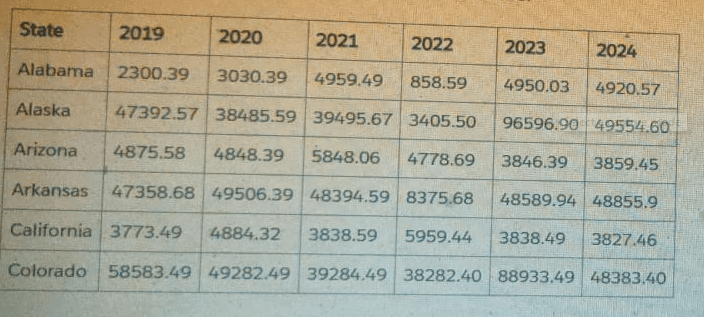
The dataset shown is a classic ''wide'' format'':
A single row per state
Separate columns for each year: 2019, 2020, 2021, 2022, 2023, 2024
Tableau's documentation on data structure and pivoting explains:
Why A is TRUE
Tableau documentation identifies wide datasets (multiple columns representing categories such as years, months, or similar time periods) as high-maintenance structures because:
For every new year, a new column must be added.
Metadata and calculations must be updated each time.
This type of structure is described as having poor scalability and higher maintenance.
This dataset fits that exact description, so A is correct.
Why C is TRUE
According to Tableau's ''Pivot Data from Columns to Rows'' section:
Wide datasets can and should often be pivoted so that repeated columns (such as year columns) become rows.
Pivoting enables dynamic capabilities such as:
Year filters (year selector)
Time-series analysis
Consistent aggregations
Simplified calculations
Pivoting this dataset would produce:
State
Year
Value
Alabama
2019
2300.39
Alabama
2020
3030.39
...
...
...
This makes the dataset tall and tidy, which Tableau identifies as better for analysis and dashboard interactivity.
Therefore, C is correct.
Why B is FALSE
The column names (2019, 2020, 2021...) are simply numbers.
Tableau documentation stresses that good metadata includes descriptive column names.
These column names:
Do not indicate what the measure represents (Revenue? Sales? Population?)
Only show the year, not the meaning of the metric
Thus they are not considered accurate or descriptive column names.
Why D is FALSE
The dataset is already denormalized, not normalized.
Denormalized data means combining multiple attributes (like multiple years) into one table, which is exactly what this dataset already does.
Tableau documentation explains that wide data is already denormalized, and the recommended fix is pivoting, not further denormalization.
Therefore, D is incorrect.
A client's fiscal calendar runs from February 1 through January 31.
How should the consultant configure Tableau to use the client's fiscal calendar when building date charts?
Comprehensive and Detailed Explanation From Exact Extract:
Tableau allows fiscal calendars to be defined at the data source level, affecting how all date fields behave across the workbook.
According to Tableau documentation:
Fiscal calendars must be set using Data Source Date Properties.
Once set, this becomes a default property for all date fields unless overridden.
This allows charts, hierarchies, and date parts to automatically follow the fiscal year starting in February.
Correct procedure:
Go to Data Source.
Open Date Properties.
Set Fiscal Year Start = February.
(Optional) Adjust Date Field Default Properties.
This ensures all charts and date hierarchies use the fiscal calendar automatically.
Why the other options are incorrect:
A . Right-click on axis Use Fiscal Calendar
This option does not exist in Tableau.
B . Set Fiscal Year in Data Preview
Not supported; fiscal configuration isn't made in the preview window.
C . Use FISCALYEAR() / FISCALQUARTER()
This is manual, requires custom fields, and does not configure Tableau's built-in fiscal calendar system.
This is more work and not the correct method.
Only Option D configures the fiscal calendar globally and correctly.
Tableau Date Properties documentation specifying fiscal year settings.
Default Properties configuration for date fields.
Official guidance for implementing fiscal calendars.
A client has a published dashboard. They change the dashboard and then republish it. Now, users report that their web browser bookmarks to the dashboard
are broken.
What are two possible causes for this issue? Choose two.
When a client republishes a dashboard after making changes and users report broken bookmarks, the likely causes include:
The dashboard was published to a different project: Changing the project location alters the URL path, causing bookmarks to point to a now non-existent dashboard location.
The dashboard was published with a new name: Altering the dashboard's name changes its URL, resulting in broken bookmarks as the previous URL no longer leads to the intended dashboard.
A data analyst sets up a calculation to filter a dashboard so that it displays only the users' information. The dashboard will then be published to Tableau Cloud.
The data analyst plans to use the following calculation to filter the data: USERNAME() = [Correct Answer]
Which column in the table below should the data analyst reference in the calculation?

When dashboards are published to Tableau Cloud, the function USERNAME() returns the user's Tableau Cloud username, which is the email address associated with their Tableau Cloud account.
Tableau documentation states:
On Tableau Cloud, the value returned by USERNAME() is always the user's email address.
Row-Level Security (RLS) is typically implemented using a comparison of USERNAME() to an email field in the data source.
For secure filtering, the field compared to USERNAME() must match the authentication identity exactly.
Looking at the provided table:
''Abbreviated Name'' contains short custom codes like ''SMiller,'' which do not match Tableau Cloud usernames.
''Lower Case Name'' contains names like ''sean miller,'' which also do not match Tableau Cloud usernames.
''Email'' contains the full email address for each user, such as ''Sean.Miller@superstore.com,'' which is the only field that corresponds to what USERNAME() returns in Tableau Cloud.
Therefore, the correct field to reference is Email.
Tableau Cloud authentication documentation stating USERNAME() returns the user's email address.
Row-Level Security setup guidance recommending the comparison USERNAME() = [Email Field].
Tableau security practices indicating only the email column will match USERNAME() values on Tableau Cloud.
A company uses an extract built from Custom SQL joining Claims and Members.
Members have multiple records in both tables causing data duplication, which results in inflated claim cost trends.
Which approach meets performance and maintenance goals?
Comprehensive and Detailed Explanation From Exact Extract:
The problem:
Custom SQL joins two multi-row tables, causing many-to-many duplication.
This artificially multiplies claim costs.
The extract becomes heavy and slow due to Custom SQL.
Tableau's recommended solution:
Use Relationships in the Logical Layer
Instead of physical joins
Tableau resolves many-to-many issues automatically
Query is generated at the appropriate granularity to avoid duplication
This is exactly Option A.
Relationships allow the Claims facts to remain at the claim grain and Members to remain at the member grain. Tableau resolves aggregations correctly, preventing inflated values.
Why the others are incorrect:
B --- Physical Join
Would continue the same duplication problem because multi-row joins multiply rows.
C --- LODs
Would require complex calculations and are error-prone.
They do NOT fix the duplication in the underlying extract.
D --- Table Calculations
Happen after Tableau aggregates the duplicated data --- too late to fix the inflated baseline numbers.
Thus, the only correct and modern solution is relationships.
Relationships documentation explaining resolution of many-to-many granularity issues.
Guidance recommending avoiding Custom SQL for performance reasons.
Logical Layer behavior preventing row-duplication errors.
- Select Question Types you want
- Set your Desired Pass Percentage
- Allocate Time (Hours : Minutes)
- Create Multiple Practice tests with Limited Questions
- Customer Support
Gerald Turner
20 days agoAndrew Rivera
25 days agoWilliam Baker
2 months agoMargaret Rogers
2 months agoMaria Scott
3 months agoGary Harris
3 months agoHarold Nguyen
4 months agoRebecca Perez
4 months agoJoseph Campbell
5 months agoPaul Edwards
4 months agoStephanie Flores
4 months agoFrank Thomas
4 months agoBrian Carter
4 months agoKimberly Peterson
4 months agoLoreta
5 months agoAndra
5 months agoMarlon
6 months agoKrissy
6 months agoLaurel
6 months agoChristiane
6 months agoRaylene
7 months agoSabine
7 months agoKenia
7 months agoFrancesco
7 months agoReiko
8 months agoJudy
8 months agoVirgina
8 months agoVi
8 months agoTasia
9 months agoBelen
9 months agoKami
9 months agoIsabelle
9 months agoJames
10 months agoDenny
10 months agoMila
10 months agoKattie
10 months agoGilma
11 months agoLaurene
11 months agoCyril
11 months agoSage
11 months agoLennie
12 months agoErasmo
12 months agoJoseph
12 months agoKing
1 year agoIvette
1 year agoVallie
1 year ago