
Free Preparation Discussions
 MENU
MENU
Juniper JN0-481 Exam - Topic 7 Question 15 Discussion
Topic #: 7
Referring to the exhibit,
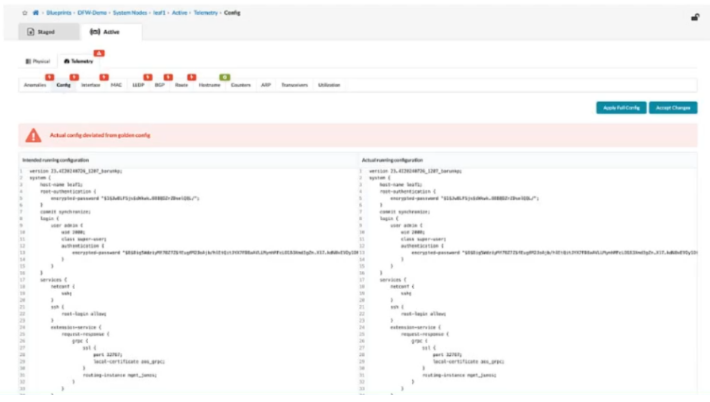
what happens when an operator clicks the Accept Changes button on the right side of the screen in Juniper Apstra?
In Apstra 5.1, this screen represents a configuration deviation workflow: Apstra is comparing the intended (golden) configuration it generated from blueprint intent against the actual configuration currently on the device. When an operator makes a change directly on the switch CLI (for example, on a Junos v24.4 leaf), Apstra detects the difference and flags it as drift because it did not originate from the blueprint's intent model.
Clicking Accept Changes tells Apstra to adopt the device's current CLI state as the new accepted baseline for that device, effectively incorporating the observed CLI delta into Apstra's intended configuration for purposes of future comparison and compliance. In other words, Apstra stops treating that specific deviation as an error because it has been acknowledged and absorbed into the ''golden config'' (the intent-aligned configuration Apstra considers correct for that node). This is commonly used when an emergency change was made on-box and you want Apstra's source of truth to reflect it, rather than reverting it.
This differs from Apply Full Config, which is used to push Apstra's intended configuration down to the device to restore compliance. If you do not accept the change, a later commit/apply action can overwrite the CLI-entered configuration to re-align with blueprint intent.
Carolynn
3 days agoLeontine
8 days agoOliva
13 days agoCatarina
19 days agoKerry
24 days agoAnnamae
29 days agoFelix
1 month agoArletta
1 month agoYen
1 month ago