
Free Preparation Discussions
 MENU
MENU
Juniper JN0-481 Exam Questions
- Topic 1: Data Center Architectures (IP Fabrics, EVPN-VXLAN): Covers spine-leaf topology design, ECMP load balancing, and underlay/overlay routing, along with EVPN and VXLAN concepts including route types, bridge domains, VNI-to-VLAN mapping, and VTEP functions.
- Topic 2: Juniper Apstra Architecture: Introduces core Apstra components including the server, device agents, and UI, along with administrative features such as RBAC, event logging, and syslog.
- Topic 3: Apstra Design Phase: Covers pre-deployment planning elements such as reference designs, logical devices, device profiles, rack types, interface maps, and templates, including their configuration and troubleshooting.
- Topic 4: Apstra Build and Deploy Phases: Covers fabric deployment tasks including agent installation, cable mapping, device states, deploy modes, and Blueprint UI usage, along with related monitoring and troubleshooting.
- Topic 5: Blueprint Operations: Covers day-to-day blueprint management including making and reverting changes, querying, virtual networks, Time Voyager, anomaly detection, property sets, configlets, and configuration types.
- Topic 6: Data Center Multitenancy: Covers multi-tenant network management through routing zones, VRFs, virtual networks, connectivity templates, security policies, VMware integration, and Data Center Interconnect.
- Topic 7: Intent-Based Analytics: Covers Apstra's analytics tools including Graph Explorer, graph queries, and intent-based analytics probes for network monitoring, validation, and troubleshooting.
Free Juniper JN0-481 Exam Actual Questions
Note: Premium Questions for JN0-481 were last updated On Sep. 29, 2026 (see below)
You are using Juniper Apstra to create logical devices and interface maps. You use them in three different rack types. You then modify the logical devices to support the required increased interface speeds and receive an error message when updating the logical devices.
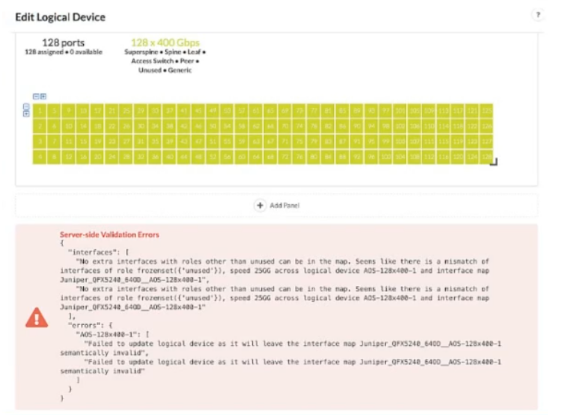
Referring to the exhibit, which action is needed to remove the error?
In Apstra 5.1, a logical device defines the abstract port layout and capabilities (including supported speeds), while an interface map binds that abstract port layout to the real, vendor-specific front-panel ports. Rack types then consume logical devices and interface maps to model the rack's leaf/superspine roles. Once a logical device is referenced by interface maps and used inside rack types (and potentially templates that instantiate those rack types), Apstra treats the combination as a consistent contract: port counts, roles, and speeds must remain semantically valid for every object that depends on it.
The exhibit's validation error indicates that after changing interface speeds on the logical device, the existing interface map(s) and their usage in rack types no longer match the logical device definition (for example, the map expects certain ports/speeds/roles, but the updated logical device would leave the map invalid). Because the logical device is being consumed in multiple places, the safest and required way to remove the error is to remove all dependencies---templates (if they reference the rack types), rack types, and interface maps---so Apstra can accept the new logical device definition without violating existing mappings. After updating the logical device, you then recreate or update the interface maps and re-associate them with the rack types/templates so the entire chain remains consistent under the new speed requirements.
Referring to the exhibit,
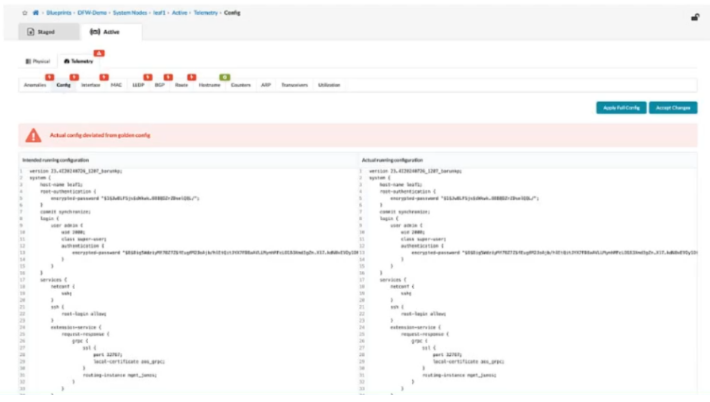
what happens when an operator clicks the Accept Changes button on the right side of the screen in Juniper Apstra?
In Apstra 5.1, this screen represents a configuration deviation workflow: Apstra is comparing the intended (golden) configuration it generated from blueprint intent against the actual configuration currently on the device. When an operator makes a change directly on the switch CLI (for example, on a Junos v24.4 leaf), Apstra detects the difference and flags it as drift because it did not originate from the blueprint's intent model.
Clicking Accept Changes tells Apstra to adopt the device's current CLI state as the new accepted baseline for that device, effectively incorporating the observed CLI delta into Apstra's intended configuration for purposes of future comparison and compliance. In other words, Apstra stops treating that specific deviation as an error because it has been acknowledged and absorbed into the ''golden config'' (the intent-aligned configuration Apstra considers correct for that node). This is commonly used when an emergency change was made on-box and you want Apstra's source of truth to reflect it, rather than reverting it.
This differs from Apply Full Config, which is used to push Apstra's intended configuration down to the device to restore compliance. If you do not accept the change, a later commit/apply action can overwrite the CLI-entered configuration to re-align with blueprint intent.
You have accessed your deployed blueprint and see the banner shown in the exhibit.

Which two statements are correct in this scenario? (Choose two.)
In Apstra 5.1, the top-level blueprint banner uses tab indicators (colored badges) to summarize blueprint status across areas such as Staged, Uncommitted, Active, and Analytics. The presence of an Uncommitted indicator signifies that there are staged modifications that have not yet been committed and therefore are not part of the active, deployed intent. That directly corresponds to the statement that changes exist which are not active on the fabric.
At the same time, the banner shows an Active indicator in an alarm state, which reflects that the running fabric has issues requiring attention---commonly surfaced as anomalies (for example, configuration deviation, interface/link faults, protocol/session issues, or service-impacting conditions). In Apstra's operational model, these issues appear as anomalies that operators should investigate and remediate to restore compliance and health. Therefore, the statement that there are anomalies that must be addressed is also correct.
The remaining options are not implied by this banner alone. Device profile assignment and resource assignment are build-time tasks, but their absence is not what the Uncommitted/Active alert indicators are specifically communicating here. The banner is highlighting uncommitted intent changes and active anomalies that affect the deployed blueprint state and assurance posture.
Verified Juniper sources (URLs):
https://www.juniper.net/documentation/us/en/software/apstra5.1/apstra-user-guide/topics/concept/uncommitted.html
https://www.juniper.net/documentation/us/en/software/apstra5.0/apstra-user-guide/topics/topic-map/anomalies-service-active.html
https://cloudlabs.apstra.com/labguide/Cloudlabs/6.0.0/test-drive-guide/lab1-junos-5_blueprints_.html
The analytics probe shown in the exhibit is enabled.
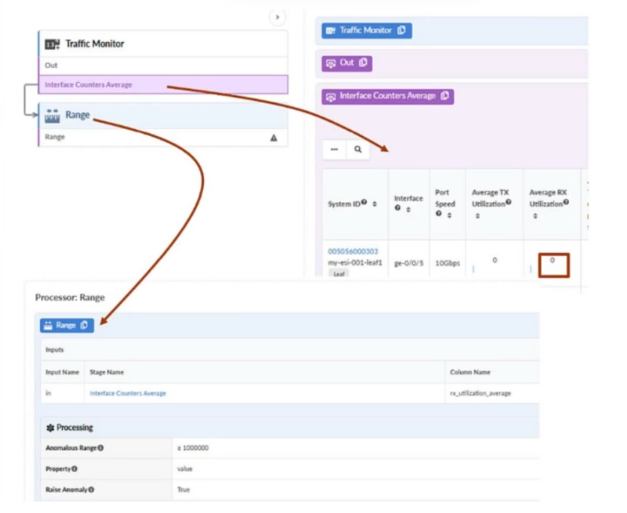
The ge-0/0/5 interface on the my-esl-001-leaf1 node receives an average of greater than 1 Mbps of traffic. Which two statements are correct in this scenario? (Choose two.)
In Apstra 5.1, an IBA probe is a defined analytics pipeline that applies to a scoped set of graph objects (here, interfaces) and evaluates telemetry against logic defined in its processors. The exhibit shows a probe that consumes Interface Counters Average and then applies a Range processor. In the processor configuration, the Anomalous Range is set to ''greater than 1,000,000'' (bytes per second--equivalent for ~1 Mbps depending on the probe's metric definition), and Raise Anomaly is set to True. Therefore, when ge-0/0/5 receives an average traffic level above the configured threshold, the probe's condition evaluates as anomalous and Apstra raises a probe anomaly for that interface. That makes statement A correct.
When probe anomalies are raised, Apstra surfaces them in the blueprint's Analytics area because they are analytics-derived findings (as opposed to configuration drift or deployment workflow issues). As a result, the blueprint's Analytics tab indicator changes state (commonly to red with a badge count) to signal active analytics anomalies requiring attention. That makes statement B correct.
This event is not classified as a service anomaly (which is associated with higher-level service intent/assurance objects) unless separately mapped by policy/logic, and it does not primarily drive the Active tab indicator, which is focused on operational state views rather than being the primary alert surface for IBA probe anomalies.
Exhibit.
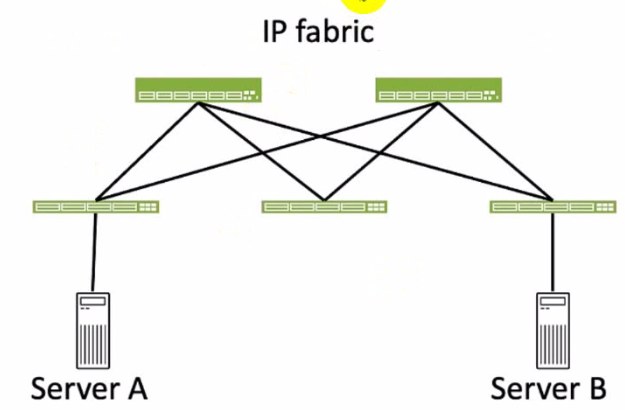
Referring to the exhibit, how many broadcast domains will an Ethernet frame pass through when traversing the IP fabric from Server A to Server B?
Referring to the exhibit, the image shows a simplified diagram of an IP fabric network connecting two servers, labeled as Server A and Server B. The IP fabric is a network architecture that uses a Clos topology to provide high bandwidth, low latency, and scalability for data center networks.The IP fabric consists of spine and leaf devices that use BGP as the routing protocol and VXLAN as the overlay technology1.
A broadcast domain is a logical portion of a network where any device can directly transmit broadcast frames to other devices at the data link layer (OSI Layer 2). A broadcast frame is a frame that has a destination MAC address of all ones (FF:FF:FF:FF:FF:FF), which means that it is intended for all devices in the same broadcast domain.A broadcast domain is usually bounded by a router, which does not forward broadcast frames to other networks2.
In the exhibit, there are two broadcast domains that an Ethernet frame will pass through when traversing the IP fabric from Server A to Server B. The first broadcast domain is the one that contains Server A and the leaf device that it is connected to. The second broadcast domain is the one that contains Server B and the leaf device that it is connected to. The IP fabric itself is not a broadcast domain, because it uses IP routing and VXLAN encapsulation to transport the Ethernet frames over the Layer 3 network. Therefore, the statement C is correct in this scenario.
The following three statements are incorrect in this scenario:
A . 1. This is not true, because there are not one, but two broadcast domains that an Ethernet frame will pass through when traversing the IP fabric from Server A to Server B. The IP fabric itself is not a broadcast domain, because it uses IP routing and VXLAN encapsulation to transport the Ethernet frames over the Layer 3 network.
B . 4. This is not true, because there are not four, but two broadcast domains that an Ethernet frame will pass through when traversing the IP fabric from Server A to Server B. The spine devices and the leaf devices that are not connected to the servers are not part of the broadcast domains, because they use IP routing and VXLAN encapsulation to transport the Ethernet frames over the Layer 3 network.
D . 3. This is not true, because there are not three, but two broadcast domains that an Ethernet frame will pass through when traversing the IP fabric from Server A to Server B. The IP fabric itself is not a broadcast domain, because it uses IP routing and VXLAN encapsulation to transport the Ethernet frames over the Layer 3 network.
IP Fabric Overview
Broadcast Domain - NetworkLessons.com
- Select Question Types you want
- Set your Desired Pass Percentage
- Allocate Time (Hours : Minutes)
- Create Multiple Practice tests with Limited Questions
- Customer Support
Michael Anderson
3 days agoMonica Hall
23 days agoKimberly Murphy
1 month agoMichelle Taylor
2 months agoEmma Collins
2 months agoEmily Howard
3 months agoDeborah Carter
3 months agoCarol Thomas
4 months agoJeffrey Reed
4 months agoAdam Collins
5 months agoThomas Nguyen
5 months agoPatricia Robinson
5 months agoAngela Flores
5 months agoNathan Wilson
5 months agoNathan Clark
4 months agoMelissa Davis
5 months agoMarget
6 months agoDana
6 months agoArlyne
6 months agoAliza
7 months agoVeronika
7 months agoLauryn
7 months agoRessie
7 months ago