
Free Preparation Discussions
 MENU
MENU
Palo Alto Networks SD-WAN-Engineer Exam Questions
- Topic 1: Planning and Design: This domain covers SD-WAN planning fundamentals including device selection, bandwidth and licensing planning, network assessment, data center and branch configurations, security requirements, high availability, and policy design for path, security, QoS, performance, and NAT.
- Topic 2: Deployment and Configuration: This domain focuses on Prisma SD-WAN deployment procedures, site-specific settings, configuration templates for different locations, routing protocol tuning, and VRF implementation for network segmentation.
- Topic 3: Operations and Monitoring: This domain addresses monitoring device statistics, controller events, alerts, WAN Clarity reports, real-time network visibility tools, and SASE-related event management.
- Topic 4: Unified SASE: This domain covers Prisma SD-WAN integration with Prisma Access, ADEM configuration, IoT connectivity via Device-ID, Cloud Identity Engine integration, and User/Group-based policy implementation.
- Topic 5: Troubleshooting: This domain focuses on resolving connectivity, routing, forwarding, application performance, and policy issues using co-pilot data analysis and analytics for network optimization and reporting.
Free Palo Alto Networks SD-WAN-Engineer Exam Actual Questions
Note: Premium Questions for SD-WAN-Engineer were last updated On Oct. 11, 2026 (see below)
1000 branches are to be deployed on Prisma SD-WAN with the following constraints:
Devices will be shipped in batches directly to the site
Configuration Management Database (CMDB) has all the necessary details for a site deployment
Field tech will be responsible for rack, stack, and cabling of the IONs at each site
Field tech will need to spend minimum amount of time at each branch site to reduce the cost
The NOC operates in shifts and is responsible for remote cutover support
Which method will achieve the mass deployment in shortest possible time?
For a massive rollout involving 1,000 branch sites, Prisma SD-WAN (formerly CloudGenix) provides a specialized workflow known as Bulk Site Configuration. This method is designed to minimize manual intervention and maximize deployment velocity by leveraging Site Templates and Device Shells.
In this scenario, the primary architectural advantage of Option C is the use of Pre-Staging. By exporting an empty SD-WAN device CSV from the Prisma SD-WAN Controller and populating it with data from the corporate CMDB, administrators can perform a bulk upload to create hundreds or thousands of sites and device shells simultaneously in the management portal. A 'Device Shell' acts as a placeholder for a physical ION device that has not yet connected to the cloud. It contains all the site-specific configuration---such as interface roles, circuit labels, and IP addressing---waiting for a serial number to be associated with it.
When the field technician performs the physical 'rack and stack,' they simply connect the ION device to the internet (via ISP modem or cellular). Through Zero Touch Provisioning (ZTP), the device automatically 'phones home' to the Prisma SD-WAN Cloud Controller using its Manufacturer Installed Certificate (MIC). Because the configuration was pre-created via the CSV bulk upload, the controller recognizes the device (once assigned to its shell) and immediately pushes the complete configuration. This eliminates the need for the field tech to access a console port or perform local configuration, reducing their on-site time to the bare minimum. While APIs (Option D) can be used for automation, the built-in CSV template workflow is the standard, documented 'best practice' for rapidly translating CMDB data into a functioning SD-WAN fabric at this scale.
The UI triggers incident DEVICESW_CONCURRENT_FLOWLIMIT_EXCEEDED for a branch site. Based in the image below, which tool can be used to identify the host?
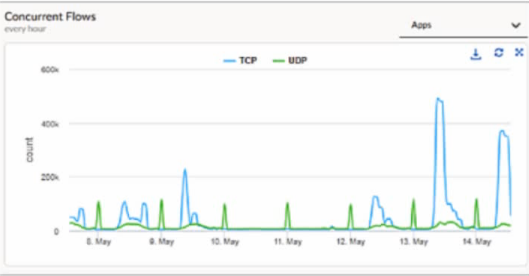
When a Prisma SD-WAN ION device triggers the DEVICESW_CONCURRENT_FLOWLIMIT_EXCEEDED incident, it indicates that the number of active sessions has reached the hardware or software-defined capacity limit of that specific appliance. In the provided graph, we can see a massive spike in concurrent TCP flows on May 13th, reaching nearly 500k, which is a clear indicator of anomalous behavior---likely a 'top talker' host, a malware outbreak, or a misconfigured application generating excessive connections.
To identify the specific host responsible for this surge, administrators should navigate to Monitor Activity Flows. This interface, commonly known as the Flow Browser, provides the most granular visibility into real-time and historical session data within the Prisma SD-WAN fabric. Unlike 'Transaction Stats,' which provide high-level summaries, or 'New Flows,' which only show the rate of session initiation, the Flows view allows an engineer to filter and sort the active session table by metadata such as Source IP, Destination IP, Application, and Site.
By utilizing the Flow Browser, an administrator can quickly group flows by 'Source IP' to pinpoint exactly which internal host is consuming the most flow table entries. This is the standard 'Day 2' operational workflow for troubleshooting performance and capacity incidents. While running a tcpdump (Option A) is a valid diagnostic for packet-level analysis, it is inefficient for identifying a single host among hundreds of thousands of flows and can further tax the device's CPU during a high-load event. The Monitor Activity Flows tool is designed specifically for this type of scale, providing the necessary visibility to remediate the flow limit exhaustion and restore normal network operations.
A network design mandates segmentation at the routing level and traffic isolation across various services, such as teller cash registers, ATM traffic, guest Wi-Fi, and corporate applications. Which command can be used to validate and display the Virtual Routing and Forwarding (VRF) route leak rules?
In complex retail or banking environments, maintaining strict network segmentation is a regulatory and security requirement. Prisma SD-WAN utilizes Virtual Routing and Forwarding (VRF) to provide this isolation, ensuring that high-security traffic, such as ATM transactions or teller cash registers, remains logically separated from Guest Wi-Fi or general corporate applications. While isolation is the default state, route leaking is used to allow specific communication between these VRFs---for instance, allowing multiple isolated segments to reach a common shared service like a DNS server or a centralized security gateway.
To verify that these configurations have been correctly pushed from the Controller to the local ION device, administrators utilize the ION CLI (Command Line Interface) for deep-dive diagnostics. The command inspect vrf route_leak_rule all is the definitive tool for this purpose. Unlike 'show' commands which typically provide interface status, 'inspect' commands in the Prisma SD-WAN ecosystem are designed to pull real-time operational state data from the control plane's internal databases.
When executed, this command displays the specific prefix-level rules that allow routes to 'leak' from one VRF table into another. It provides visibility into the source VRF, the destination VRF, and the exact network prefixes or default routes being shared. This is critical for troubleshooting 'Day 2' operations; if a teller register cannot reach a shared database, the administrator can use this command to confirm if the necessary route leak rule is active and accurately reflecting the intent of the VRF Profile configured in the portal. Without this command, verifying inter-VRF reachability would be limited to trial-and-error connectivity tests, making it an essential part of the Prisma SD-WAN engineer's toolkit.
Which statements accurately describes how the Prisma SD-WAN zone-based firewall functions within a branch network?
The Prisma SD-WAN (ION) device includes a native, application-aware Zone-Based Firewall (ZBFW) that provides comprehensive security within the branch without the mandatory requirement for additional hardware.2 The fundamental principle of this architecture is the grouping of interfaces and sub-interfaces into logical Security Zones.3 Once these zones are defined (e.g., LAN, WAN, Guest, IoT), the administrator can create security policies that govern the traffic permitted to flow between them.4
Unlike traditional routers that rely on stateless Access Control Lists (ACLs) which are difficult to manage and lack application visibility, the Prisma SD-WAN ZBFW is stateful and application-aware.5 This means it can apply granular control over North-South traffic (flows moving between the LAN and the WAN/Internet) and East-West traffic (flows moving between different segments within the LAN, such as from a Guest zone to a Corporate zone).6
By using security zones, an ION device can ensure that even if two local networks are connected to the same physical appliance, they remain completely isolated unless a specific policy explicitly allows communication. This 'Zero Trust' approach at the branch edge allows organizations to segment vulnerable devices (like IoT) from critical internal resources and strictly control how users access the internet or the corporate data center.7 The ZBFW works in tandem with the global controller to ensure that security postures are consistent across all branch locations, eliminating the complexity of manual ACL management at each site.8
When identifying devices for IoT classification purposes, which two methods does Prisma SD-WAN use to discover devices that are not directly connected to the branch ION? (Choose two.)
Comprehensive and Detailed Explanation
Prisma SD-WAN (formerly CloudGenix) integrates with Palo Alto Networks IoT Security to provide comprehensive visibility into all devices at a branch, including those that are not directly connected to the ION device. While the ION automatically detects and classifies devices connected directly to its interfaces via traffic inspection (DPI), DHCP, and ARP analysis, gaining visibility into off-branch devices (devices connected to downstream switches or access points) requires additional discovery mechanisms that can query the network infrastructure or ingest its logs.
1. SNMP (Simple Network Management Protocol): This is the primary active discovery method for off-branch devices. The Prisma SD-WAN ION device acts as a sensor that actively polls local network switches and wireless controllers using SNMP. By querying the ARP tables and MAC address tables (Bridge MIBs) of these intermediate network devices, the ION can identify endpoints that are connected to the switch ports, even if those endpoints are not currently sending traffic through the ION. This allows the system to map the topology and discover silent or lateral-traffic-only devices.
2. Syslog: In conjunction with SNMP, the IoT Security solution can utilize Syslog messages to discover and profile devices. Network infrastructure devices (like switches and WLAN controllers) can be configured to send Syslog messages to the collection point (which enables the IoT Security service) whenever a device connects or disconnects (e.g., port up/down events, DHCP snooping logs, or 802.1x authentication logs). These logs provide real-time data about device presence and identity (MAC/IP mappings) for devices that are not directly adjacent to the ION, ensuring 100% visibility across the branch network segments. LLDP (A) and CDP (B) are typically Link Layer discovery protocols used for discovering directly connected neighbors and do not propagate beyond the immediate link, making them unsuitable for discovering devices multiple hops away or behind a switch.
- Select Question Types you want
- Set your Desired Pass Percentage
- Allocate Time (Hours : Minutes)
- Create Multiple Practice tests with Limited Questions
- Customer Support
Charles Turner
22 days agoTimothy Flores
1 month agoLinda Morgan
2 months agoRobert Brown
2 months agoDeborah Green
3 months agoAngela Reed
3 months agoDeborah Flores
4 months agoDonald Torres
4 months agoJoseph Nguyen
5 months agoSteven Flores
5 months agoLisa White
6 months agoSusan King
6 months agoGeorge Collins
5 months agoRobert Davis
5 months agoNathan Jones
5 months agoBronwyn
6 months agoJess
7 months agoGerald
7 months agoRebbecca
7 months agoQuiana
7 months agoLashawna
8 months agoEdna
8 months agoMarge
8 months agoPatrick
8 months agoArlette
9 months agoGilma
9 months agoToi
9 months agoGearldine
9 months agoBenedict
10 months agoAlona
10 months agoMalika
10 months agoWilliam
10 months ago