Deal of The Day! Hurry Up, Grab the Special Discount - Save 25% - Ends In 00:00:00 Coupon code: SAVE25

Welcome to Pass4Success

- Free Preparation Discussions

Nutanix NCP-US Exam - Topic 8 Question 67 Discussion

[Configure and Utilize Nutanix Unified Storage]An administrator has received a complaint from a user that a Windows VM lost access to an iSCSI Volume Group (VG) during a maintenance window of an ESXi-based Nutanix cluster. The VM's iSCSI configuration shows it is connecting to a specific IP (172.20.100.104).What recommended change should the administrator make to resolve this disruption?
B) Remove Discovery IP and configure with DSIP.
A) Change the Discovery IP to match the configured VIP.
C) Add all missing CVM IPs in Discovery tab.
D) Select the Enable multi-path checkbox.

Nutanix NCP-US Exam - Topic 8 Question 67 Discussion

Actual exam question for Nutanix's NCP-US exam
Question #: 67
Topic #: 8
[All NCP-US Questions]

[Configure and Utilize Nutanix Unified Storage]
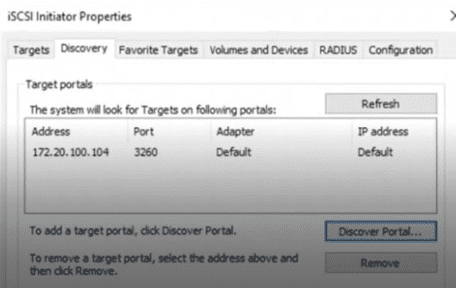
An administrator has received a complaint from a user that a Windows VM lost access to an iSCSI Volume Group (VG) during a maintenance window of an ESXi-based Nutanix cluster. The VM's iSCSI configuration shows it is connecting to a specific IP (172.20.100.104).

What recommended change should the administrator make to resolve this disruption?

Show Suggested Answer Hide Answer
Suggested Answer: B

Contribute your Thoughts:

0/2000 characters
Devorah
21 days ago
I'm leaning towards option D. Enabling multi-path could improve connectivity overall.
upvoted 0 times
...
Shaquana
26 days ago
I feel like option C could also work. Adding missing CVM IPs might solve the issue.
upvoted 0 times
...
Rosendo
1 month ago
I think option A is the best choice. It aligns the Discovery IP with the VIP.
upvoted 0 times
...
Charlene
1 month ago
D is a good idea too, but not sure if it’s the main issue here.
upvoted 0 times
...
Tyra
1 month ago
Wait, why would the iSCSI lose access during maintenance? Sounds odd.
upvoted 0 times
...
Raylene
2 months ago
I think C could also work, but not sure if it's the best option.
upvoted 0 times
...
Cecilia
2 months ago
Totally agree with A! That should fix it.
upvoted 0 times
...
Thurman
2 months ago
A) Change the Discovery IP to match the configured VIP.
upvoted 0 times
...
Lorean
2 months ago
I think changing the Discovery IP to match the VIP makes sense, but I’m not entirely confident that’s the only solution.
upvoted 0 times
...
Denise
2 months ago
I’m a bit confused about the multi-pathing option. Does enabling it really help with iSCSI connectivity issues?
upvoted 0 times
...
Hubert
2 months ago
This question feels familiar; I think we practiced a similar one where we had to add CVM IPs to the Discovery tab.
upvoted 0 times
...
Bobbie
3 months ago
I remember something about Discovery IPs, but I'm not sure if it should match the VIP or if we need to use DSIP instead.
upvoted 0 times
...

Save Cancel