
Free Preparation Discussions
 MENU
MENU
NetApp NS0-304 Exam - Topic 3 Question 43 Discussion
Topic #: 3
Refer to the exhibit.
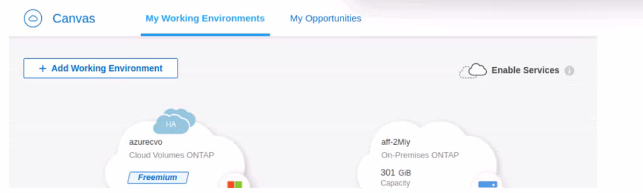
The administrator wants to replicate all the data from their On-Premises ONTAP to Cloud Volumes ONTAP. What should the administrator do first?
To replicate all data from an On-Premises ONTAP to Cloud Volumes ONTAP, the first step within the BlueXP (formerly NetApp Cloud Manager) interface is to establish a replication relationship. Here's how:
Setup Data Replication: In the BlueXP interface, drag and drop the On-Premises ONTAP environment onto the Cloud Volumes ONTAP environment. This action initiates the setup of a SnapMirror relationship, where the on-premises system acts as the source, and the cloud volumes serve as the destination.
Configure Replication Settings: After dragging and dropping, you will be prompted to configure the replication settings, including schedules, policies, and the volumes to be replicated.
Initiate and Monitor Replication: Once the configuration is completed, start the replication process. BlueXP provides tools to monitor the status and health of the replication, ensuring data is synchronized according to the defined settings.
This method leverages the integrated tools in BlueXP to simplify the management of hybrid cloud environments and ensures data continuity between on-premises and cloud-based systems.
For detailed instructions and best practices on setting up SnapMirror with BlueXP, refer to the NetApp documentation: NetApp SnapMirror Documentation.
Roxanne
Cathern
5 days agoJonell
10 days agoLavonda
15 days agoIn
21 days agoLeonardo
26 days agoMargarett
1 month agoJulie
1 month agoJunita
1 month agoJanae
2 months agoVenita
2 months agoKip
2 months agoReuben
2 months agoHarrison
2 months agoLevi
2 months agoRupert
3 months agoMatthew
3 months agoCarole
3 months ago