
Free Preparation Discussions
 MENU
MENU
Microsoft AZ-104 Exam Questions
Free Microsoft AZ-104 Exam Actual Questions
Note: Premium Questions for AZ-104 were last updated On May. 31, 2026 (see below)
You have an Azure Subscription that contains the virtual networks Shown in the following table.
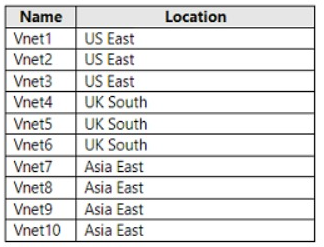
All the virtual networks are peered. Each virtual network contains nine virtual machines.
You need to configure secure RDP corrections to the virtual machines by using Azure Boston.
Whit is the minimum number of Bastion nests required?
According to theMicrosoft documentation, Azure Bastion is a service that provides more secure and seamless RDP and SSH access to virtual machines without any exposure through public IP addresses. You can provision the service directly in your local or peered virtual network to get support for all the VMs within it.
In your scenario, you have three virtual networks that are peered with each other. This means that they can communicate with each other as if they were in the same virtual network. Therefore, you can deploy one Bastion host in any of the virtual networks and use it to connect to all the virtual machines in the peered virtual networks. You don't need to deploy a separate Bastion host for each virtual network or each virtual machine.
For more information about how to deploy and use Azure Bastion, seeTutorial: Deploy Bastion using specified settings: Azure portal.
Note: This question is part of a series of questions that present the same scenario. Each question in the series contains a unique solution that might meet the stated goals. Some question sets might have more than one correct solution, while others might not have a correct solution.
After you answer a question in this section, you will NOT be able to return to it. As a result, these questions will not appear in the review screen.
You have an Azure subscription that contains the virtual machines shown in the following table.
You deploy a load balancer that has the following configurations:
*Name: LB1
*Type: Internal
*SKU: Standard
*Virtual network: VNET1
You need to ensure that you can add VM1 and VM2 to the backend pool of LB1.
Solution: You create two Standard public IP addresses and associate a Standard SKU public IP address to the network interface of each virtual machine.
Does this meet the goal?
This question tests understanding of Azure Load Balancer SKU compatibility and backend pool configuration requirements.
Scenario Summary
You have:
VM1 and VM2 in the same VNet (VNET1)
A Load Balancer (LB1) configured as:
Type: Internal
SKU: Standard
You need to ensure that VM1 and VM2 can be added to LB1's backend pool.
The proposed solution:
'You create two Standard public IP addresses and associate a Standard SKU public IP address to the network interface of each virtual machine.'
Understanding Azure Load Balancer Requirements
1. Backend pool requirements for a Standard Load Balancer:
All VMs must be in the same virtual network as the load balancer.
Each VM's NIC must be configured with a Standard SKU IP configuration (private or public).
The Load Balancer SKU must match the SKU of the IP addresses associated with the VM network interfaces.
2. Internal Load Balancer behavior:
An Internal Load Balancer (ILB) distributes traffic within a virtual network using private IP addresses, not public IPs.
Therefore, the backend VMs do not need public IPs --- and adding them does not affect backend pool membership.
3. SKU alignment rule (Microsoft Docs):
''You can only attach virtual machines or instances that use Standard IP configurations to a Standard Load Balancer. Basic and Standard SKUs are not interchangeable.''
However:
A public IP is only required for inbound Internet access or outbound NAT, not for internal load balancing.
For an Internal Standard Load Balancer, backend pool members require Standard SKU NIC configurations, not public IPs.
Why the Proposed Solution Fails
The solution suggests creating two Standard public IPs and assigning them to the VMs' NICs.
This does not enable VM1 and VM2 to join the backend pool of an internal load balancer, because:
The load balancer type is internal, meaning it routes private traffic within the virtual network, not via public IPs.
Backend pool membership depends on the NIC's private IP configuration, not its public IP.
Adding public IPs only exposes VMs to the Internet and does not influence load balancer backend eligibility.
Thus, this action is unnecessary and does not meet the goal.
Correct Solution (for reference)
To meet the goal:
Ensure VM1 and VM2 have NICs configured with Standard SKU private IPs.
Ensure both VMs are in VNet1, the same virtual network as LB1.
No need to assign public IPs to internal backend VMs.
You could also ensure:
az network nic ip-config update \
--name ipconfig1 \
--nic-name VM1-nic \
--resource-group RG1 \
--private-ip-address-version IPv4 \
--sku Standard
Final Verified Answe r:
You have an Azure subscription that contains the resources shown in the following table.
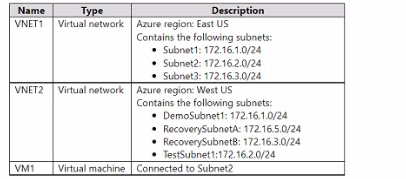
You configure Azure Site Recovery to replicate VM1 between the East US and Wt US regions.
You perform a test failove of VM1 and specify VNET2 as the target v>riual network.
When the test version of VM1 is created, to which subnet will the virtual machine be connected?
https://learn.microsoft.com/en-us/azure/site-recovery/azure-to-azure-network-mapping
The subnet of the target VM is selected based on the name of the subnet of the source VM.
- If a subnet with the same name as the source VM subnet is available in the target network, that subnet is set for the target VM.
- If a subnet with the same name doesn't exist in the target network, the first subnet in the alphabetical order is set as the target subnet.
You have an Azure subscription named Subscription1 that is used be several departments at your company. Subscription1 contains the resources in the following table:

Another administrator deploys a virtual machine named VM1 and an Azure Storage account named Storage2 by using a single Azure Resource Manager template.
You need to view the template used for the deployment.
From which blade can you view the template that was used for the deployment?
1. View template from deployment history
Go to the resource group for your new resource group. Notice that the portal shows the result of the last deployment. Select this link.

2. You see a history of deployments for the group. In your case, the portal probably lists only one deployment. Select this deployment.
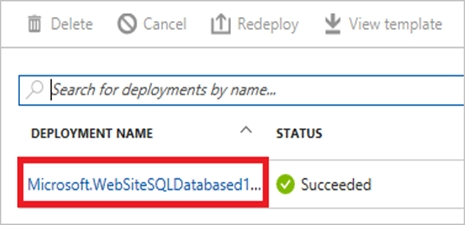
The portal displays a summary of the deployment. The summary includes the status of the deployment and its operations and the values that you provided for parameters. To see the template that you used for the deployment, select View template.

You have an Azure subscription named Subscription1.
You have 5 TB of data that you need to transfer to Subscription1.
You plan to use an Azure Import/Export job.
What can you use as the destination of the imported data?
Azure Import/Export service is used to securely import large amounts of data to Azure Blob storage and Azure Files by shipping disk drives to an Azure datacenter.
The maximum size of an Azure Files Resource of a file share is 5 TB.
https://docs.microsoft.com/en-us/azure/storage/common/storage-import-export-service
- Select Question Types you want
- Set your Desired Pass Percentage
- Allocate Time (Hours : Minutes)
- Create Multiple Practice tests with Limited Questions
- Customer Support
Donald King
13 days agoCarol Turner
24 days agoBrenda Wilson
1 month agoCrystal Hall
1 month agoMichael Nguyen
1 month agoGerald Allen
1 month agoLinda Baker
1 month agoDennis Flores
1 month agoDaniel
2 months agoLashandra
2 months agoJulio
3 months agoJolene
3 months agoOzell
3 months agoLaurena
3 months agoEric
4 months agoCarole
4 months agoKimbery
4 months agoGeoffrey
4 months agoCarman
5 months agoElza
5 months agoCristy
5 months agoStevie
5 months agoMagdalene
5 months agoNadine
6 months agoJustine
6 months agoDerrick
6 months agoStephen
6 months agoPolly
7 months agoLizbeth
7 months agoNobuko
7 months agoJannette
8 months agoNicolette
8 months agoGaynell
8 months agoStefania
8 months agoHuey
9 months agoRanee
9 months agoOmega
9 months agoLuis
9 months agoSonia
9 months agoJanna
11 months agoAlyce
11 months agoMauricio
11 months agoLaine
12 months agoJohnna
1 year agoMicaela
1 year agoBettina
1 year agoDorsey
1 year agoStephanie
1 year agoHoward
1 year agoDonette
1 year agoBritt
1 year agoMicaela
1 year agoMireya
1 year agoDeandrea
1 year agoKenneth
1 year agoLashon
1 year agoCecil
1 year agoIola
1 year agoRebecka
2 years agoRhea
2 years agoDesiree
2 years agoChuck
2 years agoGail
2 years agoTerry
2 years agoCorrinne
2 years agoGwenn
2 years agoGianna
2 years agoEmogene
2 years agoJuliana
2 years agoAja
2 years agoLindsey
2 years agoDevorah
2 years agoFelix
2 years agoCiara
2 years agoRessie
2 years agoOretha
2 years agoAdelaide
2 years agoMari
2 years agoLetha
2 years agoalizabeth
2 years agoMark james
2 years agoJAZZY
2 years agolivingston
2 years agohamim
2 years agopelvis
2 years agosijag
2 years agogarey
2 years ago