
 MENU
MENU
You have an Azure AD tenant that contains an access package named Package1 and a user named User1. Package1 is configured as shown in the following exhibit.
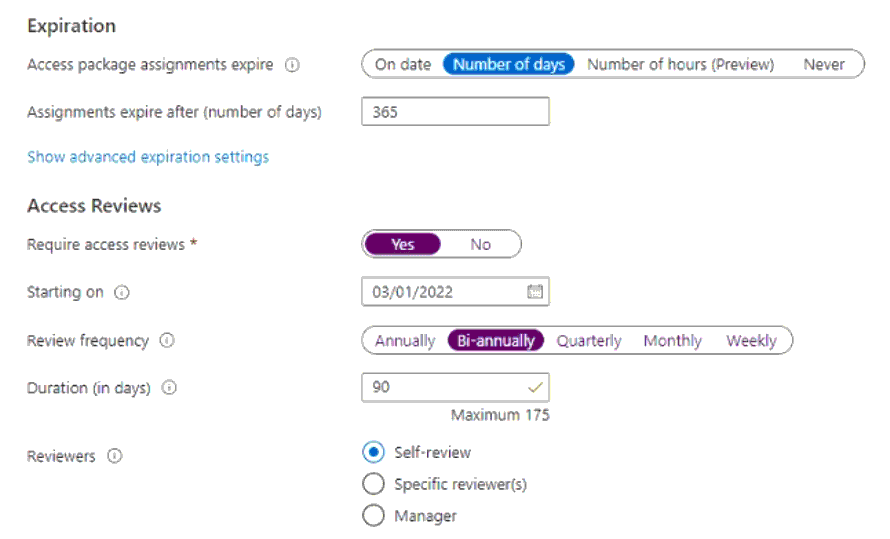
You need to ensure that User1 can modify the review frequency of Package1. The solution must use the principle of least privilege.
Which role should you assign to User1?
This question refers to Azure AD Entitlement Management under Identity Governance. The goal is to let User1 modify the review frequency (i.e., Access Reviews) for an existing access package named Package1, following the principle of least privilege.
In Azure AD, the ability to create and manage access packages, catalogs, and access reviews is granted through certain administrative roles:
Global Administrator and Identity Governance Administrator --- Full control over all Identity Governance settings.
Catalog Owner or Access Package Manager --- Manage access packages and settings within a catalog.
User Administrator --- Can configure access reviews and manage users, groups, and limited governance settings.
Privileged Role Administrator, Security Administrator, and External Identity Provider Administrator --- Have no direct control over access review settings in Entitlement Management.
From Microsoft documentation (''Azure AD Entitlement Management Delegation and Roles''):
''A user administrator can manage access reviews and entitlement management settings for the directory and assigned catalogs, including adjusting the review frequency or review settings.''
Thus, to modify the Access Review configuration (frequency, reviewers, etc.) in Package1, the User Administrator role provides the minimum necessary privilege without granting excessive permissions like Identity Governance Administrator or Global Administrator.