
Free Preparation Discussions
 MENU
MENU
Fortinet NSE6_EDR_AD-7.0 Exam - Topic 2 Question 2 Discussion
Topic #: 2
Refer to the exhibit.
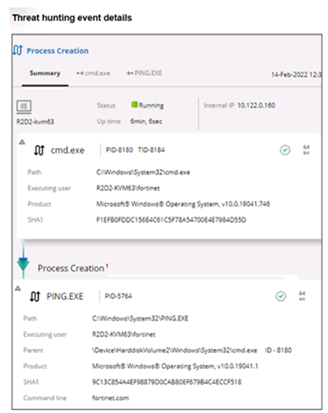
Based on the threat hunting event details shown in the exhibit, which two statements about the event are true? (Choose two answers)
The correct answers are B and D.
The exhibit shows a Process Creation activity event where cmd.exe is the source process and PING.EXE is the target process. The displayed Executing user is R2D2-KVM63fortinet, and the command line shows fortinet.com, which means the user fortinet executed a ping command targeting fortinet.com.
The FortiEDR guide explains that Threat Hunting activity events consist of a source, an action, and a target. It also states that Process Actions have another process as the target and include process-related actions such as Process Creation.
The exhibit also shows file-related details for the executable, including the executable path, product, SHA1 hash, and command line. In FortiEDR Threat Hunting, process execution events are tied to executable-file metadata, so the event is associated with the executable file involved in the process action. This supports B in the exam's intended wording.
Option A is not reliable because the screenshot does not prove MITRE details are unavailable; it only shows that no MITRE detail is visible in the current portion of the details pane. The guide states that MITRE indications appear when an activity event has related MITRE information.
Option C is wrong because the screenshot shows the process status as Running and does not show a block indicator. A green check does not mean blocked; it indicates a trusted/signed/allowed status context. There is no evidence that PING.EXE was blocked.
Clay
3 days agoCornell
8 days agoTom
13 days agoXochitl
18 days agoElli
24 days agoDante
29 days agoLeonora
1 month agoJade
1 month agoTayna
1 month ago