
Free Preparation Discussions
 MENU
MENU
Microsoft SC-300 Exam Questions
Free Microsoft SC-300 Exam Actual Questions
Note: Premium Questions for SC-300 were last updated On Sep. 07, 2026 (see below)
You have 2,500 users who are assigned Microsoft 365 E3 licenses. The licenses are assigned to individual users. From the Groups blade in the Microsoft Entra admin center, you assign Microsoft 365 E5 licenses to a group that includes all users. You need to remove the Microsoft 365 E3 licenses from the users by using the least amount of administrative effort What should you use?
You need to resolve the issue of the sales department users. What should you configure for the Azure AD tenant?
In Microsoft Entra ID (Azure AD), the per-user device cap is controlled in Devices > Device settings. The SC-300 materials describe that administrators can configure ''Users may join devices to Azure AD'' and the ''Maximum number of devices per user''. The guide notes that this limit defaults to five and is used to ''control how many devices a user can join or register in Azure AD''; when users reach the limit, ''they cannot add additional devices until the limit is increased or an existing device is removed.'' For scenarios like field or sales staff who use multiple devices, the study content recommends adjusting this value to meet business needs. Because A. Datum's sales users hit the current cap and a requirement states ''Increase the maximum number of devices that can be joined or registered to Azure AD to 10,'' the fix is to change the tenant's Device settings---not User settings, Access reviews, or Security defaults. This aligns with the exam objective to configure device settings for Azure AD join and registration and addresses the precise symptom reported by users.
Your network contains an Active Directory forest named contoso.com that is linked to an Azure Active Directory
(Azure AD) tenant named contoso.com by using Azure AD Connect.
You need to prevent the synchronization of users who have the extensionAttribute15 attribute set to
NoSync.
What should you do in Azure AD Connect?
In Azure AD Connect, filtering which users synchronize is achieved via synchronization rules. The SC-300 study content explains that to exclude objects based on an on-premises attribute (for example, extensionAttribute15=NoSync), you create an inbound rule on the Active Directory Domain Services (AD DS) connector. Inbound rules control the flow of data from AD DS into the metaverse, where you can use a scoping filter to mark objects as filtered (often via the cloudFiltered projection), preventing them from being provisioned to Azure AD. The official guidance highlights that inbound rules on the AD DS connector are used for attribute-based filtering and that export or run profiles (Full Import/Export) do not define logic; they only execute the configured rules. Therefore, to stop users with extensionAttribute15=NoSync from syncing, you create an inbound synchronization rule on the AD DS connector with a condition on that attribute to exclude those users from synchronization.
You have a Microsoft Exchange organization that uses an SMTP address space of contoso.com.
Several users use their contoso.com email address for self-service sign-up to 1 Microsoft Entra.
You gain global administrator privileges to the Microsoft Entra tenant that contains the self-signed users.
You need to prevent the users from creating user accounts in the contoso.com 2 Microsoft Entra tenant for self-service sign-up to Microsoft 365 services.
Which PowerShell cmdlet should you run?
According to the Microsoft SC-300 Study Guide and Microsoft Learn module: ''Manage Microsoft Entra domains and custom domain names'', when users perform self-service sign-up (email verified users) using a public domain such as contoso.com, Microsoft Entra creates a shadow tenant that you can later claim ownership of by verifying the DNS domain.
Once you become the Global Administrator of the verified tenant, you can control domain behavior, including blocking self-service sign-up using that domain. To disable further self-service creation of accounts for that domain, you must modify the domain configuration using the Update-MgDomain PowerShell cmdlet.
The cmdlet Update-MgDomain allows you to change properties of the domain, such as IsDefault, IsVerified, and crucially, blocking self-service sign-ups.
Example:
Update-MgDomain -DomainId contoso.com -IsAdminManaged $true
This action prevents external or unverified users from using @contoso.com email addresses for new self-service sign-ups.
Other options like Update-MgPolicyAuthorizationPolicy, Update-MgPolicyPermissionGrantPolicyExclude, and Update-MgDomainFederationConfiguration are used for tenant-wide access, permission grants, or federated authentication but not to block self-service domain registration.
You have a Microsoft Entra tenant that contains the devices shown in the following table.
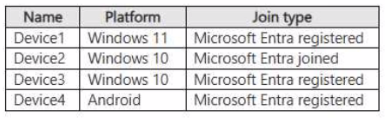
You plan to configure Microsoft Entra Private Access. You deploy the Global Secure Access client to compatible devices. From which devices can you use Private Access?
- Select Question Types you want
- Set your Desired Pass Percentage
- Allocate Time (Hours : Minutes)
- Create Multiple Practice tests with Limited Questions
- Customer Support
Crystal Flores
15 days agoCarol Perez
25 days agoOlivia Gonzalez
2 months agoAngela Howard
2 months agoWilliam Scott
3 months agoJessica Rogers
3 months agoBetty Stewart
4 months agoKimberly Robinson
4 months agoRebecca Jones
4 months agoNancy Miller
5 months agoLisa Parker
4 months agoChristopher Evans
4 months agoMichelle Nguyen
4 months agoMelissa Robinson
4 months agoRonald Lewis
5 months agoCorrina
5 months agoMabel
6 months agoTommy
6 months agoAlberto
6 months agoVerda
6 months agoHobert
7 months agoClarinda
7 months agoTiffiny
7 months agoShanda
7 months agoLuann
8 months agoFrederica
8 months agoEvangelina
8 months agoTheola
8 months agoLilli
9 months agoVilma
9 months agoValentin
9 months agoJin
9 months agoBonita
10 months agoBuck
10 months agoDick
10 months agoMarshall
10 months agoMarjory
11 months agoEric
11 months agoFausto
11 months agoErinn
11 months agoBrent
12 months agoTerrilyn
12 months agoArgelia
12 months agoOdelia
1 year agoEliz
1 year agoStephaine
1 year agoTarra
1 year agoCarlton
1 year agoArminda
1 year agoElli
2 years agoMari
2 years agoSusy
2 years agoSharen
2 years agoMona
2 years agoAn
2 years agoAntione
2 years agoLilli
2 years agoGertude
2 years agoAllene
2 years agoMattie
2 years agoJacqueline
2 years agoEden
2 years agoJuan
2 years agoCherilyn
2 years agoMatthew
2 years agoEladia
2 years agoShaunna
2 years agoHyman
2 years agoFanny
2 years agoArtie
2 years agoRoyce
2 years agoIesha
2 years agoLorriane
2 years ago