
Deal of The Day! Hurry Up, Grab the Special Discount - Save 25% - Ends In 00:00:00 Coupon code: SAVE25
Welcome to Pass4Success

- Free Preparation Discussions

Microsoft AZ-400 Exam - Topic 4 Question 126 Discussion

Actual exam question for Microsoft's AZ-400 exam
Question #: 126
Topic #: 4
[All AZ-400 Questions]

SIMULATION

You need to create and configure an Azure Storage account named az400lod11566895stor in a resource group named RG1lod11566895 to store the boot diagnostics for a virtual machine named VM1.

To complete this task, sign in to the Microsoft Azure portal.

Show Suggested Answer Hide Answer
Suggested Answer: A

Step 1: To create a general-purpose v2 storage account in the Azure portal, follow these steps:

On the Azure portal menu, select All services. In the list of resources,type Storage Accounts. As you begin typing, the list filters based on your input. Select Storage Accounts.

On the Storage Accounts window that appears, choose Add.

Select the subscription in which to create the storage account.

Under the Resource group field, select RG1lod11566895

Next, enter a name for your storage account named: az400lod11566895stor

Select Create.

Step 2: Enable boot diagnostics on existing virtual machine

To enable Boot diagnostics on an existing virtual machine, follow these steps:

1.Sign in to the Azure portal, and then select the virtual machine VM1.

2. In the Support + troubleshooting section, select Boot diagnostics, then select the Settings tab.

3. In Boot diagnostics settings, change the status to On, and from the Storage account drop-down list, select the storage account az400lod11566895stor.

4. Save the change.
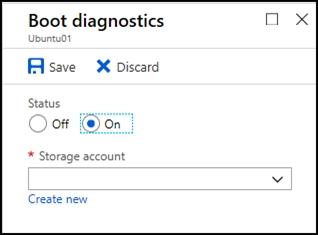
You must restart the virtual machine for the change to take effect.


https://docs.microsoft.com/en-us/azure/storage/common/storage-account-create

https://docs.microsoft.com/en-us/azure/virtual-machines/troubleshooting/boot-diagnostics

Contribute your Thoughts:

0/2000 characters
Kanisha
2 days ago
I feel confident about Azure.
upvoted 0 times
...
Azzie
7 days ago
Yup, that's correct! Just double-check the naming conventions.
upvoted 0 times
...
Penney
25 days ago
RG1lod11566895 is the resource group name, right?
upvoted 0 times
...
Cyril
1 month ago
Wait, do you really need a separate storage account for that?
upvoted 0 times
...
Freida
1 month ago
Totally agree, it's essential for VM monitoring!
upvoted 0 times
...
Shawnda
1 month ago
You need to create a storage account in Azure for diagnostics.
upvoted 0 times
...
Edison
2 months ago
Haha, I hope the exam doesn't ask us to create a storage account named "az400lod11566895stor" - that's a mouthful!
upvoted 0 times
...
Mona
2 months ago
I bet the boot diagnostics will come in handy if the VM ever has any issues.
upvoted 0 times
...
Francesco
2 months ago
This is a straightforward task, should be easy to complete.
upvoted 0 times
...
Val
2 months ago
I definitely remember that we need to select the right region for the storage account, but I hope I don’t mix up the settings for boot diagnostics!
upvoted 0 times
...
Rickie
2 months ago
I feel like I should remember the naming conventions for Azure resources, but I’m a bit confused about the resource group part.
upvoted 0 times
...
Nu
2 months ago
I think we did a similar question where we had to configure diagnostics for a VM, but I can’t recall the exact steps to link the storage account.
upvoted 0 times
...
Malcolm
3 months ago
I remember we practiced creating storage accounts, but I’m not sure if I need to set any specific replication options for this one.
upvoted 0 times
...
Gabriele
3 months ago
Okay, I think I've got a plan. I'll start by creating the storage account in the RG1lod11566895 resource group, then I'll configure it to store the boot diagnostics for the VM1 virtual machine. Hopefully that covers all the requirements.
upvoted 0 times
...
Ivory
3 months ago
Wait, do I need to create the VM first before I can set up the storage account for the boot diagnostics? I want to make sure I do this in the right order.
upvoted 0 times
...
Jesusita
3 months ago
No problem, I've done this type of task before. I'll log into the Azure portal, create the storage account in the specified resource group, and then configure it to store the boot diagnostics for the VM.
upvoted 0 times
...
Gilma
4 months ago
This question is tricky.
upvoted 0 times
...
Alesia
4 months ago
Hmm, I wonder if there are any gotchas with the naming conventions for the storage account.
upvoted 0 times
...
Lenora
4 months ago
Hmm, I'm a bit unsure about the specific steps to create and configure the storage account. I'll need to review the Azure portal documentation to make sure I do this correctly.
upvoted 0 times
...
Jina
4 months ago
Okay, this seems straightforward. I'll need to create the storage account and configure it to store the boot diagnostics for the VM.
upvoted 0 times
Lavina
3 months ago
Sounds easy enough! Just follow the steps.
upvoted 0 times
...
...

Save Cancel