
Free Preparation Discussions
 MENU
MENU
Microsoft AZ-104 Exam - Topic 4 Question 132 Discussion
Topic #: 4
You have an Azure subscription named Subscription1 that is used be several departments at your company. Subscription1 contains the resources in the following table:

Another administrator deploys a virtual machine named VM1 and an Azure Storage account named Storage2 by using a single Azure Resource Manager template.
You need to view the template used for the deployment.
From which blade can you view the template that was used for the deployment?
1. View template from deployment history
Go to the resource group for your new resource group. Notice that the portal shows the result of the last deployment. Select this link.

2. You see a history of deployments for the group. In your case, the portal probably lists only one deployment. Select this deployment.
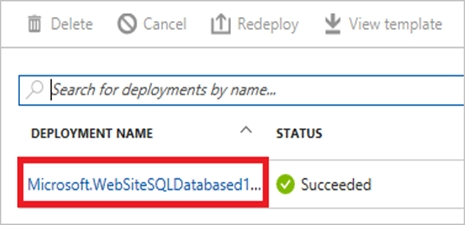
The portal displays a summary of the deployment. The summary includes the status of the deployment and its operations and the values that you provided for parameters. To see the template that you used for the deployment, select View template.

Jolene
4 days agoMarleen
9 days agoLaquanda
14 days agoGlendora
20 days agoRoyal
25 days agoGoldie
30 days agoCarin
1 month agoIn
1 month agoFrederica
2 months agoSherman
2 months agoGerry
2 months agoJody
2 months agoKerry
2 months agoRusty
2 months agoLai
4 months agoCeleste
4 months agoSuzi
5 months agoAliza
5 months agoCorinne
5 months agoMonte
5 months ago