Free Preparation Discussions
 MENU
MENU
Free Microsoft AZ-104 Exam Dumps - Page 18
MultipleChoice
Note: This question is part of a series of questions that present the same scenario. Each question in the series contains a unique solution that might meet the stated goals. Some question sets might have more than one correct solution, while others might not have a correct solution.
After you answer a question in this section, you will NOT be able to return to it. As a result, these questions will not appear in the review screen.
You have an app named App1 that is installed on two Azure virtual machines named VM1 and VM2. Connections to App1 are managed by using an Azure Load Balancer.
The effective network security configurations for VM2 are shown in the following exhibit.
You discover that connections to App1 from 131.107.100.50 over TCP port 443 fail.
You verify that the Load Balancer rules are configured correctly.
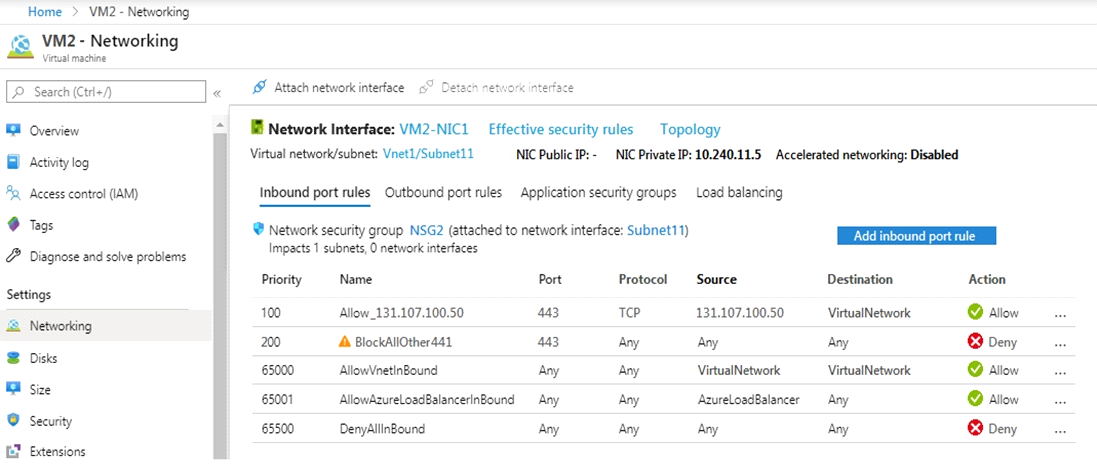
Solution: You delete the BlockAllOther443 inbound security rule.
Does this meet the goal?
OptionsMultipleChoice
You have an on-premises server that contains a folder named D:\Folder1.
You need to copy the contents of D:\Folder1 to the public container in an Azure Storage account named contoso data.
Which command should you run?
D18912E1457D5D1DDCBD40AB3BF70D5D
OptionsHotspot
You have an Azure subscription that contains the virtual machines shown in the following table:

VM1 and VM2 use public IP addresses. From Windows Server 2019 on VM1 and VM2, you allow inbound Remote Desktop connections.
Subnet1 and Subnet2 are in a virtual network named VNET1.
The subscription contains two network security groups (NSGs) named NSG1 and NSG2. NSG1 uses only the default rules.
NSG2 uses the default rules and the following custom incoming rule:
* Priority: 100
* Name: Rule1
* Port: 3389
* Protocol: TCP
* Source: Any
* Destination: Any
* Action: Allow
NSG1 is associated to Subnet1. NSG2 is associated to the network interface of VM2.
D18912E1457D5D1DDCBD40AB3BF70D5D
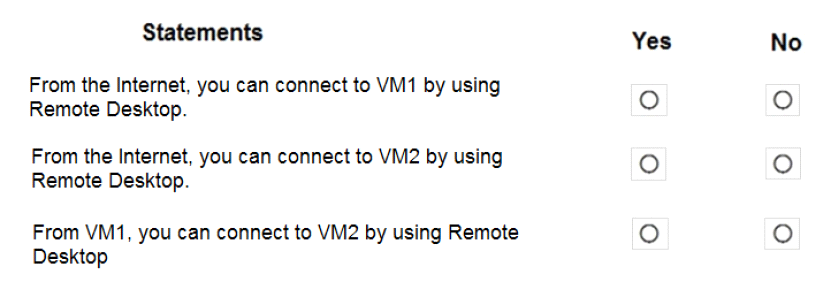
For each of the following statements, select Yes if the statement is true. Otherwise, select No.
NOTE: Each correct selection is worth one point.
Hotspot
You have a virtual network named VNET1 that contains the subnets shown in the following table:

D18912E1457D5D1DDCBD40AB3BF70D5D
You have two Azure virtual machines that have the network configurations shown in the following table:

For NSG1, you create the inbound security rule shown in the following table:

For NSG2, you create the inbound security rule shown in the following table:

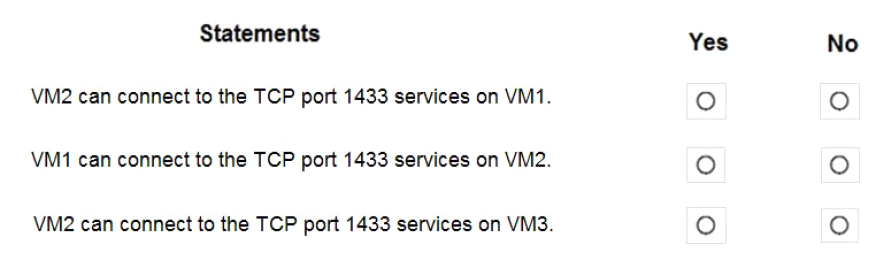
For each of the following statements, select Yes if the statement is true. Otherwise, select No.
NOTE: Each correct selection is worth one point.
Hotspot
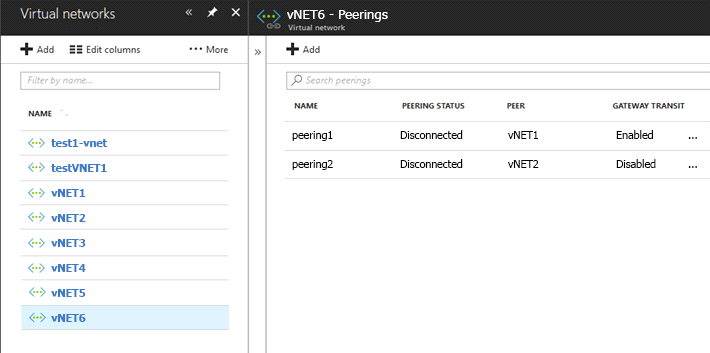
You have peering configured as shown in the following exhibit.
Use the drop-down menus to select the answer choice that completes each statement based on the information presented in the graphic.
NOTE: Each correct selection is worth one point.
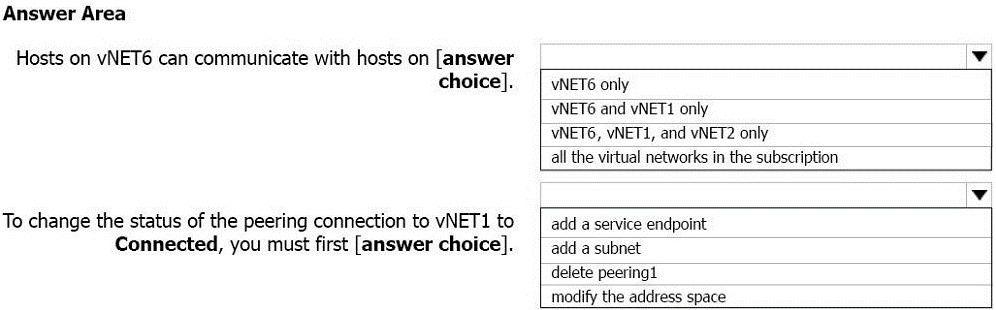
Box 1: vNET6 only
Peering status to both VNet1 and Vnet2 are disconnected.
Box 2: delete peering1
Peering to Vnet1 is Enabled but disconnected. We need to update or re-create the remote peering to get it back to Initiated state.
MultipleChoice
Your company has an Azure subscription named Subscription1.
The company also has two on-premises servers named Server1 and Server2 that run Windows Server 2016. Server1 is configured as a DNS server that has a primary DNS zone named adatum.com. Adatum.com contains 1,000 DNS records.
You manage Server1 and Subscription1 from Server2. Server2 has the following tools installed:
* The DNS Manager console
* Azure PowerShell
* Azure CLI 2.0
You need to move the adatum.com zone to Subscription1. The solution must minimize administrative effort.
What should you use?
OptionsHotspot
You have a pay-as-you-go Azure subscription that contains the virtual machines shown in the following table.
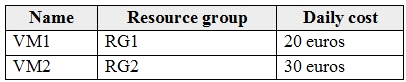
You create the budget shown in the following exhibit.
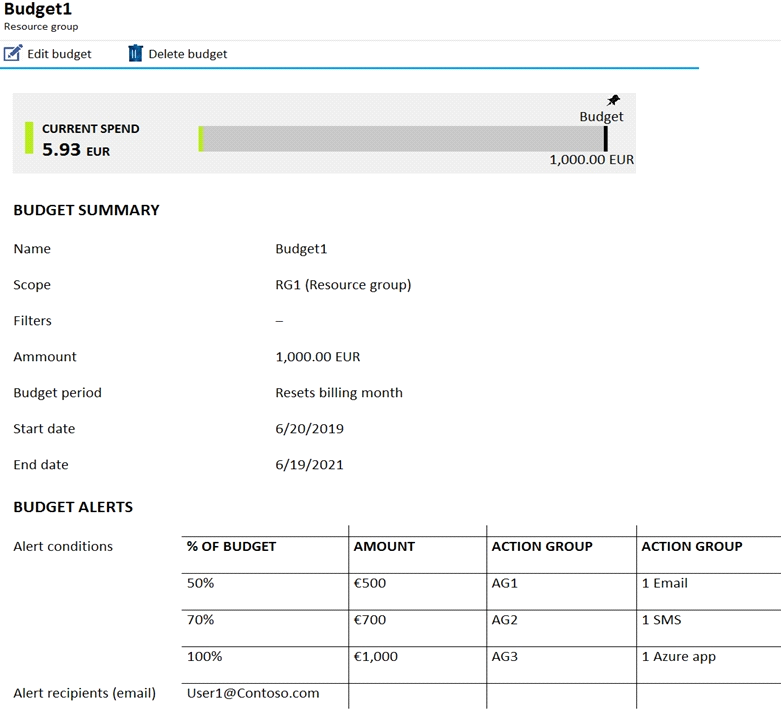
The AG1 action group contains a user named admin@contoso.com only.
Use the drop-down menus to select the answer choice that completes each statement based on the information presented in the graphic.
NOTE: Each correct selection is worth one point.
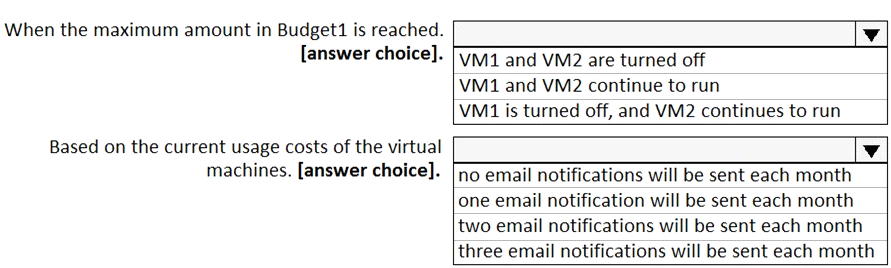
Box 1: VM1 and VM2 continues to run
Hotspot
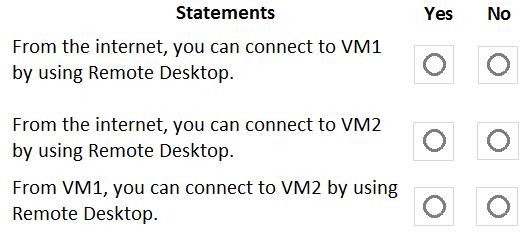
You have an Azure subscription that contains the virtual machines shown in the following table.

VM1 and VM2 use public IP addresses. From Windows Server 2019 on VM1 and VM2, you allow inbound Remote Desktop connections.
Subnet1 and Subnet2 are in a virtual network named VNET1.
The subscription contains two network security groups (NSGs) named NSG1 and NSG2. NSG1 uses only the default rules.
NSG2 uses the default and the following custom incoming rule:
* Priority: 100
* Name: Rule1
* Port: 3389
* Protocol: TCP
* Source: Any
* Destination: Any
* Action: Allow
NSG1 connects to Subnet1. NSG2 connects to the network interface of VM2.
For each of the following statements, select Yes if the statement is true. Otherwise, select No.
Hotspot
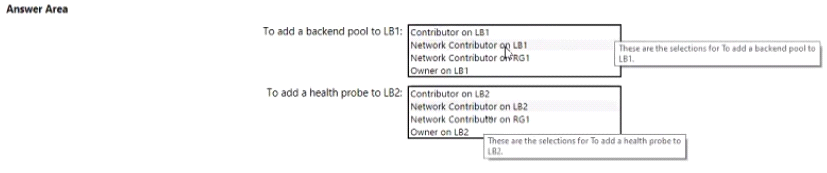
You have an Azure subscription named Subcription1 that contains a resource group named RG1.
In RG1. you create an internal load balancer named LB1 and a public load balancer named 162.
You need to ensure that an administrator named Admin 1 can manage LB1 and LB2. The solution must follow the principle of least privilege.
Which role should you assign to Admin1 for each task? To answer, select the appropriate options in the answer area.
NOTE: Caen correct selection is worth one point.
Explanation
Hotspot
You have an Azure virtual machine that runs Windows Server 2019 and has the following configurations:
* Name: VM1
* Location: West US
* Connected to: VNET1
* Private IP address: 10.1.0.4
* Public IP addresses: 52.186.85.63
* DNS suffix in Windows Server: Adatum.com
You create the Azure DNS zones shown in the following table.
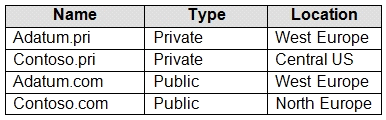
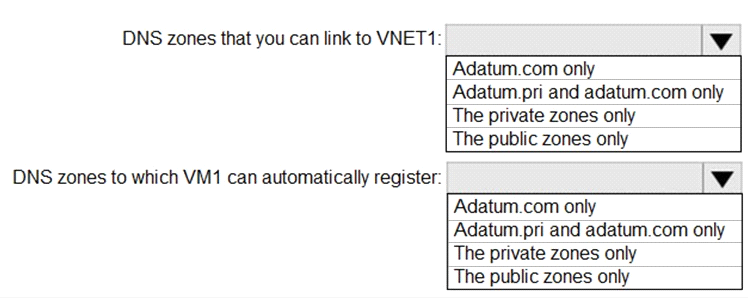
You need to identify which DNS zones you can link to VNET1 and the DNS zones to which VM1 can automatically register.
Which zones should you identify? To answer, select the appropriate options in the answer area.
NOTE: Each correct selection is worth one point.