Deal of The Day! Hurry Up, Grab the Special Discount - Save 25% - Ends In 00:00:00 Coupon code: SAVE25

Free Preparation Discussions
 MENU
MENU
Linux Foundation CKA Exam - Topic 6 Question 24 Discussion
Actual exam question for
Linux Foundation's
CKA exam
Question #: 24
Topic #: 6
[All CKA Questions]
Topic #: 6
Score: 5%
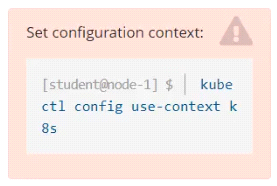
Task
From the pod label name=cpu-utilizer, find pods running high CPU workloads and write the name of the pod consuming most CPU to the file /opt/KUTR00401/KUTR00401.txt (which already exists).
Suggested Answer:
A
Evangelina
11 months agoDesirae
11 months agoAngelica
11 months agoSharika
11 months agoNguyet
11 months agoGerman
11 months agoCandida
11 months agoTalia
11 months agoCecilia
12 months agoBulah
12 months agoColeen
12 months agoRaul
12 months ago