
Free Preparation Discussions
 MENU
MENU
Linux Foundation CKA Exam Questions
- Topic 1: Storage: It explains storage classes, persistent volumes, volume mode, access modes, persistent volume claims primitive, and reclaim policies for volumes. Furthermore, this topic deals with configuring applications with persistent storage.
- Topic 2: Troubleshooting: This topic discusses cluster and node logging, monitoring applications, managing container stdout, and stderr logs. It also deals with troubleshooting application failure, cluster component failure, and networking.
- Topic 3: Workloads & Scheduling: Its sub-topics are manifest management and common templating tools, primitives, scaling apps, ConfigMaps, and performing rolling update and rollbacks.
- Topic 4: Cluster Architecture, Installation & Configuration: In this questions about role-based access control (RBAC), highly-available Kubernetes cluster, deployment of a Kubernetes cluster, etcd backup, and restore are included.
- Topic 5: Services & Networking: This topic tests you understandings of host networking configuration, connectivity between Pods, ClusterIP, NodePort, LoadBalancer service types and endpoints. It also explains how to use Ingress controllers and Ingress resources, configure and use CoreDNS. Lastly, it discusses choosing a suitable container network interface plugin.
Free Linux Foundation CKA Exam Actual Questions
Note: Premium Questions for CKA were last updated On Sep. 02, 2026 (see below)
SIMULATION
Task Weight: 4%
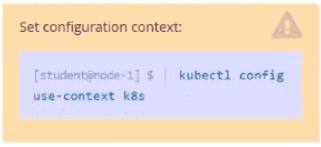
Task
Scale the deployment webserver to 3 pods.
Solution:

SIMULATION
Score: 13%
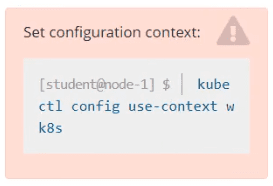
Task
A Kubernetes worker node, named wk8s-node-0 is in state NotReady. Investigate why this is the case, and perform any appropriate steps to bring the node to a Ready state, ensuring that any changes are made permanent.
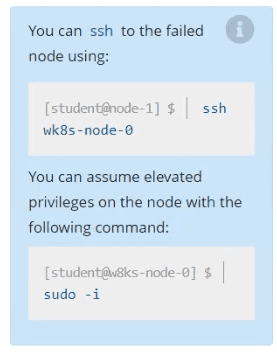
Solution:
sudo -i
systemctl status kubelet
systemctl start kubelet
systemctl enable kubelet
SIMULATION
Score: 4%
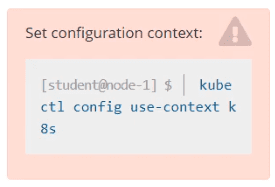
Context
You have been asked to create a new ClusterRole for a deployment pipeline and bind it to a specific ServiceAccount scoped to a specific namespace.
Task
Create a new ClusterRole named deployment-clusterrole, which only allows to create the following resource types:
* Deployment
* StatefulSet
* DaemonSet
Create a new ServiceAccount named cicd-token in the existing namespace app-team1.
Bind the new ClusterRole deployment-clusterrole lo the new ServiceAccount cicd-token , limited to the namespace app-team1.
Solution:
Task should be complete on node k8s -1 master, 2 worker for this connect use command
[student@node-1] > ssh k8s
kubectl create clusterrole deployment-clusterrole --verb=create --resource=deployments,statefulsets,daemonsets
kubectl create serviceaccount cicd-token --namespace=app-team1
kubectl create rolebinding deployment-clusterrole --clusterrole=deployment-clusterrole --serviceaccount=default:cicd-token --namespace=app-team1
SIMULATION
Quick Reference
ConfigMaps,
Documentation Deployments,
Namespace
You must connect to the correct host . Failure to do so may result in a zero score.
[candidate@base] $ ssh cka000048b
Task
An NGINX Deployment named nginx-static is running in the nginx-static namespace. It is configured using a ConfigMap named nginx-config .
First, update the nginx-config ConfigMap to also allow TLSv1.2. connections.
You may re-create, restart, or scale resources as necessary.
You can use the following command to test the changes:
[candidate@cka000048b] $ curl -- tls-max
1.2 https://web.k8s.local
Task Summary
SSH into cka000048b
Update the nginx-config ConfigMap in the nginx-static namespace to allow TLSv1.2
Ensure the nginx-static Deployment picks up the new config
Verify the change using the provided curl command
Step-by-Step Instructions
Step 1: SSH into the correct host
ssh cka000048b
Step 2: Get the ConfigMap
kubectl get configmap nginx-config -n nginx-static -o yaml > nginx-config.yaml
Open the file for editing:
nano nginx-config.yaml
Look for the TLS configuration in the data field. You are likely to find something like:
ssl_protocols TLSv1.3;
Modify it to include TLSv1.2 as well:
ssl_protocols TLSv1.2 TLSv1.3;
Save and exit the file.
Now update the ConfigMap:
kubectl apply -f nginx-config.yaml
Step 3: Restart the NGINX pods to pick up the new ConfigMap
Pods will not reload a ConfigMap automatically unless it's mounted in a way that supports dynamic reload and the app is watching for it (NGINX typically doesn't by default).
The safest way is to restart the pods:
Option 1: Roll the deployment
kubectl rollout restart deployment nginx-static -n nginx-static
Option 2: Delete pods to force recreation
kubectl delete pod -n nginx-static -l app=nginx-static
Step 4: Verify using curl
Use the provided curl command to confirm that TLS 1.2 is accepted:
curl --tls-max 1.2 https://web.k8s.local
A successful response means the TLS configuration is correct.
Final Command Summary
ssh cka000048b
kubectl get configmap nginx-config -n nginx-static -o yaml > nginx-config.yaml
nano nginx-config.yaml # Modify to include 'ssl_protocols TLSv1.2 TLSv1.3;'
kubectl apply -f nginx-config.yaml
kubectl rollout restart deployment nginx-static -n nginx-static
# or
kubectl delete pod -n nginx-static -l app=nginx-static
curl --tls-max 1.2 https://web.k8s.local
SIMULATION
Print pod name and start time to ''/opt/pod-status'' file
kubect1 get pods -o=jsonpath='{range
items[*]}{.metadata.name}{'\t'}{.status.podIP}{'\n'}{end}'
- Select Question Types you want
- Set your Desired Pass Percentage
- Allocate Time (Hours : Minutes)
- Create Multiple Practice tests with Limited Questions
- Customer Support
Jason Roberts
20 days agoAnthony Moore
27 days agoKaren Moore
2 months agoMonica Turner
2 months agoHeather Sanchez
3 months agoSteven Cooper
3 months agoDaniel Mitchell
4 months agoJennifer Stewart
4 months agoRonald Bell
4 months agoAngela Morris
4 months agoJessica Johnson
4 months agoSteven Williams
4 months agoMaria Torres
4 months agoSharon Edwards
5 months agoRory
5 months agoVashti
5 months agoDorathy
6 months agoBillye
6 months agoHillary
6 months agoCarlee
6 months agoLaurene
7 months agoRobt
7 months agoLenna
7 months agoAyesha
7 months agoElfrieda
8 months agoLynelle
8 months agoUla
8 months agoWilda
8 months agoErnest
9 months agoLettie
9 months agoColeen
9 months agoNoel
9 months agoRuthann
10 months agoMartina
10 months agoHolley
10 months agoTy
10 months agoCatherin
11 months agoJaney
11 months agoAdela
11 months agoMerissa
11 months agoJaime
12 months agoGerald
1 year agoAnjelica
1 year agoAlberto
1 year agoLottie
1 year agoRossana
1 year agoChantell
1 year agoLai
2 years agoKanisha
2 years agoAlonzo
2 years agoBernadine
2 years agoTresa
2 years agoRochell
2 years agoElvera
2 years agoShawnta
2 years agoOsvaldo
2 years agoNgoc
2 years agoRyan
2 years agoDaren
2 years agoJustine
2 years agoGeraldine
2 years agoDominque
2 years agoDyan
2 years agoRozella
2 years agoRoosevelt
2 years agoLoren
2 years agoNorah
2 years agorimoha Kellis
2 years ago