Deal of The Day! Hurry Up, Grab the Special Discount - Save 25% - Ends In 00:00:00 Coupon code: SAVE25

Welcome to Pass4Success

- Free Preparation Discussions

Linux Foundation CKA Exam - Topic 4 Question 87 Discussion

Actual exam question for Linux Foundation's CKA exam
Question #: 87
Topic #: 4
[All CKA Questions]

Score: 4%

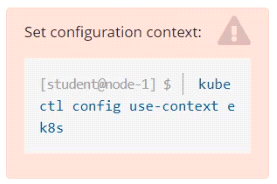
Task

Set the node named ek8s-node-1 as unavailable and reschedule all the pods running on it.

Show Suggested Answer Hide Answer
Suggested Answer: A

Contribute your Thoughts:

0/2000 characters
Rene
3 months ago
Wait, does draining really delete local data? That sounds risky!
upvoted 0 times
...
Tawna
3 months ago
Totally agree, draining can be risky if you're not careful.
upvoted 0 times
...
Celestina
3 months ago
Just a reminder, don't forget to check for any critical pods before draining!
upvoted 0 times
...
Pearline
4 months ago
I thought you had to uncordon the node after rescheduling.
upvoted 0 times
...
Dewitt
4 months ago
This is the standard procedure, nothing surprising here.
upvoted 0 times
...
German
4 months ago
I definitely recall the `--ignore-daemonsets` flag, but I can't remember if I need to include `--force` every time.
upvoted 0 times
...
Billye
4 months ago
I feel like I might have mixed up the order of the commands. Should I cordon first or drain first?
upvoted 0 times
...
Sommer
4 months ago
This question seems similar to one we did in class about managing node availability. I think I need to use `kubectl` for this.
upvoted 0 times
...
Nikita
5 months ago
I remember practicing the cordon and drain commands, but I'm not entirely sure about the flags needed for the drain command.
upvoted 0 times
...
Yvette
5 months ago
Hmm, I'm a bit unsure about this one. I know I need to mark the node as unavailable and reschedule the pods, but I want to make sure I don't accidentally cause any disruptions. I'll need to review the documentation carefully before executing the commands.
upvoted 0 times
...
Diane
5 months ago
I've got this! I'll just follow the steps in the solution and run the commands to cordon the node and drain the pods. Easy peasy!
upvoted 0 times
...
Francene
5 months ago
Whoa, this is a new one for me. I'm not too familiar with the `kubectl cordon` and `kubectl drain` commands. I'll need to double-check the syntax and make sure I don't accidentally delete any important data or services.
upvoted 0 times
...
Nobuko
5 months ago
Okay, I think I understand the task. I'll need to use the `kubectl cordon` command to mark the node as unschedulable, and then the `kubectl drain` command to evict the pods running on that node. I'll need to be careful with the `--delete-local-data` and `--ignore-daemonsets` flags.
upvoted 0 times
...
Carmelina
5 months ago
Hmm, this looks straightforward. I'll start by checking the node status and then use the `kubectl cordon` and `kubectl drain` commands to mark the node as unavailable and reschedule the pods.
upvoted 0 times
...
Paulene
7 months ago
Ah, the joys of node maintenance. Just remember, don't let the pods get too comfortable on their new digs. Shake things up a bit!
upvoted 0 times
Tracey
6 months ago
Okay, let's mark ek8s-node-1 as unavailable.
upvoted 0 times
...
...
Lauran
8 months ago
Yes, the explanation provided gives a step-by-step guide on how to achieve the task.
upvoted 0 times
...
Wilburn
8 months ago
I believe the solution involves using kubectl commands to cordon and drain the node.
upvoted 0 times
...
Angella
8 months ago
I agree, setting a node as unavailable can be challenging.
upvoted 0 times
...
Marge
8 months ago
Hmm, I wonder if the pods will find a new home as swiftly as my cat finds a new napping spot. Gotta love those furry friends!
upvoted 0 times
...
Alesia
8 months ago
This is a classic move. Cordon, drain, and let the pods find a new home. Easy-peasy, lemon squeezy!
upvoted 0 times
...
Silva
8 months ago
Easy peasy, just like my morning coffee! Although, I'd probably avoid the --force unless I'm feeling spicy today.
upvoted 0 times
Latosha
7 months ago
I might skip the --force option too, better safe than sorry.
upvoted 0 times
...
Lauryn
7 months ago
Yeah, just follow the steps provided in the solution and you'll be good to go.
upvoted 0 times
...
Maryrose
7 months ago
I agree, setting a node as unavailable and rescheduling pods is pretty straightforward.
upvoted 0 times
...
...
Herman
8 months ago
I think this question is tricky.
upvoted 0 times
...
Brandon
8 months ago
Looks straightforward, but I'd double-check the --force flag. Might cause issues with DaemonSets.
upvoted 0 times
Mila
7 months ago
I'll make sure to be careful with the --force flag.
upvoted 0 times
...
Billy
8 months ago
Good point, thanks for the heads up!
upvoted 0 times
...
...

Save Cancel