Deal of The Day! Hurry Up, Grab the Special Discount - Save 25% - Ends In 00:00:00 Coupon code: SAVE25

Welcome to Pass4Success

- Free Preparation Discussions

Linux Foundation CKA Exam - Topic 4 Question 87 Discussion

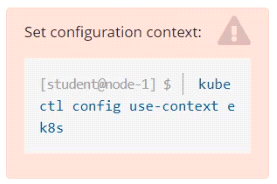
Score: 4%TaskSet the node named ek8s-node-1 as unavailable and reschedule all the pods running on it.
A) Explanation: SOLUTION: [student@node-1] > ssh ek8s kubectl cordon ek8s-node-1 kubectl drain ek8s-node-1 --delete-local-data --ignore-daemonsets --force

Linux Foundation CKA Exam - Topic 4 Question 87 Discussion

Actual exam question for Linux Foundation's CKA exam
Question #: 87
Topic #: 4
[All CKA Questions]

Score: 4%

Task

Set the node named ek8s-node-1 as unavailable and reschedule all the pods running on it.

Show Suggested Answer Hide Answer
Suggested Answer: A

Contribute your Thoughts:

0/2000 characters
Rene
9 months ago
Wait, does draining really delete local data? That sounds risky!
upvoted 0 times
...
Tawna
9 months ago
Totally agree, draining can be risky if you're not careful.
upvoted 0 times
...
Celestina
9 months ago
Just a reminder, don't forget to check for any critical pods before draining!
upvoted 0 times
...
Pearline
10 months ago
I thought you had to uncordon the node after rescheduling.
upvoted 0 times
...
Dewitt
10 months ago
This is the standard procedure, nothing surprising here.
upvoted 0 times
...
German
10 months ago
I definitely recall the `--ignore-daemonsets` flag, but I can't remember if I need to include `--force` every time.
upvoted 0 times
...
Billye
10 months ago
I feel like I might have mixed up the order of the commands. Should I cordon first or drain first?
upvoted 0 times
...
Sommer
10 months ago
This question seems similar to one we did in class about managing node availability. I think I need to use `kubectl` for this.
upvoted 0 times
...
Nikita
11 months ago
I remember practicing the cordon and drain commands, but I'm not entirely sure about the flags needed for the drain command.
upvoted 0 times
...
Yvette
11 months ago
Hmm, I'm a bit unsure about this one. I know I need to mark the node as unavailable and reschedule the pods, but I want to make sure I don't accidentally cause any disruptions. I'll need to review the documentation carefully before executing the commands.
upvoted 0 times
...
Diane
11 months ago
I've got this! I'll just follow the steps in the solution and run the commands to cordon the node and drain the pods. Easy peasy!
upvoted 0 times
...
Francene
11 months ago
Whoa, this is a new one for me. I'm not too familiar with the `kubectl cordon` and `kubectl drain` commands. I'll need to double-check the syntax and make sure I don't accidentally delete any important data or services.
upvoted 0 times
...
Nobuko
11 months ago
Okay, I think I understand the task. I'll need to use the `kubectl cordon` command to mark the node as unschedulable, and then the `kubectl drain` command to evict the pods running on that node. I'll need to be careful with the `--delete-local-data` and `--ignore-daemonsets` flags.
upvoted 0 times
...
Carmelina
11 months ago
Hmm, this looks straightforward. I'll start by checking the node status and then use the `kubectl cordon` and `kubectl drain` commands to mark the node as unavailable and reschedule the pods.
upvoted 0 times
...
Paulene
1 year ago
Ah, the joys of node maintenance. Just remember, don't let the pods get too comfortable on their new digs. Shake things up a bit!
upvoted 0 times
Tracey
1 year ago
Okay, let's mark ek8s-node-1 as unavailable.
upvoted 0 times
...
...
Lauran
1 year ago
Yes, the explanation provided gives a step-by-step guide on how to achieve the task.
upvoted 0 times
...
Wilburn
1 year ago
I believe the solution involves using kubectl commands to cordon and drain the node.
upvoted 0 times
...
Angella
1 year ago
I agree, setting a node as unavailable can be challenging.
upvoted 0 times
...
Marge
1 year ago
Hmm, I wonder if the pods will find a new home as swiftly as my cat finds a new napping spot. Gotta love those furry friends!
upvoted 0 times
...
Alesia
1 year ago
This is a classic move. Cordon, drain, and let the pods find a new home. Easy-peasy, lemon squeezy!
upvoted 0 times
...
Silva
1 year ago
Easy peasy, just like my morning coffee! Although, I'd probably avoid the --force unless I'm feeling spicy today.
upvoted 0 times
Latosha
1 year ago
I might skip the --force option too, better safe than sorry.
upvoted 0 times
...
Lauryn
1 year ago
Yeah, just follow the steps provided in the solution and you'll be good to go.
upvoted 0 times
...
Maryrose
1 year ago
I agree, setting a node as unavailable and rescheduling pods is pretty straightforward.
upvoted 0 times
...
...
Herman
1 year ago
I think this question is tricky.
upvoted 0 times
...
Brandon
1 year ago
Looks straightforward, but I'd double-check the --force flag. Might cause issues with DaemonSets.
upvoted 0 times
Mila
1 year ago
I'll make sure to be careful with the --force flag.
upvoted 0 times
...
Billy
1 year ago
Good point, thanks for the heads up!
upvoted 0 times
...
...

Save Cancel