
Free Preparation Discussions
 MENU
MENU
Juniper JN0-232 Exam - Topic 6 Question 1 Discussion
Topic #: 6
You just made a configuration change to a security policy on your SRX Series Firewall. Your users alert you that an application that uses FTP is no longer working.
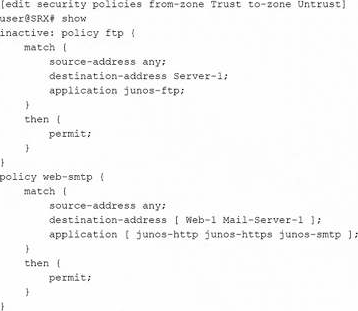
Referring to the exhibit, what are two ways to solve this problem? (Choose two.)
The exhibit shows that the FTP policy is marked inactive, so it remains in the configuration but does not take effect when the configuration is committed. Juniper documentation explains that inactive configuration elements are ignored and are not applied during commit. One valid fix is to activate the FTP policy and commit the configuration so that the policy becomes active again. Another valid fix is to use rollback 1 to return to the previously committed configuration, then commit that restored configuration. Simply moving the inactive FTP policy before another policy would not help because an inactive policy is still ignored. Changing the destination address to any is unnecessary because the primary problem shown is the inactive FTP policy.
Valentine
3 days agoJeannine
8 days agoKimberely
13 days agoMammie
18 days agoStacey
24 days agoEleni
29 days agoCharisse
1 month agoAngella
1 month agoLucina
1 month ago