
Free Preparation Discussions
 MENU
MENU
Juniper JN0-232 Exam Questions
- Topic 1: SRX Series Service Gateways: Covers the foundational architecture, hardware, interfaces, initial setup, and traffic processing of SRX devices, along with J-Web and vSRX virtual firewall basics.
- Topic 2: Junos OS Security Objects: Covers the core building blocks of Junos security configuration, including zones, screens, address objects, and application/ALG objects.
- Topic 3: Security Policies: Covers how zone-based, global, and unified security policies are structured and used to control traffic.
- Topic 4: Network Address Translation: Covers the concepts and operation of source, destination, and static NAT on Junos devices.
- Topic 5: Content Security: Covers UTM-style features such as content filtering, web filtering, antivirus, and antispam protections.
- Topic 6: Monitoring and Troubleshooting: Covers techniques for troubleshooting security policies, validating expected behavior, and monitoring packet flow.
Free Juniper JN0-232 Exam Actual Questions
Note: Premium Questions for JN0-232 were last updated On Sep. 21, 2026 (see below)
In which order does Junos OS process the various forms of NAT?
NAT processing in Junos OS follows a strict sequence to ensure correct packet handling:
Static NAT -- applied first because it provides a permanent one-to-one bidirectional mapping.
Destination NAT -- applied second to translate inbound destination addresses, often used for servers in private networks.
Source NAT -- applied last to translate outbound private source addresses to public ones.
This ensures deterministic behavior and avoids conflicts between translation types.
Options B, C, and D list incorrect sequences.
Correct Order: static NAT destination NAT source NAT
Click the Exhibit button.

Referring to the exhibit, which two statements are correct about the traffic flow shown in the exhibit? (Choose two.)
Inbound Flow (before NAT):
Source = 10.20.30.40 (internal private IP)
Destination = 203.0.113.1 (public DNS server)
Outbound Flow (after NAT):
Source = 192.0.2.1 (translated IP)
Destination = 203.0.113.1 (unchanged)
Analysis:
The source IP (10.20.30.40) was translated to 192.0.2.1. This indicates Source NAT was applied Option B is correct.
The destination IP changed between the inbound and outbound view. Inbound it was 203.0.113.1, and outbound it is still 203.0.113.1 in appearance, but notice the reversal: the session entry shows it as the outbound 'source' side. This confirms Destination NAT translation has occurred for return flow consistency Option D is correct.
Option A: Incorrect. The original source IP was indeed translated.
Option C: Incorrect. The destination IP did change in the flow processing.
Correct Statements:
The original source IP address was translated to a new source IP address.
The original destination IP address was translated to a new destination IP address.
What is the processing order for the antispam feature?
The Juniper SRX antispam feature checks messages in a specific order when both local lists and the SBL server are used.
The processing order is:
Local allowlist is checked first.
If there is a match, the message is allowed, and no further antispam checking is performed.
Local blocklist is checked second.
If there is a match, the configured spam action is applied.
Spam Block List (SBL) server is checked last.
If the sender is not found in the local allowlist or blocklist, the SRX queries the SBL server.
Therefore, the correct processing order is:
allowlist blocklist Spam Block List (SBL) server
Which statement is correct about source NAT?
Source NAT (Network Address Translation) is used on SRX devices to allow hosts with private IP addresses to access external networks, such as the Internet. The SRX translates the private IP address of the source host into a public IP address before forwarding traffic toward the destination.
It does not translate MAC addresses (Option A).
NAT is unidirectional in this case: it specifically translates private-to-public in the outbound direction, while the reverse (return traffic) is handled automatically through the session table. It is not a bidirectional translation (Option C).
NAT processing occurs as part of the flow module, not limited only to ingress traffic (Option D).
Therefore, the correct statement is that source NAT translates private IP addresses to public IP addresses.
Your manager asks you to ping 192.0.2.128. The ping fails and you do not know why, so you enable a trace option on your SRX Series Firewall.
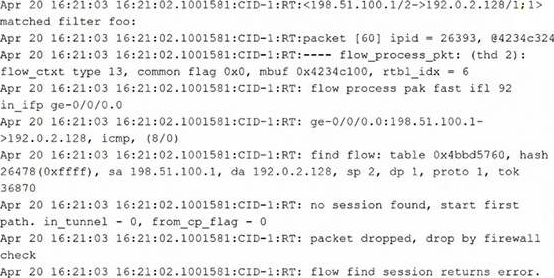
Referring to the exhibit, what is the reason for this behavior?
The trace output shows that the SRX receives the ICMP packet, does not find an existing session, starts first path processing, and then drops the packet with a firewall check failure before a session is successfully created. In SRX troubleshooting, first path processing includes route lookup, policy evaluation, and session creation. If the device cannot determine a valid forwarding path for the destination, the session cannot be established and the packet is dropped. The exhibit does not show evidence of a web filtering decision, ALG processing, or a screen counter match. Therefore, the best answer is that there is no known route to the destination 192.0.2.128. The appropriate operational verification would be to check the routing table using a command such as show route 192.0.2.128.
- Select Question Types you want
- Set your Desired Pass Percentage
- Allocate Time (Hours : Minutes)
- Create Multiple Practice tests with Limited Questions
- Customer Support
Laura King
9 hours agoSoo Vo
11 hours agoRichard Harris
7 days agoSanjay Chopra
18 days agoAiko Hoang
26 days agoHanna Michel
1 month agoPooja Singh
1 month agoIvan Durand
1 month agoGiovanni Popov
2 months agoDiego Fernandez
2 months agoYusuf Aziz
2 months agoNeha Yadav
2 months agoLing Dang
2 months ago