
Free Preparation Discussions
 MENU
MENU
Juniper JN0-232 Exam - Topic 4 Question 5 Discussion
Topic #: 4
Your manager asks you to ping 192.0.2.128. The ping fails and you do not know why, so you enable a trace option on your SRX Series Firewall.
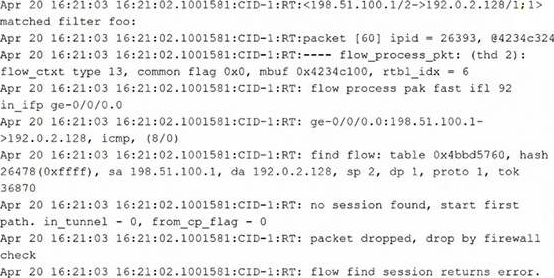
Referring to the exhibit, what is the reason for this behavior?
The trace output shows that the SRX receives the ICMP packet, does not find an existing session, starts first path processing, and then drops the packet with a firewall check failure before a session is successfully created. In SRX troubleshooting, first path processing includes route lookup, policy evaluation, and session creation. If the device cannot determine a valid forwarding path for the destination, the session cannot be established and the packet is dropped. The exhibit does not show evidence of a web filtering decision, ALG processing, or a screen counter match. Therefore, the best answer is that there is no known route to the destination 192.0.2.128. The appropriate operational verification would be to check the routing table using a command such as show route 192.0.2.128.
Kenda
3 days agoCristal
8 days agoMignon
13 days agoGlendora
18 days agoIlona
24 days agoVal
29 days agoMaddie
1 month agoBenedict
1 month agoVicente
1 month ago