
 MENU
MENU
Refer to the exhibit.
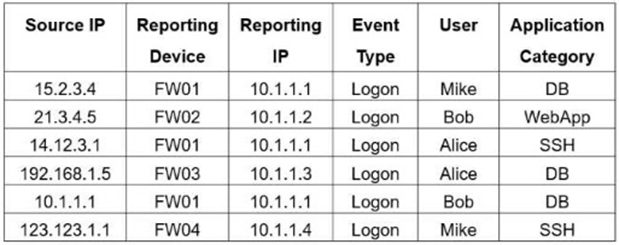
If you group the events by Reporting Device, Reporting IP, and Application Category, how many results will FortiSIEM display?
FortiSIEM grouping works by combining events that have the same values for all selected Group By attributes. The Study Guide's rule and subpattern example states that when multiple events have the same Group By values, ''they are grouped together in one row, and the count column tracks the number of events for each of those rows.'' In the exhibit, the selected grouping fields are Reporting Device, Reporting IP, and Application Category. The table contains six raw rows, but two rows share the same grouped combination: FW01 / 10.1.1.1 / DB. Those two rows are collapsed into one grouped result. The other combinations are unique: FW02 / 10.1.1.2 / WebApp, FW01 / 10.1.1.1 / SSH, FW03 / 10.1.1.3 / DB, and FW04 / 10.1.1.4 / SSH. That creates five grouped rows in total. FortiSIEM does not display six because grouping removes duplicate combinations, and it does not display four because only one duplicate combination exists.