
Free Preparation Discussions
 MENU
MENU
Fortinet NSE6_FSM_AN-7.4 Exam Questions
- Fortinet Certified Solution Specialist Certifications
- Fortinet FCSS Fortinet Certified Solution Specialist Security Operations Certifications
- Topic 1: Analytics: Covers building and refining search queries, applying grouping and aggregation, and running CMDB, lookup table, and nested queries to investigate data.
- Topic 2: FortiEDR security settings and policies: Covers configuring communication control and security policies, setting up playbooks, and understanding Fortinet Cloud Service (FCS) within FortiEDR.
- Topic 3: Rules and subpatterns: Covers identifying rule components and using subpatterns, aggregation, and group by to build and configure FortiSIEM analytics rules.
- Topic 4: Incidents, notifications, and remediation: Covers managing and tuning incidents, setting up notification policies, and configuring remediation actions.
- Topic 5: ML, UEBA, and ZTNA: Covers configuring machine learning tasks, integrating UEBA data into rules and dashboards, and understanding ZTNA integration with FortiSIEM operations.
Free Fortinet NSE6_FSM_AN-7.4 Exam Actual Questions
Note: Premium Questions for NSE6_FSM_AN-7.4 were last updated On Jul. 13, 2026 (see below)
Refer to the exhibit.
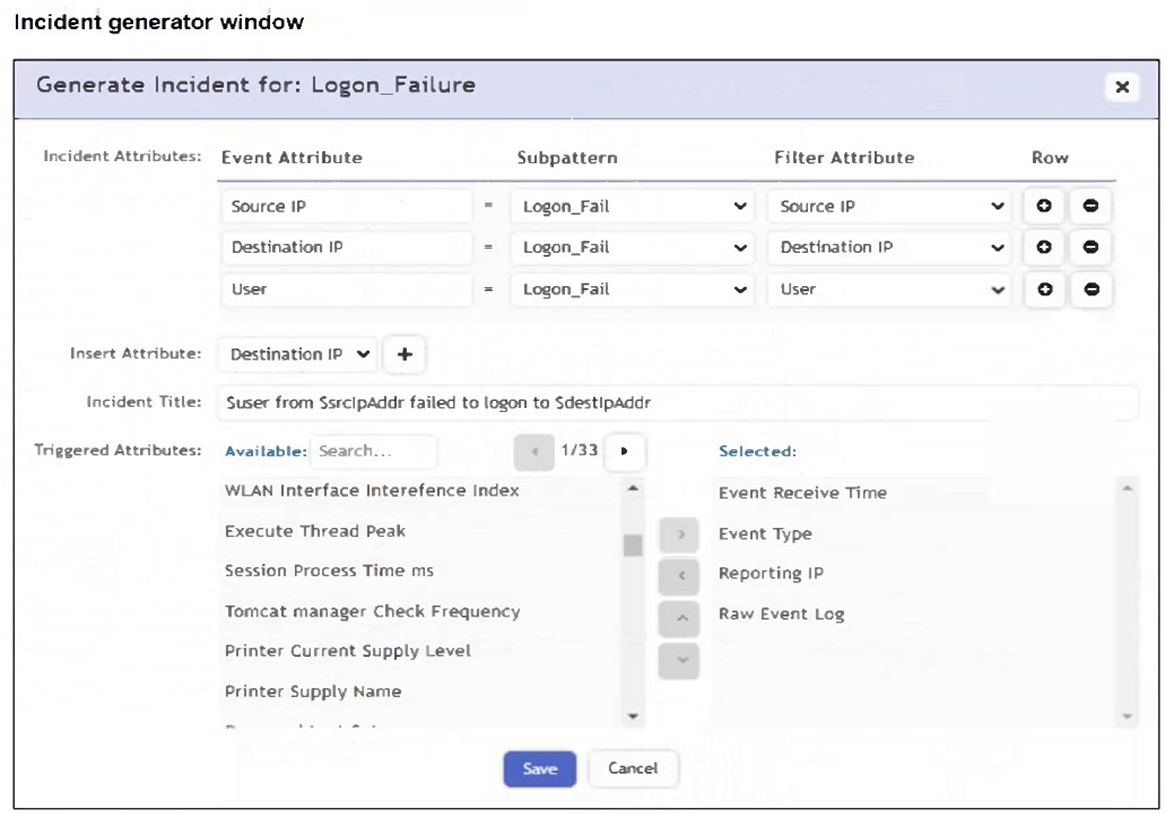
An analyst is trying to generate an incident with a title that includes the Source IP, Destination IP, User, and Destination Host Name. They are unable to add Destination Host Name as an incident attribute.
What must be changed to allow the analyst to select Destination Host Name as an attribute?
The attribute must be selected as a Triggered Attribute so that it becomes available for incident generation and incident-title substitution. In the FortiSIEM Study Guide's rule action configuration section, FortiSIEM separates incident attributes from triggered attributes. Triggered attributes are taken from the events that cause the rule to trigger and are then available for incident display and incident context. The guide explains that the rule action step is where an analyst defines the incident generated by a rule and chooses which attributes are carried forward. If Destination Host Name is not selected in the Triggered Attributes list, FortiSIEM cannot use it as an incident attribute in the generated incident title. Option B is wrong because aggregate items are used for calculations such as COUNT, AVG, or SUM, not for making a text attribute available in the incident title. Option C is wrong because Destination Host Name is an event attribute, not an event type. Option D is unrelated; removing Destination IP would not make Destination Host Name selectable.
Which two data areas can you use for user and entity behavior analytics (EBA) machine learning models? (Choose two.)
The correct answers are A. Process and C. Resources. FortiSIEM UEBA/EBA analytics uses endpoint and behavior-related telemetry to identify abnormal activity. The Study Guide explains that the UEBA incident dashboard shows incidents that the AI module creates based on alerts received from FortiInsight. The UEBA attribute list includes the incident name, host, application, user, tag, and activity. This aligns with process-oriented activity monitoring from endpoint agents. The performance and baseline lessons also explain that FortiSIEM collects performance and availability data from devices and applications, including resource-utilization metrics, and uses that information to build baselines and detect anomalous activity. Resource behavior includes CPU, memory, disk, I/O, and similar utilization patterns, which are valid behavioral-model inputs. Location and Network are important FortiSIEM context areas, but in this question's EBA machine learning model choices, the valid model areas are process behavior and resource behavior. Process reflects what is running or being executed; Resources reflects system or application utilization behavior. Together, these are the two data areas used for EBA machine learning models.
Refer to the exhibit.
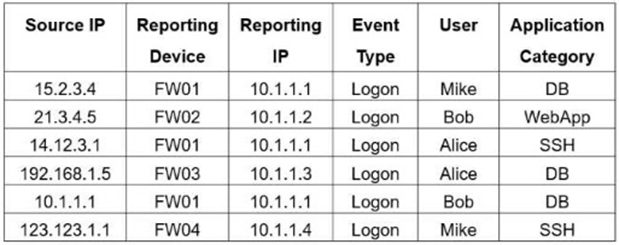
If you group the events by Reporting Device, Reporting IP, and Application Category, how many results will FortiSIEM display?
FortiSIEM grouping works by combining events that have the same values for all selected Group By attributes. The Study Guide's rule and subpattern example states that when multiple events have the same Group By values, ''they are grouped together in one row, and the count column tracks the number of events for each of those rows.'' In the exhibit, the selected grouping fields are Reporting Device, Reporting IP, and Application Category. The table contains six raw rows, but two rows share the same grouped combination: FW01 / 10.1.1.1 / DB. Those two rows are collapsed into one grouped result. The other combinations are unique: FW02 / 10.1.1.2 / WebApp, FW01 / 10.1.1.1 / SSH, FW03 / 10.1.1.3 / DB, and FW04 / 10.1.1.4 / SSH. That creates five grouped rows in total. FortiSIEM does not display six because grouping removes duplicate combinations, and it does not display four because only one duplicate combination exists.
Refer to the exhibit.
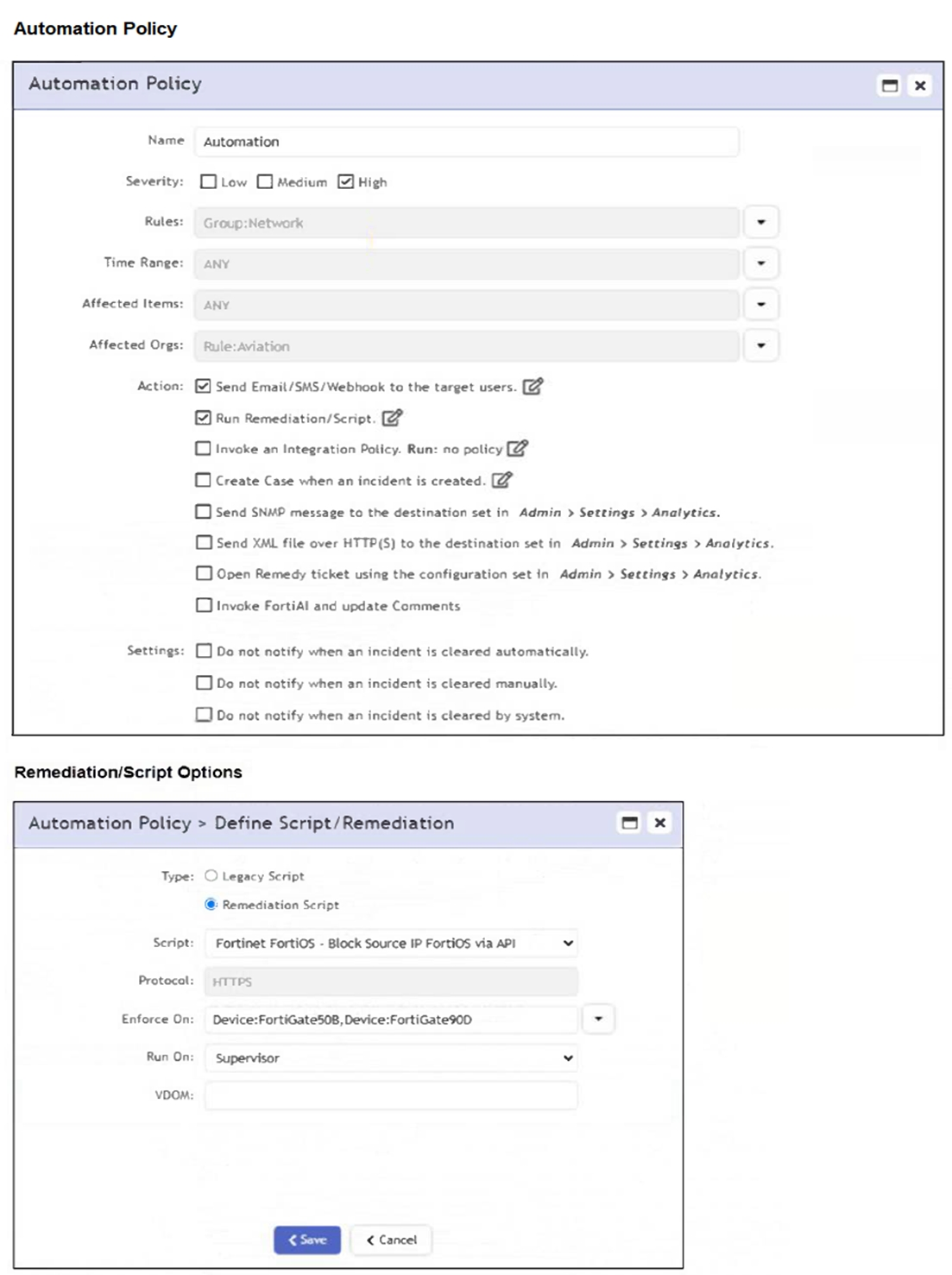
If a rule containing the automation policy shown in the exhibit triggers, what will happen?
The automation policy is configured to run a remediation script named 'Fortinet FortiOS - Block Source IP FortiOS via API'. It specifies enforcement on two FortiGate devices: FortiGate508 and FortiGate90D. Therefore, associated source IP addresses will be blocked on those two FortiGate firewalls only.
The correct answer is D because the remediation configuration defines specific enforcement targets. The FortiSIEM Study Guide explains that automation policies can run remediation scripts automatically when an incident occurs. It also explains the remediation options: Enforce On determines which devices the script runs against, while Run On identifies whether the script is launched from the supervisor or a collector. The Study Guide further states that mitigation scripts can block an IP address in a firewall or disable a user in Active Directory, and recommends specifying the Enforce On value because it controls the target device used by the remediation script. In the exhibit, the selected script is a Fortinet FortiOS block-source-IP remediation script, and the Enforce On field lists two FortiGate devices. That means the block action is targeted only at those two named FortiGate firewalls. The Aviation organization limits the automation policy context, but it does not mean every device in the organization receives the block. It is also not all FortiGate firewalls or the whole Network CMDB group.
Refer to the exhibit.
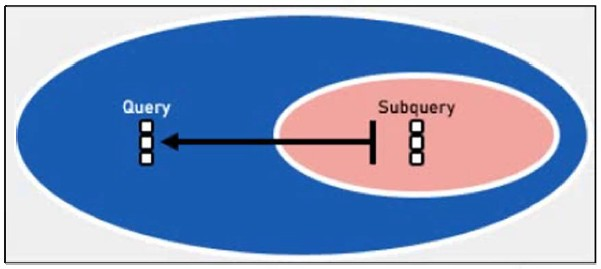
Which two lookup types can you reference as the subquery in a nested analytics query? (Choose two.)
The FortiSIEM Study Guide defines a nested query as a query that has another query embedded within it, where the embedded query is known as the subquery. The FortiSIEM 7.4 User Guide lists the supported nested search scenarios: Outer CMDB Query, Inner Event Query; Outer Event Query, Inner Event Query; and Outer Event Query, Inner CMDB Query. These supported combinations prove that the inner or subquery can be either an Event Query or a CMDB Query. LDAP Query and SNMP Query are not listed as supported nested analytics subquery types. LDAP may be used for user discovery or authentication, and SNMP may be used for monitoring or discovery, but neither is referenced as a nested analytics query type. The User Guide also explains that the outer query uses Select from Report to reference the saved inner query and that the matching attribute data types must align between the outer query and the selected display column in the inner query.
- Select Question Types you want
- Set your Desired Pass Percentage
- Allocate Time (Hours : Minutes)
- Create Multiple Practice tests with Limited Questions
- Customer Support
Currently there are no comments in this discussion, be the first to comment!