
Free Preparation Discussions
 MENU
MENU
F5 Networks F5CAB4 Exam - Topic 7 Question 12 Discussion
Topic #: 7
Refer to the exhibit.
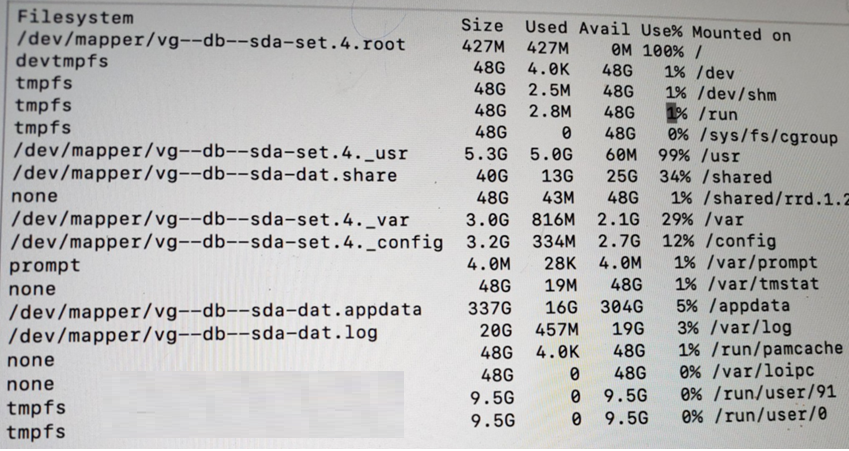
The BIG-IP Administrator is investigating disk utilization on the BIG-IP device. What should the BIG-IP Administrator check next? (Choose one answer)
When troubleshooting a BIG-IP system where a partition is reported as full (100% utilization), identifying and removing large or unnecessary files is the immediate next step for restoration of system stability.
Symptoms of Full Partitions: If a file system (such as the root / or /var) becomes full, it can result in unpredictable system behavior, failure to save configurations, and the inability to log in to the Web UI.
The Root (/) Partition: This partition is intentionally kept small on F5 systems. It is highly sensitive to the storage of third-party software or diagnostic files that should ideally be stored in the /shared or /var directories.
Procedural Resolution: To resolve 100% disk usage, administrators should check for large files on the affected partition using CLI commands like du -ah or find / -xdev -type f -exec du {} ; | sort -rn | head -20.
Common Culprits: Large files typically causing these issues include old core files, tech support bundles, large diagnostic logs (packet diags), or temporary files created during administrative tasks.
Diagnostics vs. Remediation: While tests like the EUD (End User Diagnostics) or platform diagnostics are useful for hardware verification, they do not resolve file system exhaustion issues that have already reached a critical 100% state.
Xochitl
1 day agoNan
6 days agoGerman
11 days agoAlaine
17 days agoSharee
22 days agoBrande
27 days agoLaurel
1 month agoReita
1 month agoMicah
1 month agoCharlette
2 months agoClarinda
2 months agoJamal
2 months agoChandra
2 months ago