
Free Preparation Discussions
 MENU
MENU
F5 Networks F5CAB4 Exam Questions
- Topic 1: Apply procedural concepts required to manage the state of a high availability pair: This domain covers controlling and monitoring failover states in high availability pairs, including forcing standby/offline modes, reporting failover status, and verifying device trust.
- Topic 2: Identify management connectivity configurations: This section focuses on understanding management access configurations, including management IP addresses, port lockdown settings, remote connectivity verification, and troubleshooting access issues.
- Topic 3: Identify and report current device status: This domain covers monitoring BIG-IP operational status through LCD panels, dashboards, Network Map, GUI/TMSH commands, and checking high availability states.
- Topic 4: List which log files could be used to find events and/or hardware issues: This section teaches identification of key log files (/var/log/ltm, secure, audit), understanding event severity levels, and interpreting log messages.
- Topic 5: Apply procedural concepts required to create, manage, and restore a UCS archive: This domain covers UCS backup and restore procedures, understanding backup use cases, proper storage practices, and UCS file contents including private keys.
- Topic 6: Explain authentication methods: This section focuses on user management including creating/modifying users, configuring remote authentication providers, and implementing group-based access control.
- Topic 7: Identify configured system services: This domain covers verifying proper configuration of essential services including DNS, NTP, SNMP, and syslog.
- Topic 8: Explain config sync: This section focuses on configuration synchronization procedures, identifying sync errors, determining sync necessity, checking sync status, and comparing configuration timestamps.
- Topic 9: Given a scenario, determine device upgrade eligibility: This domain covers determining appropriate timing for software and platform upgrades and strategies to minimize downtime during upgrades.
- Topic 10: Given a scenario, interpret Service status: This section teaches interpreting service states, analyzing netstat output, and determining whether services are listening on specific ports.
Free F5 Networks F5CAB4 Exam Actual Questions
Note: Premium Questions for F5CAB4 were last updated On Sep. 06, 2026 (see below)
What can the BIG-IP Administrator do when restoring BIG-IP configuration files with a UCS archive? (Choose two answers)
The User Configuration Set (UCS) is a flexible tool designed by the Control Plane to handle various lifecycle management scenarios, including upgrades and hardware migrations.
Platform Portability (Option C): While a UCS archive contains platform-specific information, the BIG-IP system allows for 'platform-independent' restores. This is a vital procedural concept for migrating from one hardware model to another or from physical hardware to a Virtual Edition (VE).
Management of State: When restoring to a different platform or a later version, the administrator often uses specific flags (such as no-license or platform-migrate in later versions) to ensure that only the portable configuration data is applied while preserving the new platform's unique identifiers.
A local user account (Users) on the BIG-IP device is assigned the User Manager role. User1 attempts to modify the properties of another account (User2), but the action fails. The BIG-IP Administrator can successfully modify the User2 account. Assuming the principle of least privilege, what is the correct way to allow User1 to modify User2 properties?
In F5 TMOS, administrative roles and user permissions are partition-specific. The User Manager role allows an account to manage other user accounts, but this authority is restricted to the administrative partitions to which the User Manager has been granted access.
Partition Awareness: If User1 (the User Manager) attempts to modify User2 and fails, while the full Administrator succeeds, it indicates that User2 resides in a partition where User1 does not have management rights.
Principle of Least Privilege: This principle dictates that a user should be given only the minimum level of access necessary to perform their job functions.
Procedural Solution: Granting 'Administrator' privileges (Option B) would violate least privilege by giving User1 full control over all system settings and all partitions. Moving users between partitions (Options A and C) might disrupt the organizational security structure. The correct and most secure administrative action is to modify the partition access for User1 to include the partition where User2 is located. This enables User1 to manage User2's properties while maintaining their restricted role as a User Manager.
A configuration change is made on the standby member of a device group. What is displayed as "Recommended Action" on the Device Management Overview screen?
The BIG-IP Control Plane monitors the 'Commit ID' of the configuration on all group members. When a change is made on the Standby unit, it becomes the member with the most recent configuration. The 'Recommended Action' in the HA status dashboard will be to synchronize that specific device's configuration to the rest of the group to ensure consistency
A BIG-IP Administrator needs to export system configuration for migration purposes. Which file type should be used?
In F5 TMOS, a User Configuration Set (UCS) is the standard archive format used for backing up and migrating a complete system configuration .
Composition: A UCS file contains all necessary configuration data, including system-specific files, license information, SSL certificates, private keys, and local user accounts.
Procedural Use: When migrating to new hardware or performing an RMA replacement, the UCS file is the primary tool used to restore the entire Control Plane state to the new device.
Restoration: It can be managed through the Configuration Utility under System > Archives or via the CLI using the tmsh load /sys ucs command
The correct location to restrict management access to specific subnets is D. System > Platform1.
Refer to the exhibit.
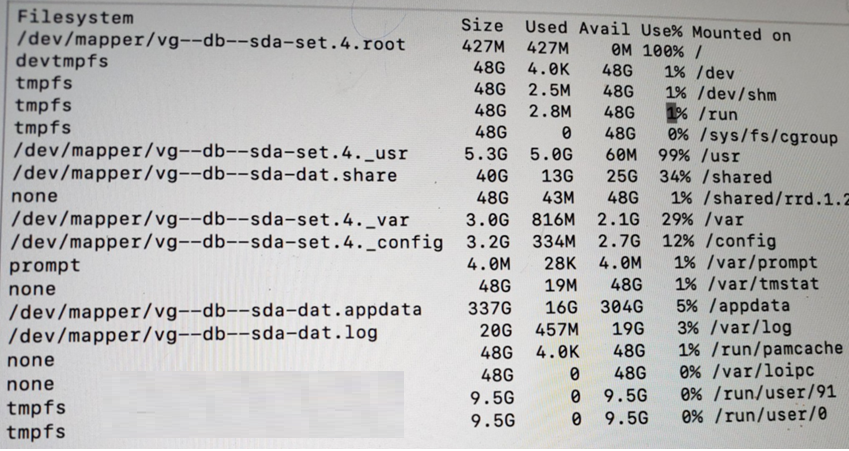
The BIG-IP Administrator is investigating disk utilization on the BIG-IP device. What should the BIG-IP Administrator check next? (Choose one answer)
When troubleshooting a BIG-IP system where a partition is reported as full (100% utilization), identifying and removing large or unnecessary files is the immediate next step for restoration of system stability.
Symptoms of Full Partitions: If a file system (such as the root / or /var) becomes full, it can result in unpredictable system behavior, failure to save configurations, and the inability to log in to the Web UI.
The Root (/) Partition: This partition is intentionally kept small on F5 systems. It is highly sensitive to the storage of third-party software or diagnostic files that should ideally be stored in the /shared or /var directories.
Procedural Resolution: To resolve 100% disk usage, administrators should check for large files on the affected partition using CLI commands like du -ah or find / -xdev -type f -exec du {} \; | sort -rn | head -20.
Common Culprits: Large files typically causing these issues include old core files, tech support bundles, large diagnostic logs (packet diags), or temporary files created during administrative tasks.
Diagnostics vs. Remediation: While tests like the EUD (End User Diagnostics) or platform diagnostics are useful for hardware verification, they do not resolve file system exhaustion issues that have already reached a critical 100% state.
- Select Question Types you want
- Set your Desired Pass Percentage
- Allocate Time (Hours : Minutes)
- Create Multiple Practice tests with Limited Questions
- Customer Support
Deborah Peterson
3 days agoSarah Green
22 days agoHarold Jackson
1 month agoEric Adams
2 months agoSarah Nguyen
2 months agoStephen Perez
3 months agoRyan Perez
3 months agoCarol Walker
4 months agoRachel Nguyen
4 months agoSharon White
5 months agoJason Robinson
4 months agoTiffany Smith
4 months agoKenneth Gonzalez
4 months agoMelissa Ramirez
4 months agoRyan Phillips
4 months agoTimothy
5 months agoLelia
5 months agoMarkus
6 months agoYoulanda
6 months agoNieves
6 months agoJoanna
6 months agoMarylin
7 months agoGayla
7 months agoValentin
7 months agoTanesha
7 months agoMabel
8 months agoIlona
8 months agoJosphine
8 months agoTijuana
8 months agoIsaiah
9 months ago