
Free Preparation Discussions
 MENU
MENU
Dell EMC D-PSC-MN-01 Exam - Topic 4 Question 32 Discussion
Topic #: 4
Refer to the exhibit.
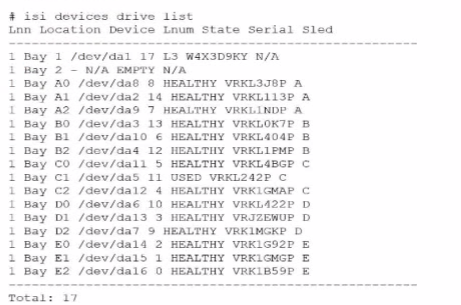
An engineer replaced the drive in C1. They run the isi devices drive list command and obtain the output that is shown.
What action must the engineer take?
In the output of the isi devices drive list command shown in the exhibit, the drive in location C1 is marked as 'USED,' with the serial number VRKL242P. This indicates that the drive has been replaced but has not yet been initialized or formatted for use within the PowerScale cluster.
To make the drive usable, it must be formatted. The correct procedure to follow is to use the isi devices drive format command, specifying the drive location (C1 in this case). This will prepare the drive for use in the cluster, ensuring that it is recognized and available for OneFS to start writing data to it.
Steps to format the drive:
Log in to the OneFS cluster using an SSH session with an account that has the necessary privileges.
Run the following command to format the new drive:
bash
Copy code
isi devices drive format C1
This command will format the drive located at C1, making it available for use in the cluster.
After the format is complete, verify that the drive is now in a HEALTHY state by running:
isi devices drive list
This should display the new status of the drive as HEALTHY, indicating that it has been successfully formatted and is ready for data operations.
This process is outlined in Dell's PowerScale Administration Guide and ensures the correct initialization of new or replaced drives.
Trevor
3 hours agoSalome
5 days agoDemetra
10 days agoRonnie
16 days agoPete
21 days agoSalome
26 days agoDemetra
1 month agoRonnie
1 month agoPete
1 month agoMariko
2 months agoJulian
2 months agoPete
2 months agoAlease
2 months agoMaryanne
2 months agoFrederica
2 months agoYuette
3 months agoTrinidad
3 months agoCatarina
3 months ago