
 MENU
MENU
Refer to exhibit.
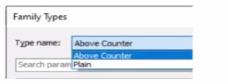
A family in a project contains the following types:
The following edits are made in the Family Editor and loaded into the project:
1. The type Plain is renamed to Standard
2 A new type is added named GFCI
Which types does this family now have in the project?
1. The type Plain is renamed to Standard
In Revit, when editing a family in the Family Editor and reloading it into a project, Revit handles type changes using specific update rules. Types that are renamed overwrite their earlier version in the project because they retain the same internal type ID. Types that are added to the family also appear in the project once reloaded.
Initially, the family contains two types:
Above Counter
Plain
The changes made in the Family Editor are: 1 Rename Plain Standard 2 Add a new type named GFCI
According to documented Revit behavior for type updates:
''When a family is reloaded into the project, any renamed family type replaces its previous version while maintaining its parameter assignments. Newly created types are added as additional family types available for placement within the project.''
Therefore:
Plain no longer exists because it was renamed
Standard now exists in its place
GFCI is added as a new family type
Above Counter remains unchanged
Thus, the family in the project now contains: Above Counter GFCI Standard
This matches answer choice: B. Above Counter, GFCI, Standard