Free Preparation Discussions
 MENU
MENU
Free WGU (KVO1) Web Development Applications Exam Dumps October 2026
Here you can find all the free questions related with WGU Web Development Applications (KVO1) (WGU (KVO1) Web Development Applications) exam. You can also find on this page links to recently updated premium files with which you can practice for actual WGU Web Development Applications (KVO1) Exam. These premium versions are provided as WGU (KVO1) Web Development Applications exam practice tests, both as desktop software and browser based application, you can use whatever suits your style. Feel free to try the WGU Web Development Applications (KVO1) Exam premium files for free, Good luck with your WGU Web Development Applications (KVO1) Exam.MultipleChoice
What should be used to request and Update data in the background?
OptionsMultipleChoice
Which CSS property defines whether users can see an element when it is rotated away from them?
OptionsMultipleChoice
Given the following HTML statement:

And the following style:
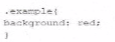
Which line of the changes the background color of the
A)

B)

C)

D)

MultipleChoice
A JavaScript programmer defines the following function:
```javascript
function square(number) {
return number * number;
}
```
Which keyword causes the function to send back a result?
OptionsMultipleChoice
A file named application, Appchache contains the following content:
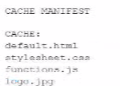
Which attribute should a developer set to application. Appchache so the four files will be cached?
OptionsMultipleChoice
Which HTML segment should a developer use to enable the Offline AppCache application interface (API)?
A)

B)

C)

D)

MultipleChoice
Which HTML element should a developer use to logically group a set of related HTML elements?
Options