
Free Preparation Discussions
 MENU
MENU
Salesforce Certified MuleSoft Platform Architect (Mule-Arch-201) Exam - Topic 8 Question 44 Discussion
Topic #: 8
An Order API triggers a sequence of other API calls to look up details of an order's items in a back-end inventory database. The Order API calls the OrderItems process API, which calls the Inventory system API. The Inventory system API performs database operations in the back-end inventory database.
The network connection between the Inventory system API and the database is known to be unreliable and hang at unpredictable times.
Where should a two-second timeout be configured in the API processing sequence so that the Order API never waits more than two seconds for a response from the Orderltems process API?
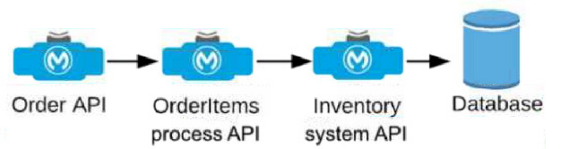
Understanding the API Flow and Timeout Requirement:
The Order API initiates a call to the OrderItems process API, which in turn calls the Inventory system API to fetch details from the inventory database.
The requirement specifies that the Order API should not wait more than two seconds for a response from the OrderItems process API, even if there are delays further down the chain (between Inventory system API and the database).
Choosing the Appropriate Timeout Location:
Setting the timeout at the OrderItems process API level ensures that if the Inventory system API takes longer than two seconds to respond, the OrderItems process API will terminate the request and send a timeout response back to the Order API. This prevents the Order API from waiting indefinitely due to the unreliable connection to the database.
If the timeout were set in the Inventory system API or database, it would not help the Order API directly, as the OrderItems process API would still be waiting for a response.
Detailed Analysis of Each Option:
Option A (Correct Answer): Setting the timeout in the OrderItems process API allows it to control how long it waits for a response from the Inventory system API. If the Inventory system API does not respond within two seconds, the OrderItems process API can terminate the call and return a timeout response to the Order API, meeting the requirement.
Option B: Setting the timeout in the Order API would not limit the wait time at the OrderItems process API level, meaning the OrderItems process API could still wait indefinitely for the Inventory system API, leading to a longer delay.
Option C: Setting the timeout in the Inventory system API only affects the connection to the database and does not influence how long the OrderItems process API waits for the Inventory system API's response.
Option D: Setting a timeout in the database is not feasible in this context since database timeouts are typically configured for database operations and would not directly control the API response times in the overall API chain.
Conclusion:
Option A is the best choice, as it ensures that the OrderItems process API does not hold the Order API longer than the required two seconds, even if the downstream connection to the database hangs. This configuration aligns with MuleSoft best practices for setting timeouts in API orchestration to manage dependencies and prevent delays across a chain of API calls.
For additional information on timeout settings, refer to MuleSoft documentation on handling timeouts and API orchestration best practices.
Currently there are no comments in this discussion, be the first to comment!