
Free Preparation Discussions
 MENU
MENU
Salesforce Marketing Cloud Intelligence Accredited Professional (AP-215) Exam - Topic 7 Question 47 Discussion
Topic #: 7
A client has integrated the following files:
File A:
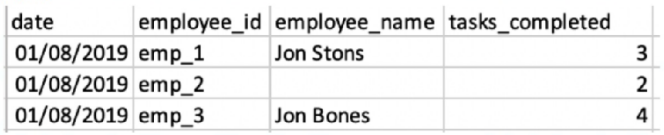
File B:

The client would like to link the two files in order to view the two KPIs ('Tasks Completed' and 'Tasks Assigned) alongside 'Employee Name' and/or
'Squad'.
The client set the following properties:
+ File A is set as the Parent data stream
* Both files were uploaded to a generic data stream type.
* Override Media Buy Hierarchies is checked for file A.
* The 'Data Updates Permissions' set for file B is 'Update Attributes and Hierarchy'.
When filtering on the entire date range (1-30/8), and querying employee ID, Name and Squad with the two measurements - what will the result look like?
A)

B)

C)
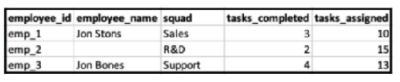
D)

In Marketing Cloud Intelligence, when linking two data streams, the parent data stream (File A) provides the main structure. Since 'Override Media Buy Hierarchies' is checked for File A, the hierarchies from File B will be aligned with File A. Given 'Data Updates Permissions' set for file B as 'Update Attributes and Hierarchy', this means that attributes and hierarchy will be updated in the parent file based on the child file (File B), but the child file's metrics won't be associated with the parent file's date.
Hence, when filtering on the entire date range (1-30/8), the resulting view will align with the structure of the parent data stream, showing the KPIs ('Tasks Completed' from File A and 'Tasks Assigned' from File B) alongside the employee names and squads from the respective files. Since the employee IDs align, the data can be linked properly. However, since the dates do not align (File A data is from 01/08/2019 and File B from 15/08/2019), only attributes from File B will be updated without date association.
The result will look like Option C, where the employee names are corrected based on File B's data, the squads are added from File B, and the tasks_completed and tasks_assigned are displayed from their respective files. The tasks_assigned from File B are shown without date association as File B's date doesn't match with File A's.
Currently there are no comments in this discussion, be the first to comment!