Deal of The Day! Hurry Up, Grab the Special Discount - Save 25% - Ends In 00:00:00 Coupon code: SAVE25
Welcome to Pass4Success

- Free Preparation Discussions

Netskope NSK200 Exam - Topic 5 Question 60 Discussion

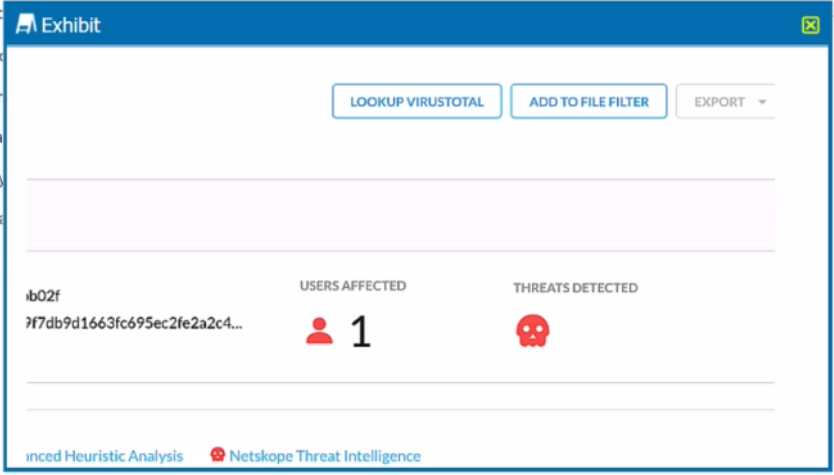
Review the exhibit.You are at the Malware Incident page. A virus was detected by the Netskope Heuristics Engine. Your security team has confirmed that the virus was a test data file You want to allow the security team to use this fileReferring to the exhibit, which two statements are correct? (Choose two.)
A) Click the 'Add To File Filter button to add the IOC to a file list. and C) Click the ''Lookup VirusTotal' button to verify if this IOC is a false positive.
B) Contact the CrowdStrike administrator to have the file marked as safe.
D) Create a malware detection profile and update the file hash list with the IOC.

Netskope NSK200 Exam - Topic 5 Question 60 Discussion

Actual exam question for Netskope's NSK200 exam
Question #: 60
Topic #: 5
[All NSK200 Questions]

Review the exhibit.

You are at the Malware Incident page. A virus was detected by the Netskope Heuristics Engine. Your security team has confirmed that the virus was a test data file You want to allow the security team to use this file

Referring to the exhibit, which two statements are correct? (Choose two.)

Show Suggested Answer Hide Answer
Suggested Answer: A, C

To allow the security team to use the test data file that was detected as a virus by the Netskope Heuristics Engine, the following two steps are correct:

Click the ''Add To File Filter'' button to add the IOC to a file list. This will exclude the file from future malware scans and prevent false positive alerts.The file list can be managed in the Settings > File Filter page1.

Click the ''Lookup VirusTotal'' button to verify if this IOC is a false positive. This will open a new tab with the VirusTotal report for the file hash. VirusTotal is a service that analyzes files and URLs for viruses, worms, trojans, and other kinds of malicious content.The report will show how many antivirus engines detected the file as malicious and provide additional information about the file2.

https://docs.netskope.com/en/netskope-help/admin-console/incidents/


Contribute your Thoughts:

0/2000 characters
Portia
4 days ago
I'm a bit confused about whether we should contact CrowdStrike or just handle it internally. Option B seems plausible, but I’m not confident.
upvoted 0 times
...
Susy
9 days ago
I remember practicing a question similar to this where we had to verify a file's status. I feel like option C might be the correct choice here.
upvoted 0 times
...
Shantell
14 days ago
I think option A sounds familiar, but I'm not entirely sure if that's the right step to take first.
upvoted 0 times
...

Save Cancel