
Free Preparation Discussions
 MENU
MENU
Netskope NSK200 Exam Questions
- Topic 1: Netskope Security Cloud Fundamentals: This domain covers the structure of Netskope Security Cloud. It explores the foundations of the Cloud Access Security Broker (CASB) the implementation of Netskope as a CASB solution.
- Topic 2: Netskope User Activity and Threat Protection: This portion focuses on Netskope's capabilities in monitoring user behavior and identifying anomalies. It also covers the implementation of cloud application controls and detailed access policies. The section further delves into Netskope's approach to detecting cloud-based malware and its threat intelligence features, as well as cloud data security measures.
- Topic 3: Data discovery and classification for cloud storage: This section of the exam covers Data Loss and how to prevent it using DLP policies. Moreover, this section covers cloud encryption techniques related to data at rest and in transit.
- Topic 4: SWG functionalities for web traffic filtering and control: This section explores Netskope SWG's capabilities in URL filtering, protection against malware, and threat prevention strategies.
- Topic 5: Integration with Third-Party Security Tools: In this module, the focus is on how Netskope can link with the current security infrastructure and how the adoption of Single Sign-On (SSO) and Active Directory integration is possible.
Free Netskope NSK200 Exam Actual Questions
Note: Premium Questions for NSK200 were last updated On Oct. 12, 2026 (see below)
Netskope is being used as a secure Web gateway. Your organization's URL list changes frequently. In this scenario, what makes It possible for a mass update of the URL list in the Netskope platform?
The method that makes it possible for a mass update of the URL list in the Netskope platform is A. REST API v2.REST API v2 is a feature that allows you to use an auth token to make authorized calls to the Netskope API and access resources via URI paths5.You can use REST API v2 to update a URL list with new values by providing the name of an existing URL list and a comma-separated list of URLs or IP addresses6. This can help you automate or script the management of your URL lists and keep them up-to-date. Therefore, option A is correct and the other options are incorrect.Reference:REST API v2 Overview - Netskope Knowledge Portal,Update a URL List - Netskope Knowledge Portal
Your company wants to know if there has been any unusual user activity. In the UI, you go to Skope IT -> Alerts.
Which two types of alerts would you filter to find this information? (Choose two.)
To identify unusual user activity, filter alerts by 'uba' (User Behavior Analytics) and 'anomaly.' UBA and anomaly alerts highlight deviations from typical user behavior, which are indicators of unusual or potentially risky activities.
Review the exhibit.
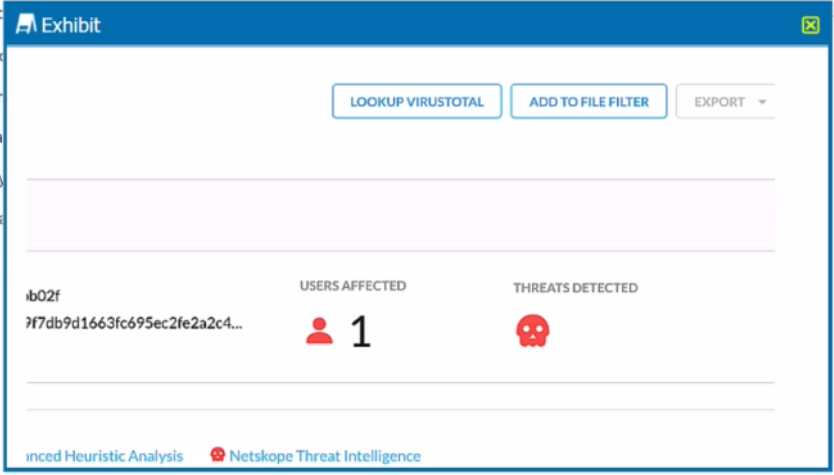
You are at the Malware Incident page. A virus was detected by the Netskope Heuristics Engine. Your security team has confirmed that the virus was a test data file You want to allow the security team to use this file
Referring to the exhibit, which two statements are correct? (Choose two.)
To allow the security team to use the test data file that was detected as a virus by the Netskope Heuristics Engine, the following two steps are correct:
Click the ''Add To File Filter'' button to add the IOC to a file list. This will exclude the file from future malware scans and prevent false positive alerts.The file list can be managed in the Settings > File Filter page1.
Click the ''Lookup VirusTotal'' button to verify if this IOC is a false positive. This will open a new tab with the VirusTotal report for the file hash. VirusTotal is a service that analyzes files and URLs for viruses, worms, trojans, and other kinds of malicious content.The report will show how many antivirus engines detected the file as malicious and provide additional information about the file2.
https://docs.netskope.com/en/netskope-help/admin-console/incidents/
While most Web and SaaS traffic is decrypted for inspection, you are asked to prevent a certain host on the network from SSL decryption for privacy purposes.
Creating a steering exception for the host is the appropriate action to prevent SSL decryption on specific network traffic. Steering exceptions allow you to bypass decryption for designated hosts, which is useful for privacy-sensitive scenarios.
Your small company of 10 people wants to deploy the Netskope client to all company users without requiring users to be imported using Active Directory, LDAP, or an IdP.
Deploying the Netskope client using an email invitation allows smaller companies to onboard users easily without relying on integration with AD, LDAP, or an IdP. This method is efficient for smaller teams that need a quick deployment without complex setup.
- Select Question Types you want
- Set your Desired Pass Percentage
- Allocate Time (Hours : Minutes)
- Create Multiple Practice tests with Limited Questions
- Customer Support
Tiffany Nguyen
24 days agoRachel Phillips
1 month agoMelissa Harris
2 months agoAmanda Miller
2 months agoLaura Carter
3 months agoMelissa Carter
3 months agoWilliam Scott
4 months agoJeffrey Harris
4 months agoJames Edwards
5 months agoJoshua Allen
5 months agoFrank Harris
6 months agoKevin Campbell
6 months agoDorothy Hill
5 months agoAngela Evans
5 months agoLinda Garcia
6 months agoBarbara Johnson
6 months agoLakeesha
6 months agoSylvia
7 months agoRoselle
7 months agoFelicitas
7 months agoMitzie
7 months agoCordie
8 months agoLeota
8 months agoJoanna
8 months agoRosalind
9 months agoColby
9 months agoHelga
9 months agoAvery
9 months agoTamra
10 months agoShad
10 months agoVi
10 months agoGlenn
10 months agoShenika
11 months agoMagnolia
11 months agoKindra
11 months agoReyes
11 months agoVirgie
12 months agoChantay
12 months agoVeronika
1 year agoSalome
1 year agoAnika
1 year agoDona
1 year agoLashandra
1 year agoShawnee
1 year agoGlory
1 year agoJonell
1 year agoLourdes
1 year agoNydia
1 year agoMing
1 year agoMelinda
1 year agoDorinda
1 year agoQuentin
1 year agoLuis
2 years agoStephaine
2 years agoSharika
2 years agoLetha
2 years agoJohnna
2 years agoAntonette
2 years agoHorace
2 years agoDulce
2 years agoShawana
2 years agoWhitney
2 years agoStephanie
2 years agoAndra
2 years agoAliza
2 years agoRamonita
2 years agoGlory
2 years agoDerrick
2 years agoPenney
2 years agoJuliann
2 years agoCarey
2 years agoAntonio
2 years agoHubert
2 years agoValene
2 years agoGlory
2 years agoParis
2 years agoLina
2 years agoCharlie
2 years agoShaun
2 years agoKris
2 years agoMicah
2 years agoErick
2 years agoLatia
2 years agoJanessa
2 years agoOretha
2 years agoJody
2 years agoAzzie
2 years agoAllene
2 years agoDahlia
2 years agoJackie
2 years agoGeorgiann
2 years agoElvera
2 years agoShawana
2 years ago