
 MENU
MENU
Click the Exhibit button.
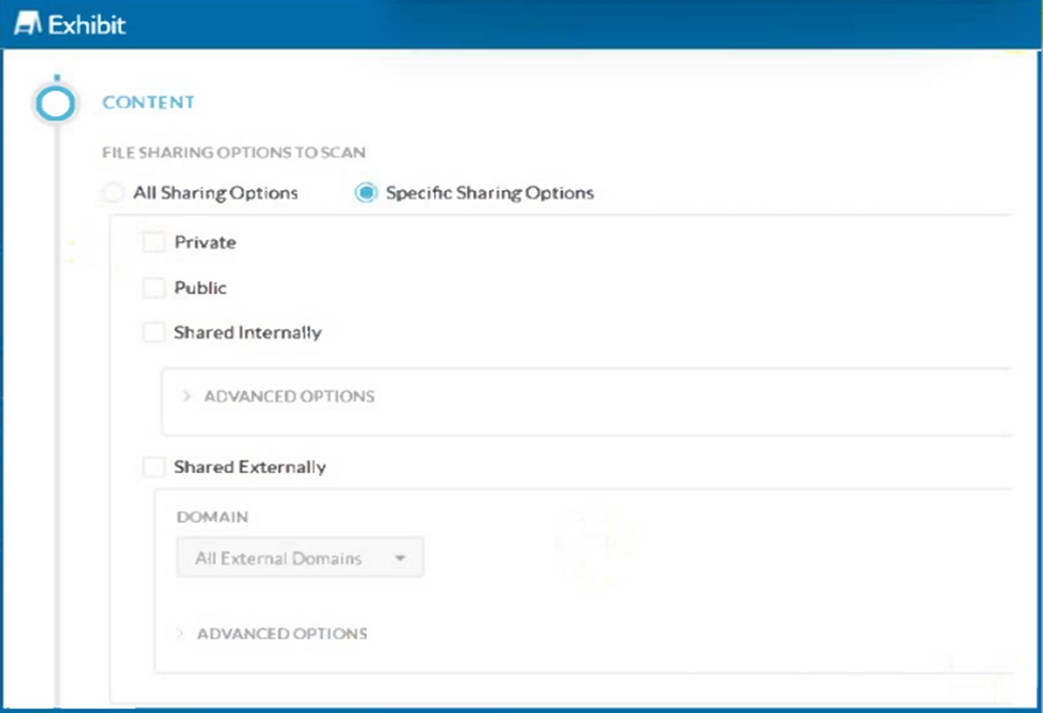
A customer has created a CASB API-enabled Protection policy to detect files containing sensitive data that are shared outside of their organization.
Referring to the exhibit, which statement is correct?
To detect files containing sensitive data that are shared outside of the organization, the administrator should select both 'Shared Externally' and 'Public' sharing options. These settings ensure that any files shared externally (outside the organization) or publicly are scanned for sensitive data. This comprehensive approach covers all potential scenarios where data could be exposed outside the organization.
Step-by-Step Configuration:
Select Specific Sharing Options:
Navigate to the CASB API-enabled Protection policy configuration page.
Choose the option for 'Specific Sharing Options' to limit the scan to files shared under certain conditions.
Enable Shared Externally and Public:
Check both 'Shared Externally' and 'Public' options. This setting ensures that files shared either publicly or with external domains are included in the scan.
Configure Advanced Options:
For further granularity, configure the advanced options under each sharing type if needed (e.g., specifying particular external domains).
This configuration aligns with the best practices for CASB policies and ensures that all files potentially leaving the organization are scanned for sensitive data.
Netskope CASB Policy Configuration Documentation