
 MENU
MENU
Refer to the exhibit.
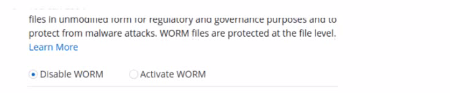
An administrator is deploying the latest version of CVO via BlueXP. What will be the result of leaving the option disabled?
In the context of deploying Cloud Volumes ONTAP (CVO) via BlueXP, if the administrator chooses to leave the WORM (Write Once Read Many) option disabled, the default behavior for newly created volumes will be as non-SnapLock volumes. Here's what this implies:
Non-SnapLock Volumes: Leaving the WORM feature disabled means that new volumes will not be created with the SnapLock compliance feature activated. SnapLock is used to ensure data immutability for compliance and regulatory purposes, protecting files from being altered or deleted before a predetermined retention period expires.
Volume Configuration Flexibility: Administrators will have the option to activate SnapLock or other data protection features on a per-volume basis in the future if needed, but this would need to be explicitly configured.
Impact on Data Management: This choice affects how data is managed in terms of compliance and security. Without SnapLock enabled by default, the volumes will operate under standard data management policies, which do not include immutability protections.
For more information on the implications of enabling or disabling SnapLock and how it affects volume creation in Cloud Volumes ONTAP, please refer to the NetApp BlueXP and SnapLock documentation: NetApp SnapLock Documentation.
Currently there are no comments in this discussion, be the first to comment!