
 MENU
MENU
You have a Microsoft Entra tenant that contains the devices shown in the following table.
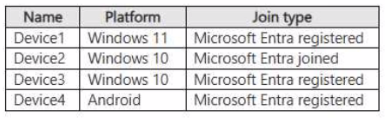
You plan to configure Microsoft Entra Private Access. You deploy the Global Secure Access client to compatible devices. From which devices can you use Private Access?
Suggested Answer: B
Get Premium SC-300 Questions
as Interactive Web-Based Practice Test or PDF
Real Exam Format
Detailed Explanations
Instant Access
Get Your Practice Test
17 comments · newest first
VA
Vanesa
1 month ago
I think Device1, Device2, and Device3 is a safe bet.
CR
Crista
1 month ago
Device2 and Device4 make sense for compatibility.
SU
Sunny
1 month ago
I’m not sure. What if Device1 has limitations?
FR
France
2 months ago
I agree with Yolande. More devices mean better access.
YO
Yolande
2 months ago
I believe it’s E. All devices should work with Private Access.
BE
Bernardine
2 months ago
I’m leaning towards Device1, Device2, and Device3.
KR
Kris
2 months ago
I feel like Device2 and Device4 are the right choices.
MI
Miss
2 months ago
I think it's Device2 only. Seems straightforward.
AD
Adrianna
3 months ago
I thought all devices could use Private Access. That's surprising!
DE
Devorah
3 months ago
I believe it's Device1, Device2, and Device3.
LA
Lashunda
3 months ago
Wait, are you sure about that? What about Device4?
EM
Emmanuel
3 months ago
I agree, Device2 seems like the right choice!
KA
Katheryn
3 months ago
I think only Device2 is compatible.
CA
Caitlin
3 months ago
If I remember correctly, Device4 was mentioned as compatible in the resources, so I think C could be a strong contender.
VE
Veronika
4 months ago
I feel like I might have seen a question where Device1 was excluded from the options, but I can't recall the details clearly.
AL
Alisha
4 months ago
I think I practiced a similar question where we had to identify compatible devices, and I believe Device2 is definitely one of them.
MA
Margery
4 months ago
I remember studying the compatibility requirements for Microsoft Entra Private Access, but I'm not sure if Device3 meets those criteria.