
 MENU

Your network contains an Active Directory Domain Services (AD DS) domain. The domain contains the resources shown in the following exhibit: CLIENT1 (client computer that runs Windows), DC1 (domain controller), Server1 (file server), Server2 (file server). You plan to replicate a volume from Server1 to Server2 by using Storage Replic
a. You need to configure Storage Replica. Where should you install Windows Admin Center?
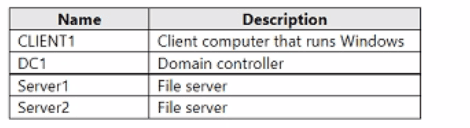
CLIENT1 (Windows client) / DC1 (domain controller) / Server1 (file server) / Server2 (file server).
Windows Admin Center is a browser-based management gateway, and while it can technically be installed on many kinds of machines, Microsoft's guidance for managing Storage Replica (and clustered or replication-partner servers generally) is to install the gateway on a separate management computer rather than on either of the servers directly involved in the replication relationship. Installing the gateway on Server1 or Server2 ties the management interface's availability to the very servers being managed and replicated, which is undesirable, particularly since one purpose of Storage Replica is disaster-recovery failover between them --- if the gateway lived on the server that becomes unavailable, you would lose your management tool exactly when you need it. Domain controllers are also not recommended hosts for additional server roles and management gateways such as Windows Admin Center, following the general best practice of minimizing what runs on a DC to reduce its attack surface and administrative complexity. CLIENT1, a standard Windows client computer that is neither a replication partner nor a domain controller, is the appropriate dedicated location to install the Windows Admin Center gateway, from which an administrator can then manage both Server1 and Server2 remotely to configure and monitor the Storage Replica partnership.
Currently there are no comments in this discussion, be the first to comment!