
 MENU
MENU
Your on-premises network contains two subnets. The subnets contain servers that run Windows Server as shown in the following table: Server1 (192.168.1.10), Server2 (192.168.0.250), Server3 (192.168.0.240), Server4 (192.168.0.10). Server4 has the following IP configuration: IPv4 Address: 192.168.0.10; Subnet Mask: 255.255.255.0; Default Gateway: 192.168.0.1. From Server4, you can ping Server1 and Server2 successfully. When you ping Server3, you get a Request timed out response. From Server2, you can ping Server1 and Server3 successfully. The misconfiguration of which component on Server3 can cause the Request timed out response?
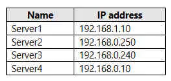
Server IP address table
Server2 (.250) and Server3 (.240) can reach each other, and Server4 (.10) can reach both Server1, which sits on the separate 192.168.1.0/24 subnet and is reached through routing, and Server2, but Server4 cannot reach Server3 even though Server2, Server3, and Server4 all nominally sit within the same 192.168.0.0/24 range. This pattern is consistent with Server3 having been configured with a smaller subnet mask than its peers, for example 255.255.255.128, which splits 192.168.0.0/24 into two separate /25 halves. Server3 (.240) and Server2 (.250) both fall within the upper half of that split range together, so each treats the other as locally reachable on the same segment, while Server4 (.10) falls in the lower half; from Server3's perspective, traffic to and from an address in the other half must be routed through a gateway rather than sent directly on the local segment, and if that routed path is not functioning correctly, the ping to and from Server4 fails while same-half communication with Server2 remains intact. A misconfigured default gateway, IP address, or DNS server on Server3 would not selectively break reachability with exactly the one host sitting in the other half of a misapplied subnet boundary while leaving same-half communication working normally, so the subnet mask is the component whose misconfiguration explains this exact symptom.