
 MENU

SIMULATION
You need to create a notification if the peak average response time of an Azure web app named az400-9940427-main is more than five seconds when evaluated during a five-minute period. The notification must trigger the ''https://contoso.com/notify'' webhook.
To complete this task, sign in to the Microsoft Azure portal.
1. Open Microsoft Azure Portal
2. Log into your Azure account and go to App Service and look under Monitoring then you will see Alert.
3. Select Add an alert rule
4. Configure the alert rule as per below and click Ok.
Source: Alert on Metrics
Resource Group: az400-9940427-main
Resource: az400-9940427-main
Threshold: 5
Period: Over the last 5 minutes
Webhook: https://contoso.com/notify
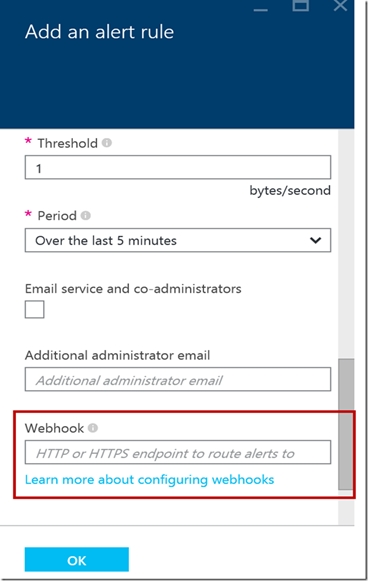
https://azure.microsoft.com/es-es/blog/webhooks-for-azure-alerts/