
Free Preparation Discussions
 MENU
MENU
Juniper JN0-460 Exam Questions
- Topic 1: Wired Assurance Fundamentals: This section of the exam measures the skills of Network Support Engineers and covers the foundational elements of Wired Assurance within the MistAI ecosystem. It introduces candidates to key concepts such as supported devices, solution architecture, and the main features and components that define Wired Assurance functionality. Additionally, it highlights how MistAI accounts, analytics, and subscriptions integrate to deliver intelligent insights for network performance and operations.
- Topic 2: Wired Assurance Provisioning or Deployment: This section of the exam measures the skills of Network Deployment Specialists and focuses on the provisioning and deployment processes of Wired Assurance. It includes the essential steps and options involved in setting up networks, from configuration templates to deployment methodologies. Candidates learn about provisioning procedures, supported architectures, and the use of site variables to streamline automation and consistency across wired infrastructures.
- Topic 3: Wired Assurance Management or Operations: This section of the exam measures the skills of Network Operations Engineers and focuses on the management and operational aspects of Wired Assurance. It covers switch management, port profiles, and dynamic port configuration to ensure optimal network performance. The section also explores service-level expectations, client insights, and the use of APIs for improved monitoring and automation. Candidates gain an understanding of how MistAI enables proactive management and predictive troubleshooting to maintain service quality.
- Topic 4: Campus Fabric Architecture: This section of the exam measures the skills of Network Design Engineers and focuses on understanding and deploying Campus Fabric Architectures. It introduces essential design concepts such as EVPN multihoming, IP Clos architecture, and micro-segmentation. The section also compares CRB and ERB models, explains scaling requirements, and highlights how the Campus Fabric Core-Distribution design supports high-performance, scalable, and secure enterprise networks.
- Topic 5: Campus EVPN-VXLAN: This section of the exam measures the skills of Data Center Network Engineers and explores the key principles of VXLAN and EVPN technologies. Candidates learn about Layer 2 tunneling, data and control plane operations, and the functions of VTEPs and VXLAN gateways. Additionally, it covers advanced EVPN concepts such as multipath routing, route types, and identifiers. The section concludes with a focus on MAC learning and policy applications to ensure efficient, scalable, and resilient network fabrics.
Free Juniper JN0-460 Exam Actual Questions
Note: Premium Questions for JN0-460 were last updated On Oct. 22, 2026 (see below)
Referring to the exhibit, what is the purpose of theSavebutton in the upper-right corner of the Mist dashboard?
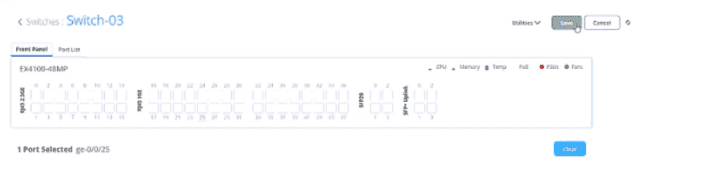
In theJuniper Mist AI for Wired dashboard, administrators can select one or more switch ports (as shown in the exhibit, e.g., port ge-0/0/25 on an EX4100-48MP). Once configuration changes are made --- such as VLAN assignment, port profiles, PoE settings, or administrative state --- theSave buttonmust be clicked to confirm and apply those changes to the device.
''When making configuration changes in the Mist switch interface, the Save button must be used to confirm the modifications. Clicking Save applies the selected port settings to the switch through Mist Cloud.''
Option Ais incorrect: saving does not create a backup. Backups and snapshots are handled through Mist's configuration archive, not via the Save button.
Option Bis incorrect: Save does not reset configuration; instead, it commits changes.
Option Cis incorrect: there is no preview function tied to Save.
Option Dis correct: the Save button is explicitly forapplying configuration changesto the selected switch or port(s).
Juniper Mist AI for Wired -- Switch Port Configuration Guide
Juniper Mist AI for Wired -- Wired Assurance Administration Guide
Juniper Mist Documentation -- Managing Switch Interfaces
What is the purpose of an EPVN Type 4 route?
According to Juniper Networks' EVPN documentation, an EVPN Type 4 route, also known as an Ethernet Segment route, is a critical component of the BGP EVPN control plane used specifically in multihoming scenarios. When a Customer Edge (CE) device is connected to two or more Provider Edge (PE) routers via a Link Aggregation Group (LAG), these PE routers must coordinate to manage traffic flow and prevent network loops.
The primary purpose of the Type 4 route is to enable Designated Forwarder (DF) election. In a multihomed Ethernet Segment (identified by a unique Ethernet Segment Identifier or ESI), only one PE router---the Designated Forwarder---is permitted to forward Broadcast, Unknown unicast, and Multicast (BUM) traffic from the EVPN core to the CE device. Without this election process, multiple PE routers would forward the same BUM packets to the CE, leading to traffic duplication and potential broadcast storms.
The workflow begins when a PE router is configured with an ESI on a physical or logical interface; it then generates and advertises a Type 4 route to all other PE routers in the network. This route carries the ESI and an 'ES-import' extended community, which allows other PEs connected to the same segment to automatically discover their peers. Once these 'peering' PEs are discovered, they collectively execute a DF election algorithm---such as the default modulo-based algorithm or the newer preference-based algorithm---to select the DF and Backup Forwarder (BDF) for each VLAN or bridge domain. By ensuring a deterministic and synchronized selection of the forwarder, Type 4 routes provide the foundational stability required for active-active and active-standby multihoming in modern campus and data center fabrics.
Click the Exhibit button.
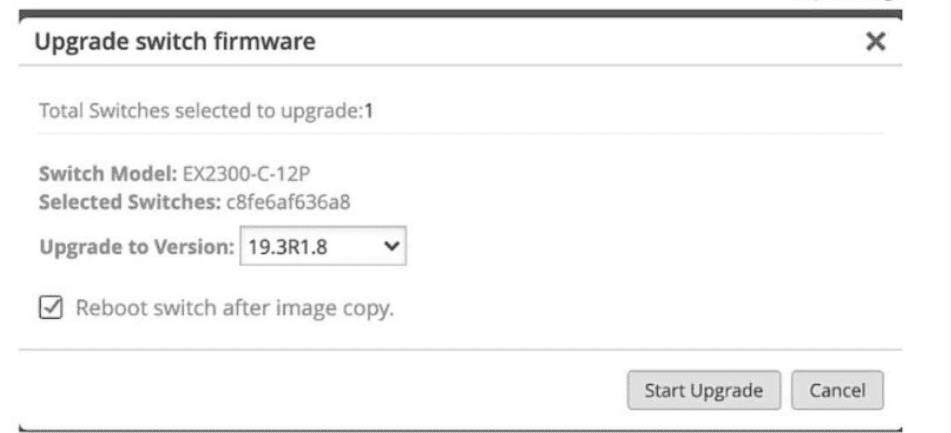
What does the exhibit show as part of the switching upgrade process?
According to the Juniper Mist dashboard's firmware management interface shown in the exhibit, several key details of the switch upgrade process are visible. The 'Upgrade switch firmware' dialog box is a standard component of Juniper Mist Wired Assurance used to manage Junos OS updates across the fabric.
The correct statement is that the switch will reboot after the upgrade. This is explicitly confirmed by the checkbox labeled 'Reboot switch after image copy,' which is currently selected in the exhibit. In Juniper's cloud-managed workflow, once the new software image is successfully transferred from the Mist cloud to the switch's local storage, the system requires a reboot to initialize the new Junos OS kernel and complete the installation process5. While some platforms support non-disruptive upgrades, the standard procedure for EX-series switches in a standalone or Virtual Chassis configuration typically involves a scheduled reboot to ensure the new version is correctly applied.
The other options are incorrect based on the visual evidence provided in the exhibit.
Option A: The exhibit clearly identifies the 'Switch Model' as an EX2300-C-12P (the 'P' designating PoE support), not an EX2300-C-12T88.
Option C: The dialog box explicitly states 'Total Switches selected to upgrade: 1,' confirming this is a single-device operation rather than a bulk upgrade.
Option D: The 'Upgrade to Version' field is set to 19.3R1.8, which indicates the target version, not the previous version10101010.
By providing these granular controls, Juniper Mist allows administrators to maintain strict version compliance across the site while choosing whether to immediately reboot or stage the image for a later maintenance window.
You want a Juniper cloud-ready switch to connect to theJuniper Mist Cloud.
In this scenario, which two statements are correct?(Choose two.)
ForJuniper cloud-ready EX Series switches(EX2300, EX3400, EX4100, EX4400, etc.) to successfully onboard to theJuniper Mist Cloud, specific connectivity requirements must be met:
''Cloud-managed EX switches require outbound connectivity to the Mist Cloud on TCP ports 2200 or 443. Switches must also have access to DNS services to resolve cloud service URLs during onboarding.''
Option A:Incorrect --- minimum version depends on switch model; older models may onboard with earlier releases (e.g., 20.x, 21.x).
Option B:Correct--- outbound TCP 2200 or 443 connectivity is required for cloud registration.
Option C:Incorrect --- switches connect directly to Mist Cloud, not the Agile Licensing Portal.
Option D:Correct--- DNS resolution is mandatory for discovering Mist Cloud endpoints.
Juniper Mist AI for Wired -- Cloud-Ready Switch Onboarding Requirements
Juniper Mist AI for Wired -- Network Connectivity and Port Usage
Junos OS Documentation -- Mist Cloud Connectivity and Registration
What information does Mist use to determine if the port is classified as an uplink? (Choose two.)
Juniper Mist automatically classifies ports to simplify visibility and automation within Wired Assurance. The Mist cloud analyzes port telemetry and link behavior to determine port roles, including uplinks.
''Mist uses machine learning and switch telemetry to automatically detect uplinks by analyzing traffic behavior and topology information. Uplink ports typically exhibit higher TX/RX utilization and are identified as spanning-tree root or forwarding ports connecting upstream devices.''
Option A: Correct --- Mist examines traffic statistics. Ports with significantly higher TX/RX utilization relative to others are likely uplinks.
Option B: Incorrect --- MTU size is not a classification criterion.
Option C: Correct --- Mist uses STP information (root or designated port status) to identify uplinks.
Option D: Incorrect --- port description fields are for administrative purposes only and are not used by Mist analytics.
Juniper Mist AI for Wired -- Port Role Classification and Telemetry
Juniper Mist AI for Wired -- Automated Uplink Detection and Insights
Juniper Wired Assurance Analytics Guide
===========
- Select Question Types you want
- Set your Desired Pass Percentage
- Allocate Time (Hours : Minutes)
- Create Multiple Practice tests with Limited Questions
- Customer Support
Steven Nguyen
21 days agoGeorge Davis
2 months agoAndrew Bailey
2 months agoTiffany Peterson
3 months agoRachel Jackson
3 months agoAngela Miller
4 months agoSharon Roberts
4 months agoDonald Lewis
5 months agoJeffrey Miller
5 months agoDavid Scott
6 months agoJessica Cooper
6 months agoSarah Brown
6 months agoStephen Roberts
5 months agoLaura Hernandez
5 months agoAmy Smith
6 months agoJoshua Baker
6 months agoWhitney
7 months agoNilsa
7 months agoSalley
7 months agoJess
7 months agoCherry
8 months agoLouann
8 months agoTeresita
8 months agoValda
8 months agoAlberta
9 months agoTalia
9 months agoMollie
9 months agoBronwyn
9 months agoGenevive
10 months agoGlory
10 months agoRegenia
10 months agoFrance
10 months agoMoon
11 months agoLang
11 months agoMari
11 months agoJesusita
11 months agoElfriede
12 months agoElbert
12 months agoJolene
1 year agoMarshall
1 year agoYoulanda
1 year agoMarlon
1 year ago