
 MENU
MENU
You are attempting to attach the server connected to the my_border_001_leaf1 node's ge-0/0/5 interface to the finance-app virtual network.
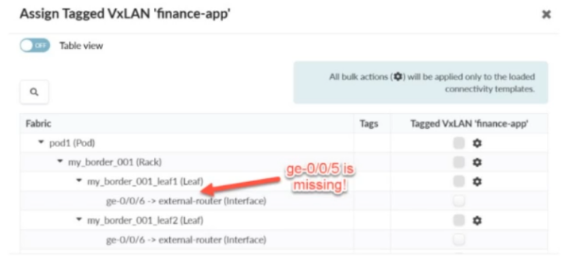
Referring to the exhibit, what would you do to solve the problem?
In Apstra 5.1, servers are modeled as Generic Systems and must be represented in the blueprint topology so that Apstra can bind an endpoint (the server) to a specific switch interface and then apply the intended connectivity template / virtual network attachment. In the exhibit, the interface ge-0/0/5 on my_border_001_leaf1 is shown as missing from the assignment workflow, which indicates that Apstra does not currently have an endpoint object connected to that port in the blueprint's staged physical topology (or that the port is not presented as an eligible connectivity point for server attachment).
The correct remediation is to add a Generic System connected to my_border_001_leaf1 ge-0/0/5 in Staged > Physical > Topology, thereby creating a modeled server link on that interface. Once the Generic System exists and the interface is a recognized server-facing connectivity point, you can assign the Tagged VXLAN ''finance-app'' connectivity template (or the VN assignment action driven by that template) to the server-facing interface and then commit the staged changes.
Changing ''deploy mode'' may affect whether Apstra actively configures a generic system-facing link, but it does not solve a missing interface in the topology model. Likewise, allocating an IP pool is unrelated to making the port available for attachment, and assigning the VN to the switch node is not how server interfaces are attached in this workflow.
Verified Juniper sources (URLs):
https://www.juniper.net/documentation/us/en/software/apstra5.1/apstra-user-guide/topics/topic-map/internal-generic-system-create.html
https://www.juniper.net/documentation/us/en/software/apstra5.0/apstra-user-guide/topics/topic-map/virtual-network-assignment-update.html
https://cloudlabs.apstra.com/labguide/Cloudlabs/6.0.0/test-drive-guide/lab1-junos-11_adding-gs.html
Currently there are no comments in this discussion, be the first to comment!