
Free Preparation Discussions
 MENU
MENU
Juniper JN0-460 Exam - Topic 5 Question 20 Discussion
Topic #: 5
Click the Exhibit button.
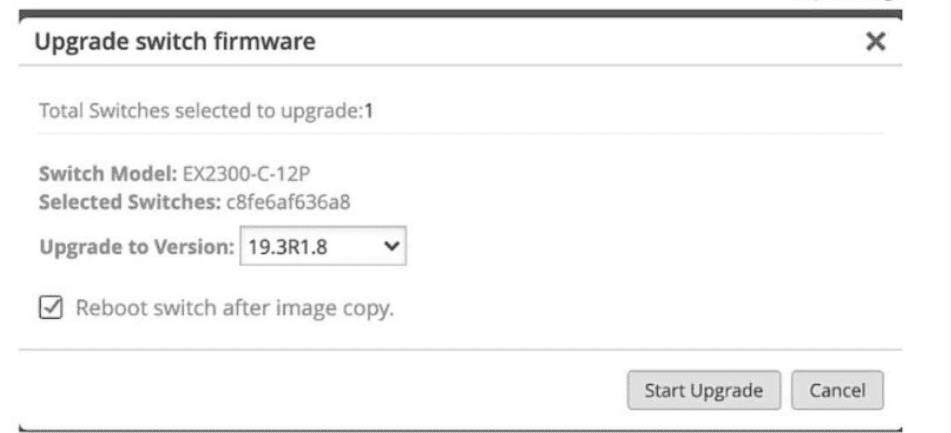
What does the exhibit show as part of the switching upgrade process?
According to the Juniper Mist dashboard's firmware management interface shown in the exhibit, several key details of the switch upgrade process are visible. The 'Upgrade switch firmware' dialog box is a standard component of Juniper Mist Wired Assurance used to manage Junos OS updates across the fabric.
The correct statement is that the switch will reboot after the upgrade. This is explicitly confirmed by the checkbox labeled 'Reboot switch after image copy,' which is currently selected in the exhibit. In Juniper's cloud-managed workflow, once the new software image is successfully transferred from the Mist cloud to the switch's local storage, the system requires a reboot to initialize the new Junos OS kernel and complete the installation process5. While some platforms support non-disruptive upgrades, the standard procedure for EX-series switches in a standalone or Virtual Chassis configuration typically involves a scheduled reboot to ensure the new version is correctly applied.
The other options are incorrect based on the visual evidence provided in the exhibit.
Option A: The exhibit clearly identifies the 'Switch Model' as an EX2300-C-12P (the 'P' designating PoE support), not an EX2300-C-12T88.
Option C: The dialog box explicitly states 'Total Switches selected to upgrade: 1,' confirming this is a single-device operation rather than a bulk upgrade.
Option D: The 'Upgrade to Version' field is set to 19.3R1.8, which indicates the target version, not the previous version10101010.
By providing these granular controls, Juniper Mist allows administrators to maintain strict version compliance across the site while choosing whether to immediately reboot or stage the image for a later maintenance window.
Currently there are no comments in this discussion, be the first to comment!