
Free Preparation Discussions
 MENU
MENU
HPE7-A06 Exam - Topic 8 Question 6 Discussion
Topic #: 8
Refer to the exhibit.
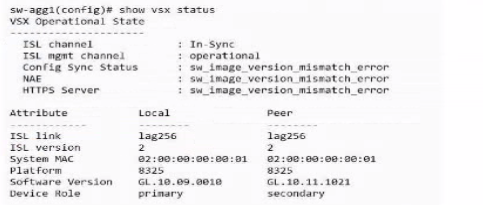
Based on the screenshot, what is required to bring the secondary switch MCLAO interfaces online"?
The exhibit shows the output of show vsx status on sw-agg1. Key information includes:
Config Sync Status : sw_image_version_mismatch_error
NAE : sw_image_version_mismatch_error
HTTPS Server : sw_image_version_mismatch_error
Primary Software Version: GL.10.09.0010
Secondary Software Version: GL.10.11.1021
These errors clearly indicate that the primary and secondary VSX switches are running different AOS-CX software versions. For VSX to operate correctly, including configuration synchronization and enabling features like MC-LAG interfaces, both switches in the pair must run the exact same software version.
Analysis of Options:
A: vsx-software-upgrade is used for upgrades but doesn't resolve the current mismatch requirement.
B: NAE errors are a symptom of the underlying version mismatch.
C: Using the same CX OS version on both primary and secondary switches is the fundamental requirement to clear the mismatch errors and achieve a stable VSX operational state.
D: While ServiceOS is part of the system, the primary requirement and error message relate to the main AOS-CX software version.
Currently there are no comments in this discussion, be the first to comment!