
Free Preparation Discussions
 MENU
MENU
HPE7-A02 Exam - Topic 3 Question 29 Discussion
Topic #: 3
Refer to the exhibit.
(Note that the HPE Aruba Networking Central interface shown here might look slightly different from what you see in your HPE Aruba Networking Central
interface as versions change; however, similar concepts continue to apply.)
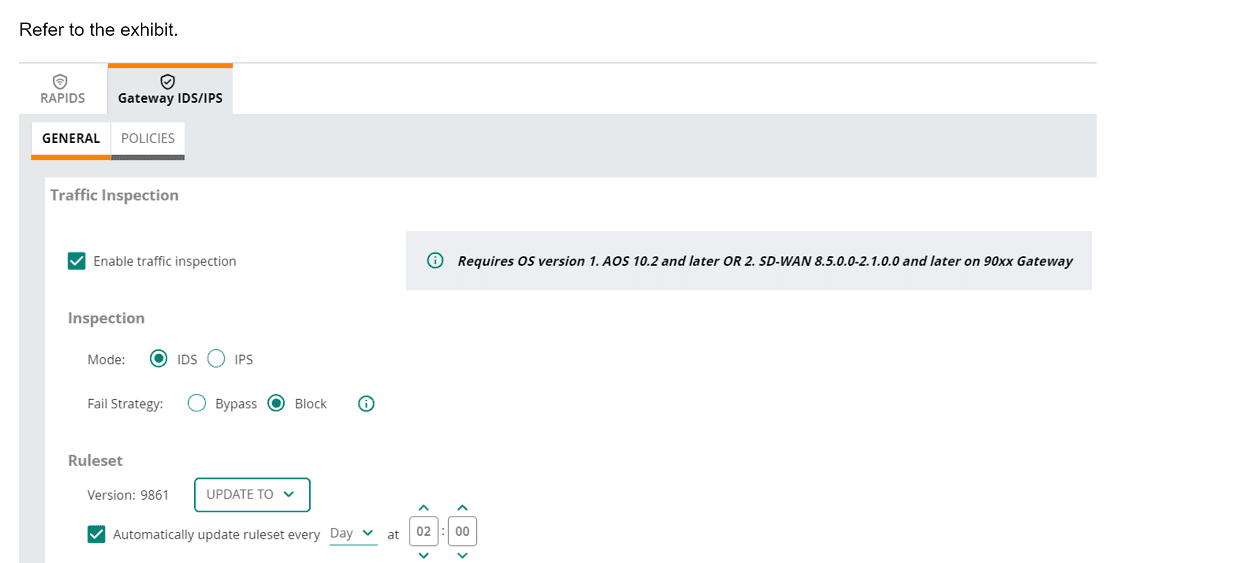
An HPE Aruba Networking 9x00 gateway is part of an HPE Aruba Networking Central group that has the settings shown in the exhibit. What would cause the
gateway to drop traffic as part of its IDPS settings?
In the exhibit, the HPE Aruba Networking Central settings for the 9x00 gateway show that traffic inspection is enabled, and the gateway is set to operate in IDS (Intrusion Detection System) mode with the fail strategy set to 'Block'. This configuration means that the gateway will drop traffic if it matches a rule in the active ruleset.
1.Active Ruleset: The ruleset version 9861 is active, and the gateway is configured to automatically update the ruleset daily.
2.Traffic Matching Rules: When traffic matches a rule in the active ruleset, it is flagged as suspicious or malicious.
3.Block Mode: Since the fail strategy is set to 'Block', any traffic that matches a rule in the active ruleset will be dropped to prevent potential threats.
Willodean
4 days agoHermila
10 days agoMarjory
15 days agoSabra
20 days agoFranklyn
25 days agoLuis
1 month agoIsabella
1 month agoHermila
1 month agoMarjory
2 months agoRoxane
2 months agoCasandra
2 months agoKattie
2 months agoDan
2 months agoEmmett
2 months agoFrankie
3 months agoAnnice
4 months agoJennie
4 months agoWillodean
4 months ago