New Year Sale 2026! Hurry Up, Grab the Special Discount - Save 25% - Ends In 00:00:00 Coupon code: SAVE25
Welcome to Pass4Success

- Free Preparation Discussions

HPE7-A01 Exam - Topic 11 Question 50 Discussion

Actual exam question for HP's HPE7-A01 exam
Question #: 50
Topic #: 11
[All HPE7-A01 Questions]

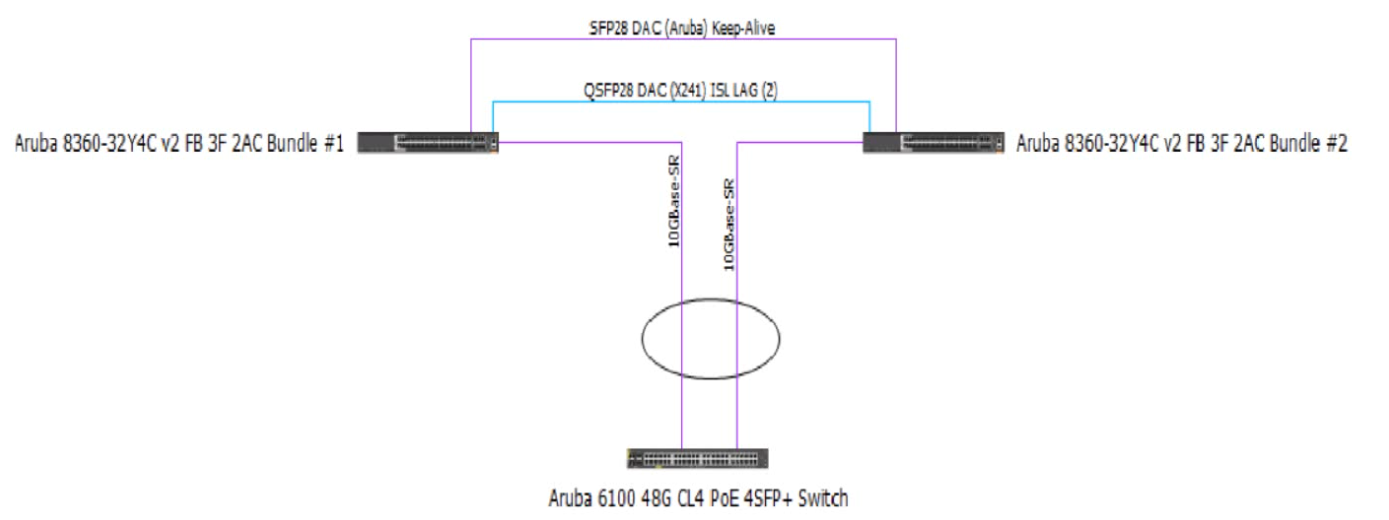
Review the exhibit.

You are troubleshooting an issue with a 10 102.39 0/24 subnet which is also VLAN 1000 used Tor wireless clients on a pair of Aruba CX 8360 switches The subnet SVI is configured on the 8360 pair, and the DHCP server is a Microsoft Windows Server 2022 Standard with an IP address of 10 200 1.100. The 10.102.250.0/24 subnet is used for switch management.

A large number of DHCP requests are failing You are observing sporadic DHCP behavior across clients attached to the CX 6100 switch.

Which action may help fix the issue?

A)

B)

C)

D)

Show Suggested Answer Hide Answer
Suggested Answer: C

Option C is the only action that configures the DHCP relay on the SVI of VLAN 1000 on the CX 8360 switches. DHCP relay is a feature that allows a switch to forward DHCP requests from clients in one subnet to a DHCP server in another subnet.DHCP relay is required when the DHCP server and the clients are not in the same broadcast domain1.

Option C uses the following commands:

interface vlan 1000: This command enters the interface configuration mode for the SVI of VLAN 1000, which has an IP address of 10.102.39.1/24 and is used for wireless clients.

ip helper-address vrf default 10.200.1.100: This command configures the IP address of the DHCP server as a helper address for the SVI, which means that the switch will forward DHCP requests from clients on VLAN 1000 to this address. The vrf default parameter indicates that the SVI and the DHCP server are in the same VRF.


Contribute your Thoughts:

0/2000 characters
Ceola
17 days ago
Not sure why they’d use VLAN 1000 for wireless, seems odd.
upvoted 0 times
...
Curtis
22 days ago
I think Option B makes the most sense here.
upvoted 0 times
...
Sean
27 days ago
Haha, this is like a game of DHCP roulette. I'll go with Option C and hope for the best.
upvoted 0 times
...
Dalene
1 month ago
This question is making my head spin! Option A might be the answer, but who knows?
upvoted 0 times
...
Flo
1 month ago
Option D seems the most straightforward solution.
upvoted 0 times
...
Vi
1 month ago
I'm leaning towards Option B, but I'm not sure.
upvoted 0 times
...
Muriel
2 months ago
Option C looks like the way to go.
upvoted 0 times
...
Lenna
2 months ago
I vaguely recall that DHCP relay settings could impact requests. I wonder if that’s relevant here, but I’m not certain which option addresses that.
upvoted 0 times
...
Reita
2 months ago
I’m a bit confused about the options. I feel like I need to look at the switch logs to see if there are any errors before deciding.
upvoted 0 times
...
Luis
2 months ago
This reminds me of a practice question where we had to troubleshoot DHCP requests. I think it was about checking the SVI settings.
upvoted 0 times
...
Laurel
2 months ago
I remember we discussed DHCP issues in class, and I think it might be related to VLAN configurations. Not sure which option to choose though.
upvoted 0 times
...
Antione
2 months ago
This is a good opportunity to apply my troubleshooting skills. I'll carefully analyze each option and consider the potential impact on the network before making a decision.
upvoted 0 times
...
Sue
3 months ago
I'm a bit confused by all the subnet and VLAN details. I'll need to make sure I understand the network topology before I can decide on the best course of action.
upvoted 0 times
...
Latrice
3 months ago
The DHCP server is on a different subnet, that could be an issue.
upvoted 0 times
...
Rashad
3 months ago
I disagree, I think Option D is the way to go!
upvoted 0 times
...
Pilar
3 months ago
Based on the information provided, I think Option C might be the way to go. Checking the DHCP server settings and ensuring the correct IP address is configured could help resolve the sporadic DHCP behavior.
upvoted 0 times
...
Carlota
4 months ago
Okay, let's see. The issue seems to be with DHCP requests failing on the wireless clients. I wonder if the DHCP server configuration or the switch port settings could be the problem.
upvoted 0 times
...
Kenia
4 months ago
Hmm, this looks like a tricky networking question. I'll need to carefully review the details and think through the possible solutions.
upvoted 0 times
Silva
3 months ago
This is definitely a complex issue.
upvoted 0 times
...
...

Save Cancel