
 MENU
MENU
You are currently planning how to display Cloud Monitoring metrics for your organization's Google Cloud projects. Your organization has three folders and six projects:
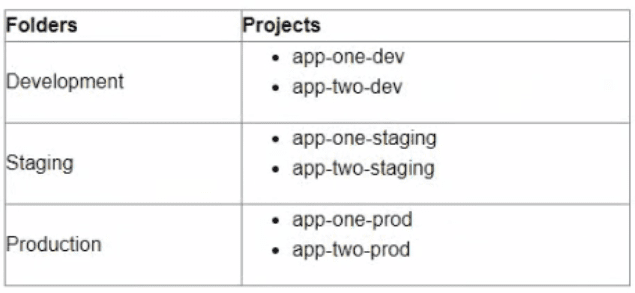
You want to configure Cloud Monitoring dashboards lo only display metrics from the projects within one folder You need to ensure that the dashboards do not display metrics from projects in the other folders You want to follow Google-recommended practices What should you do?
The best option for configuring Cloud Monitoring dashboards to only display metrics from the projects within one folder is to create new scoping projects for each folder. A scoping project is a project that defines which resources are monitored by Cloud Monitoring. You can create new scoping projects for each folder by using the gcloud monitoring register-project command. This way, you can associate each scoping project with a folder and only monitor the resources within that folder. You can then configure Cloud Monitoring dashboards to use the scoping projects as data sources and only display metrics from the projects within one folder.
Currently there are no comments in this discussion, be the first to comment!